
October at RTObase: trainer app, payment plans and employer training
Run training from a phone, offer payment plans, manage employer training and turn existing course materials into drafts your team can review.
Published 3 Nov 2026 · Vincent Lo
Your trainer finishes a session. You need the attendance and notes, the employer wants a progress update, and the learner still has a payment due.
October's RTObase updates help you manage that work from the records your team already uses. Your trainers have their own app, your learners can choose eligible payment plans, and you can follow employer training from the first request through delivery and payment.
You can also start course drafts from your existing materials and bring the evidence for your annual Standards sign-off into one summary. Here is how the changes help you run your RTO.
Give trainers a practical place to run their day
Your trainers open Today, with Calendar and Requests alongside it. From a phone or tablet, they can find assigned work, take the roll, record booked lessons and practical observations, collect Forms and mark work waiting for them.
Your learners can scan the class day's QR code to check in and complete that day's Forms. Back in the office, you can find trainer session hours, other work, professional development and leave in a timesheet for payroll.
You can give employers a view of each employee's progress and the trainer's latest recommendation, including session notes the trainer chooses to share. You have the training record available when a coordinator asks for an update.
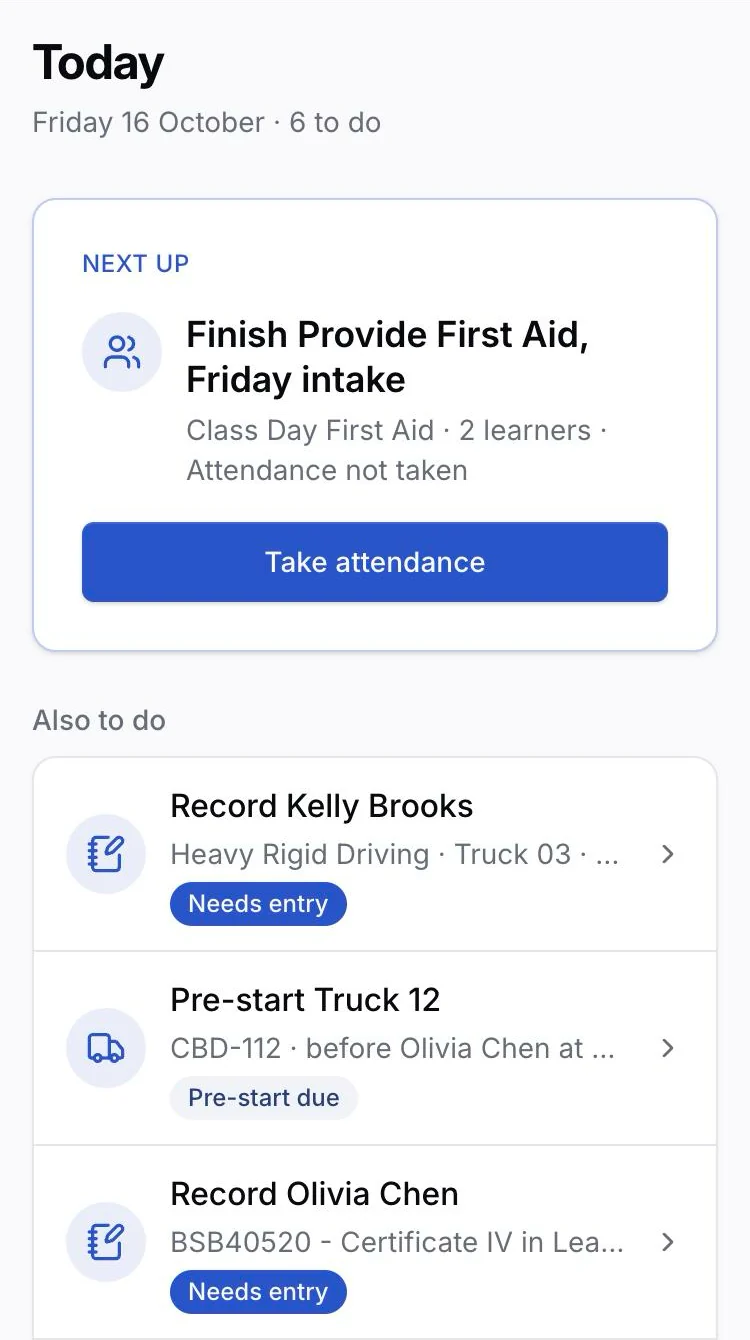
Today brings the trainer's assigned work together on a phone or tablet.
Offer payment plans alongside payment in full
You can offer eligible learners payment in full or a first payment followed by class-session or monthly payments. Learners can also consent to automatic card payments for later parts of the plan.
RTObase keeps due reminders with the payment schedule. If an automatic payment fails, you can follow the unpaid part from its payment link and the Work Queue.
For booking courses, you can choose several sessions for one payment link or record one received payment against those sessions. You can collect a combined amount and still see which sessions it covers.
Keep employer training together as the relationship grows
Employer training often starts before the names are known. A coordinator may need places for a team, then confirm the people and dates later.
You can assign an employer account owner, record the next follow-up and sell course places before learners are named. Your employer contacts can request training for named employees or a class headcount, then follow confirmed dates, learner progress and documents in their portal.
If you train employers with several branches, parent and branch records can share prices and account terms. You can keep a branch's own arrangements where needed and send its invoices to the parent. The agreed terms stay alongside the people and training they apply to.
Start course authoring from the materials you already have
You can use presentations, tests, handouts and course packs as a starting point for course drafts. Upload your materials, review the proposed lessons, tests and requirement links, and work through the follow-up checklist before publishing.
The original files stay together. Your team still checks suggested answers, content coverage and suitability for the way the course is delivered.
You can edit lessons, assessment tasks and Forms in the course's full-screen workspace, keep the course sequence nearby and open a saved learner preview. Check the content you have written against the experience your learners will receive.
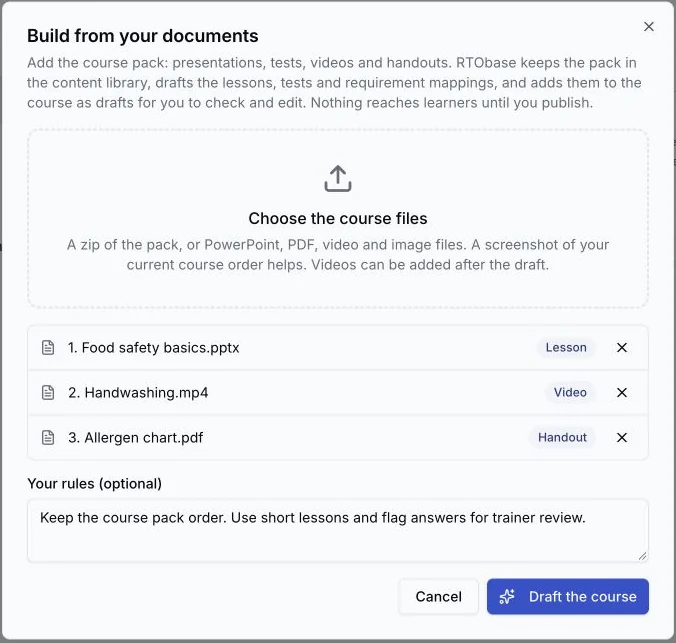
Existing course materials provide a starting point for drafts your team reviews before publishing.
Prepare one annual Standards sign-off
Turn on Standards reviews to bring what RTObase holds for the 23 Outcome Standards and fee rules into one summary. You can record required changes before an authorised person signs once for the year.
Signing freezes your summary. You can download a readable PDF and supporting files in one audit pack and keep following open required changes. Reminder emails tell your administrators when sign-off opens and when it is due.
Review records you hold outside RTObase as well. Your internal sign-off supports preparation; your CEO submits ASQA's Annual Declaration separately through the unique link ASQA provides. See ASQA's declaration process.
Smaller changes that help the day run
After saving a record, you can review proposed emails, SMS and learner calendar changes separately. Edit a filled-in email preview for one send, or return to unsent messages in History.
Plan class days once on the course, preview the timetable when creating a class, and manage sessions on the shared scheduling board.
When you are preparing a website, use a password-protected preview and launch checks to review your pages, prices and upcoming dates before going public.
The full changelog has the individual releases and fixes. Thank you for the feedback that helped shape October's changes.
More from the blog
20 Nov 2026 · Product
Offer payment plans and keep follow-up with the enrolment
Offer eligible learners instalments, review the full schedule and find unpaid parts alongside their enrolment.
Read →
13 Nov 2026 · Product
Run your trainer day and keep session records together
Give your trainers a phone-friendly place to take attendance, record delivery and leave the office a useful learner record.
Read →
6 Nov 2026 · Product
Watch RTObase in action: our new YouTube video guides
RTObase now has a YouTube channel. Start with a three-minute tour of the whole system, then follow short guides in the order an RTO works.
Read →