
AI · included on every plan
AI that meets your team inside the work.
Build lesson content, draft website pages, surface enrolment risks and get help beside your records. Connect Claude, ChatGPT, Codex or another compatible assistant to work with the same SMS and LMS data, within the access you choose.
View pricing →Connect your AI assistant →
Where AI and automation show up
Six places AI and automation work for you.
Each one is mapped to a stage of the student lifecycle, and every capability is included on every plan.
Enrol
AI Page Builder
Generate landing pages, course descriptions, and SEO articles to drive enrolments, from a prompt.
Train
AI lesson content
Drag-and-drop widgets and AI-generated topic content, delivered through the student portal.
Complete
Automated Compliance Rules
26 rule-based checks across trainers, courses, assessments, delivery data, and governance records.
Monitor
AI Enrolment Insights
An AI outlook on every active enrolment, On track, Monitor, or At risk, with the next best action.
Re-engage
AI Re-engagement
Draft renewal emails, alumni newsletters, and lifecycle nudges, context-aware to your courses.
Every stage
AI Admin Agent
Ask what needs attention, open the right form and review a change without hunting through the dashboard.
Train · Online Lessons
Build online lessons with drag-and-drop content and AI.
Create structured lessons with modules, topics and 30 content widget types. Add reusable knowledge checks, bring existing SCORM 1.2 packages and let AI draft topic content to speed up your workflow. Delivered directly through your student portal.
Unlimited courses, AI content generation, and online delivery, included on all plans.

Widget editor
Drag-and-drop content widgets, text, images, videos, downloads, and interactive exercises. Build each topic exactly the way you want.
SCORM inside lessons
Add existing SCORM 1.2 packages alongside native lesson content and assessments without rebuilding what you already own.
AI content generation
Generate topic content with AI, then review and refine. Let AI do the heavy lifting while you keep creative control.
30 widget types
Banners, stats, quotes, FAQs, image galleries, video embeds, CTAs, and more, each with multiple layout variants for professional-looking topics.
Interactive exercises
Knowledge checks, matching exercises, ordering tasks, scales, and scenario-based activities embedded directly into topics and module assessments.
Reusable question banks
Build knowledge checks with short and long text, single and multi choice, matching, ordering, true/false, tables, scales, fill-in-the-blank (cloze) and info blocks.
Structured modules
Organise content into modules and topics with a clear hierarchy. Students navigate a structured learning path.
Progression modes
Choose sequential progression where topics unlock in order, or open mode where students navigate freely. Assessments gate progress.
Portal delivery
Courses are delivered directly through the RTObase student portal, no third-party LMS required.
Progress tracking
Track student progress through modules, topics, and assessments. See completion rates and identify students who need support.
AI variations & revision
Generate alternative versions of any content widget, revise with custom instructions, or translate topics into other languages.
Online Lessons, question types, SCORM 1.2 delivery and learner progress, the full tour.
Explore Online Lessons →How it works
From units of competency to published course in four steps.
Create structured courses mapped to your training package, generate content with AI, and deliver to students, all within RTObase.
01
Create your lesson
Set up modules and topics, then link the online lesson to the course it supports. Build a clear structure before adding content.
02
Build with widgets
Use the drag-and-drop widget editor to add text, images, videos, downloads, and interactive exercises to each topic.
03
Generate with AI
Let AI generate topic content from your prompt. Review, refine, and customise the generated content to match your training approach.
04
Publish & deliver
Publish your course and students can access it directly through the RTObase student portal. Track progress and completion in real time.
Why build here
One platform beats separate tools.
Most RTOs use a separate LMS to deliver courses. With RTObase, Online Lessons are built right into your student management platform, no extra logins, no data syncing.
Standalone LMS
Separate LMS with its own login and billing
RTObase
Online Lessons built directly into your RTO platform
Standalone LMS
Existing SCORM content needs a separate LMS or a rebuild
RTObase
Add SCORM 1.2 inside lessons alongside native content and assessments
Standalone LMS
Write every page from scratch or copy-paste content
RTObase
AI generates topic content, review, refine, and publish
Standalone LMS
Static text with basic formatting options
RTObase
30 widget types with multiple layout variants for professional topics
Standalone LMS
Assessments require separate tools or paper-based workflows
RTObase
Reusable knowledge-question banks plus dedicated Assessment Task activities for practical evidence and learner declarations
Standalone LMS
Limited integration with student records
RTObase
Progress tracking linked to enrolments and completions
Standalone LMS
Separate reporting and compliance tools
RTObase
Course delivery, student management, and AVETMISS in one platform
The student experience
Courses your students actually want to complete.
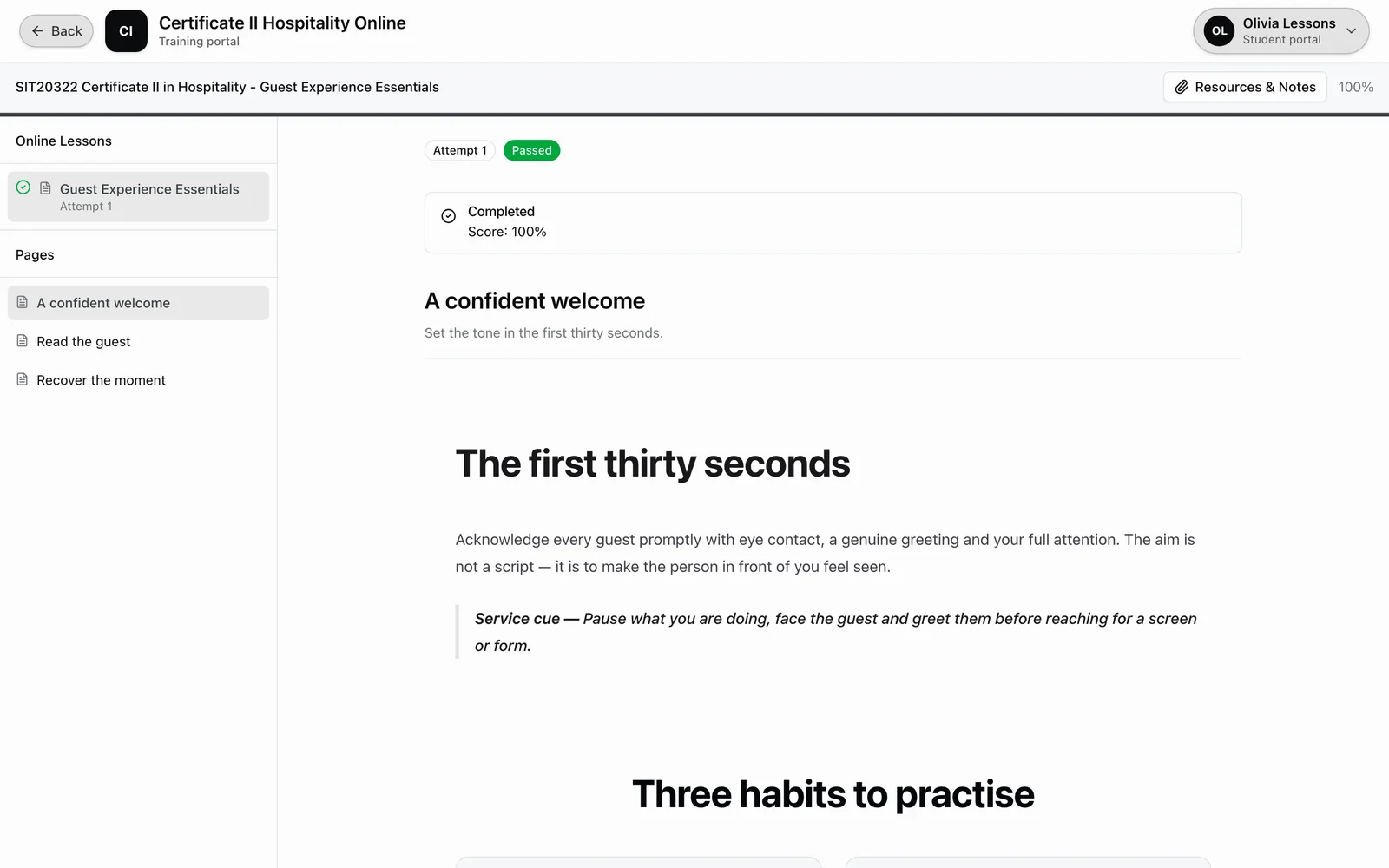
Lessons built in Online Lessons are delivered through a polished student portal with navigation, progress tracking, and interactive exercises. Students see a professional learning experience, not a cobbled-together collection of pages.
Sidebar navigation with progress indicators
Interactive exercises, matching, ordering, scales
Sequential or open progression modes
Resume where you left off across topics and assessments
Monitor · AI enrolment insights
An AI read on every active enrolment.
Most dashboards report the past. Enrolment Insights looks forward: every active enrolment carries an AI-generated outlook, On track, Monitor, or At risk, a one-line read on where the student stands, the single next best action, and a predicted completion date. The Enrolments list gains an Outlook column, so you can sort a whole cohort and see the students who need attention this week.
Colour-coded outlook on every enrolment
The single next best action, surfaced
Predicted completion date
Refreshes as USI, payment, progress and login signals move

Enrol · AI page builder
Build your website with a prompt.
Describe what you want and AI generates complete website pages, course descriptions, articles, and marketing copy, all using your organisation’s context. Every page is editable, publishable, and SEO-ready.
Prompt-to-page generation. Describe the page you need and AI generates it, layout, copy, and sections, in seconds.
Branded to your RTO. Pages use your organisation name, courses, and context for authentic, relevant content.
AI brand identity. No logo yet? AI generates a complete identity from your name and courses, a colour palette, fonts, a logo, and a matching app icon. Apply it in one click or fine-tune any part.
Full page editor. Edit any section, reorder widgets, or regenerate specific parts. You control the final result.
Custom domain ready. Publish pages on your custom domain with SEO meta, open graph tags, and sitemap generation.
Page builder, About us
AI is generating your page…
Every stage · admin agent
Find the work. Keep it moving.
Ask what needs attention, open the right form and review prepared changes. Less searching and re-keying. You still make the final call. Included on every plan.
Find the work. Ask about live learners, enrolments, bookings and payments.
Open the form. Start the real student, class, enrolment, booking or invoice workflow.
Review the change. Direct actions wait for approval and stay inside your permissions.
Open it with one click from any back-office page, the sparkles button, or Cmd/Ctrl+K if you prefer the keyboard. It knows which page you are on, so you do not need to find the same record again. Available to staff and admins.
Explore the Admin Agent →Prepared action. Needs your approval
Reassign booking
The reassignment only runs after approval and is recorded like a dashboard edit.
AI support · included on every plan
Instant answers for trainers and students.
An AI assistant grounded in your live org data and the RTObase documentation. It reads your real records before it answers, so it can surface the enrolments that need attention instead of giving a generic checklist. Role-aware, source-referenced, always available, with a human fallback when needed.
For trainers & staff
Instant answers to platform and reporting questions, drawn from your live org data and the admin and trainer documentation. Ask which enrolments need a verified USI or what is blocking AVETMISS readiness, and the answer reflects your current records.
For students
Students access AI help directly from their learning portal, courses, assessments, certificates, and platform guidance. Branded to your organisation.
Complete · automated compliance
25 fixed, rule-based checks across your operational data.
No AI involved, the same data always gives the same result. RTObase evaluates compliance-relevant data after changes and through scheduled processing, mapping operational issues to the Standards for RTOs 2025 and AVETMISS data requirements for staff review.
Trainer credentials
4 checks
TAE qualification missing
TAE credential expired
TAE expiring within 90 days
Industry currency expired
Course & unit currency
2 checks
Superseded units with active enrolments
Course superseded past transition deadline
Assessment coverage
3 checks
Missing Training & Assessment Strategy
Active course with no assessment tools
Competent unit lacking assessment evidence
Dates & delivery activity
5 checks
End date precedes start date
Unit activity end date precedes its start date
Completion recorded before the final unit
Session outside unit activity dates
Completed enrolment with future end date
AVETMISS & record completeness
6 checks
Completed enrolment missing completion date
Statement issued but units incomplete
Missing funding source
Location missing postcode
Enrolment active but all units finalised
Stale continuing unit past end date
Governance & learner support
5 checks
Policy review overdue
Care-plan review overdue
Complaint remains open beyond its SLA
Risk-register review stale
No recent governance meeting
How alerts behave
Automatic evaluation. Checks run automatically after relevant data changes, with staff sign-off for judgment-based standards.
Auto-resolving. Fix the data and the alert resolves itself. No manual dismissal required.
Severity levels. Critical, warning, and info levels so you can prioritise what matters most.
AI and automation across the lifecycle, not just one task.
Use AI for course content, renewal emails, insights, and support, alongside fixed rule-based compliance monitoring. No AI add-ons or per-message fees. Start free on Startup.
No credit card required. Full lifecycle loop and AI content generation included on all plans. Upgrade to Business ($499 + GST/mo flat) for no per-enrolment fees, text messaging included, and hands-on migration support.