
RTO employer portal · corporate training bookings
One employer portal from team booking to certificate.
Let workplace coordinators enrol a team and pay once, or give approved employer contacts a secure portal to manage employees, request training, follow progress, view invoices and download completion documents. Trainer recommendations and deliberately shared session notes help employers plan what comes next.
Employer portal included on every plan · no separate contact or portal licence

Up to 50
attendees in one team order
One payment
with one enrolment per employee
Self-service
employees, progress, invoices and documents
All plans
no separate employer portal licence
Employer self-service
Give corporate clients the answers they usually ask your team for.
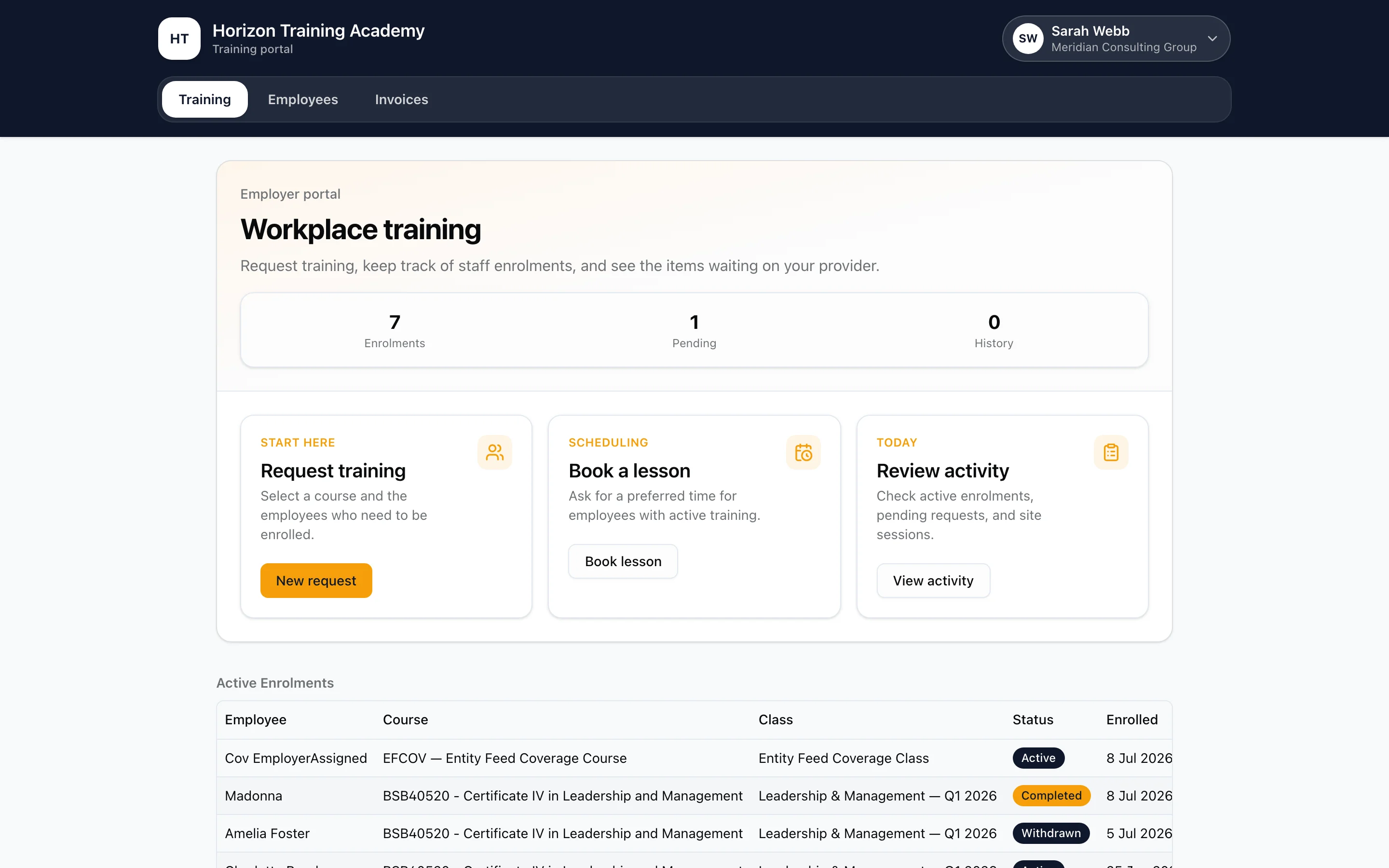
The portal is scoped to one employer and designed around the workplace coordinator’s jobs, not the RTO’s back office. Approved contacts see the people and training their organisation sponsors, while staff keep control of approval and enrolment decisions.
Employees
Add people one at a time or upload a CSV, keep current and former employees organised, and link existing student records safely.
Training requests
Nominate employees, or request a workplace class with a headcount, site and date before naming learners. Staff review and schedule the training.
Enrolment progress
Follow active enrolments, review recorded sessions and trainer recommendations, and see which team attendees still need to complete their personal and compliance details.
Invoices
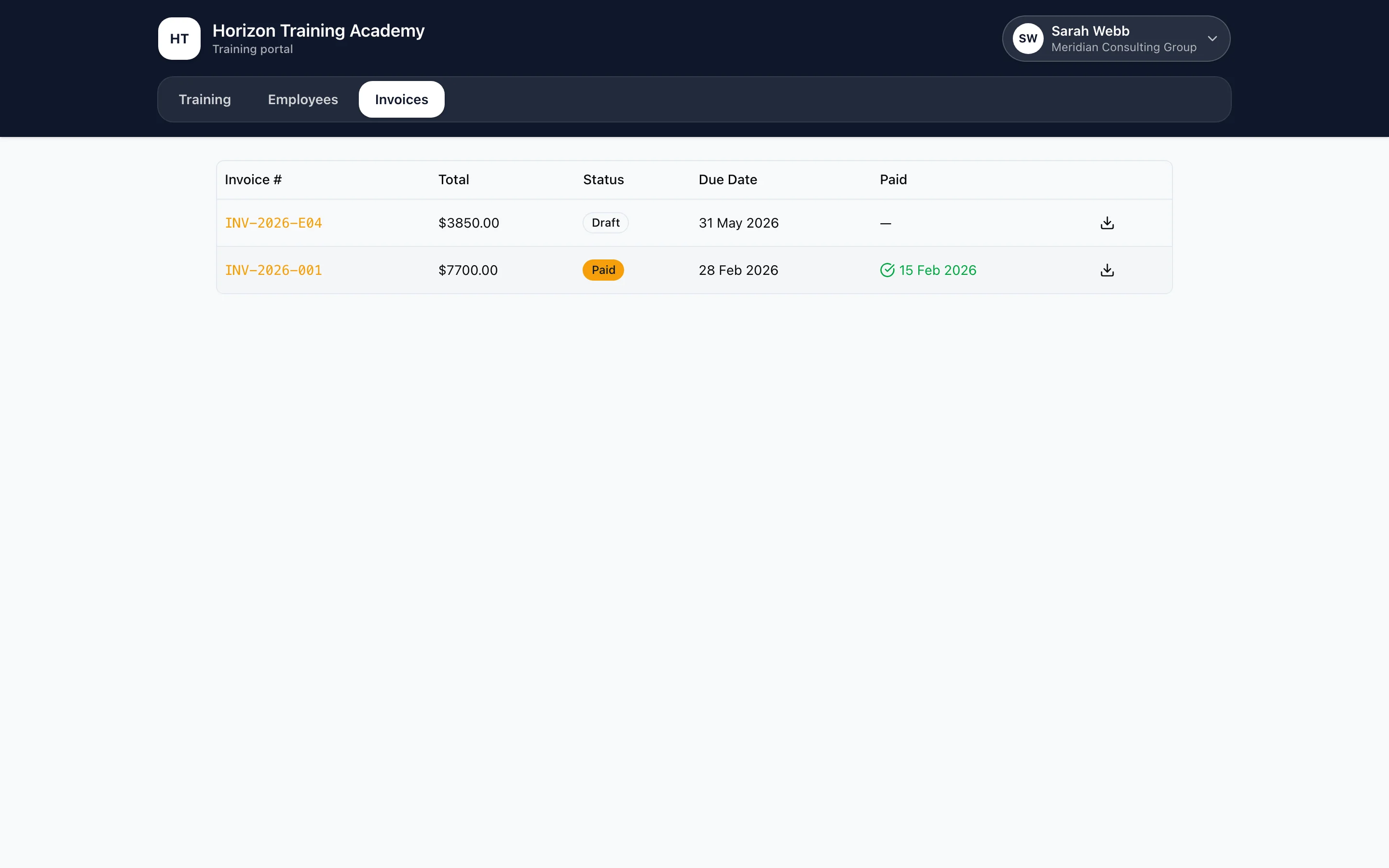
View amounts, payment state and due dates, print invoices and pay eligible invoices online. Payments update the linked enrolments.
Completion documents
Download issued qualifications, Statements of Attainment and Statements of Completion individually or together in a ZIP.
Workplace sessions
See sessions at an employer-hosted location while other organisations’ learners remain anonymous as a headcount.
Between sessions
Keep employers informed about the next step.
A workplace coordinator can follow employee training from the same session records the trainer completes.
See the recorded sessions
Open an employee’s training history to see when a session happened, who delivered it and the trainer’s recorded recommendation.
Plan the next step
See whether the trainer recommends more training or readiness for assessment. The assessor still makes the formal competency decision through the normal assessment workflow.
Share notes deliberately
Session summaries and next steps appear only when the trainer shares them with the employer. Each employer’s portal remains limited to its own workforce records.
Corporate team enrolment
One checkout for the employer. One enrolment per employee.
Public “Enrol my team” checkout handles the direct corporate-booking path. A coordinator builds the roster and pays once; RTObase still creates a separate, auditable learner and enrolment record for every attendee. Each employee supplies their own date of birth, USI and contact details through a private link, never through a shared spreadsheet or shared login.
Scheduled classes and class-free self-paced, online or booking-based courses
Up to 50 attendees in one order, with one coordinator payment
Employer discounts and course-specific GST treatment applied automatically
Paid employer tax invoice and private attendee completion links generated together

How team booking works
A group purchase that does not flatten the learner records.
01
Choose Enrol my team
Start from a public class or course page, verify the coordinator by email, then enter the workplace name and checksum-validated ABN.
02
Build the attendee list
Add up to 50 names and email addresses, including the coordinator if they are taking a seat, with duplicate emails rejected.
03
Pay once
The employer pays for the order through the RTO’s configured gateway, with employer discounts and the course GST treatment applied.
04
Create each real enrolment
RTObase creates one enrolment per attendee, issues the paid tax invoice and privately asks each employee for their own remaining details.
Training requests
Self-service does not have to mean auto-approved.
Employers can nominate employees for training or request a workplace class with an expected headcount, site and preferred date before naming the workers. Staff schedule the class, then workers check in through a secure link after verifying their email. For one-to-one sessions, employer contacts can book offered available slots or send a preferred-time request for staff to arrange.
RTO-controlled course offerings for employer requests
Approve and create enrolments from the nominated employees
Decline with a reason visible to the employer contact
Workplace class requests before the learner roster is known
Secure worker check-in after email verification
Offered booking slots and preferred-time session requests
Access and privacy
A public ABN is not a key to somebody else’s workforce records.
Team enrolment can recognise an existing employer by ABN, but RTObase does not treat that match as proof that the coordinator represents the business.
New or known contact
Access follows the verified relationship.
An approved contact sees the employer-wide portal. Staff can preview that exact view from the employer record before sending instructions or answering a support question.
Unknown ABN match
The coordinator starts in quarantine.
They can follow only the team order they created. The roster, invoices, requests and completion documents stay hidden until RTO staff verify the person and approve the contact.
Invoices and completion documents
The training record keeps paying off after checkout.
Employer invoices remain tied to the enrolments they funded, and issued completion documents appear against the sponsored employees. Contacts can open an invoice for printing or PDF saving and collect one document or the latest set together without asking the RTO to rebuild the pack.
Invoice amount, payment state, due date and printable detail
Qualifications, Statements of Attainment and Statements of Completion
Individual PDF downloads or a bulk ZIP of the listed issued documents
Voided completion documents removed from the employer view
Connected platform
Corporate bookings are part of the learner lifecycle.
Employer self-service works because the public enrolment, student record, scheduling and finance surfaces share the same underlying records.
Student management system
The employee, enrolment, payment and completion records that employer activity updates.
ExploreScheduling and bookings
Offered booking slots and preferred-time requests with qualified trainers and matching assets.
ExploreWebsite and enrolment
Publish course pages where individuals and workplace coordinators can enrol and pay.
ExplorePlans and pricing
Employer management and the portal are included without a separate contact licence.
ExploreRTO employer portal FAQ
Questions RTOs ask about corporate bookings and employer access.
Yes. Approved employer contacts can open an employee’s recorded sessions to see the session date, trainer and recommendation, such as continuing training or being ready for assessment. Session summaries and next steps appear only when the trainer chooses to share those notes with the employer. A recommendation does not issue a certificate or replace an assessment judgement.
An RTO employer portal is a secure self-service area for the businesses that sponsor workplace training. Employer contacts can maintain their employee list, request training, follow enrolment progress, view invoices and download issued completion documents without asking the RTO's administration team for every update. In RTObase, the portal is connected to the same employer, student, enrolment and invoice records staff use in the back office.
Yes. From a public course or class page, a coordinator can choose Enrol my team, verify their email, enter the business name and ABN, add up to 50 attendees and make one payment. RTObase creates one enrolment per attendee, issues a paid employer tax invoice and sends each person a private link to complete their own compliance details. This direct team checkout works for scheduled classes and class-free self-paced, online or booking-based courses.
Yes. An approved employer contact can select a course and employees in the portal and submit a training request for the RTO to review. Employers can also request a workplace class with a headcount, site and preferred date before naming learners. Staff schedule the group, then workers check in through a secure link after verifying their email. For one-to-one delivery, contacts can book offered available slots or request a preferred time for staff to confirm.
Approved contacts can see their employees, active enrolments and progress, pending training requests, invoices and issued Statements of Attainment, Statements of Completion and Qualification Certificates. They can download completion documents individually or together in a ZIP. Host employers can also see sessions at their workplace, with their own employees named and unrelated learners shown only as a headcount.
Employer contacts use email-based access rather than sharing an RTO staff login. RTObase scopes every portal read to the authenticated employer. Staff can also open View as employer from the employer record to check exactly what a contact will see before responding to them.
If the email is not already an approved contact for that employer, RTObase quarantines the new coordinator. They can follow only the team order they created; they cannot see the employer's wider roster, invoices, training requests or completion documents until RTO staff verify and approve them. Knowing a public ABN is not enough to enter an existing employer account.
Yes. Employer records, contacts, the employer portal, training requests, team enrolment and employer invoicing are included on Startup, Business and Custom plans. RTObase does not charge a separate employer-portal licence or a per-contact seat fee.
Give every workplace client a cleaner way to enrol, request and follow training.
Start with team enrolment, employer self-service, invoicing and completion-document access included.
Employer portal included on every plan. No separate contact or portal licence.