
Website + conversion journey · included on every plan
Build an RTO website that takes enrolments.
Build pages with AI, publish on your own domain, and connect every successful action to the system that runs your students. Add Google Ads or your own analytics without assembling a separate website, form tool and tracking stack.
SEO-ready pages · Contextual enquiries · Online enrolment · Payments · Provider-owned analytics
Connected website journey
Course enquiry funnel
Find the right course
Course viewed
Ask with context
Enquiry submitted
Complete details securely
Enrolment completed
Move through checkout
Payment completed
Successful actions → your analytics
No contact details or form answers included
One connected funnel
A course website should move the work forward.
Each public step connects to the next operational step. Prospects get a clear path, staff get usable records, and your analytics provider gets a successful-action signal instead of a hopeful click.
Discover
Find the right course
SEO-ready pages and a live course catalogue help prospects reach current training options.
Course viewed
Enquire
Ask with context
A successful form creates a lead with its course or location context, ready for follow-up.
Enquiry submitted
Enrol
Complete details securely
The email-verified enrolment flow collects the learner information your RTO actually needs.
Enrolment completed
Pay
Move through checkout
Paid and free enrolments continue in the same connected journey, without a separate form stack.
Payment completed
Manage
Work from the real record
The result lands in RTObase as an operational lead, enrolment or payment for staff to manage.
Record created
Two honest destinations: operational records and bounded first-party page-view records stay in RTObase; configured provider events go to the analytics provider your RTO chooses.
Analytics without the analytics project
Paste the setup. Choose the result. RTObase handles the event.
For Google Ads, paste the conversion value or the whole snippet and choose the successful website action it represents. Track a submitted enquiry, completed payment, completed enrolment, or the hand-off to required LLND screening. Add a separate conversion action for each campaign goal; RTObase sends it only when that outcome succeeds.
PII-minimised event boundary
Sent to your provider
Successful action name
Course or location context
Sanitised page path
Kept out of provider events
Names and email addresses
Messages and form answers
IP addresses and browser fingerprints
Website analytics
See what your marketing produced, not what it clicked.
RTObase already holds the outcomes that matter: the enquiry, the enrolment, the payment. These two reports read from those records, so neither needs an advertising account to tell you something useful.
Campaign results, first-party
Tag a link for an email, a social post, a QR code on a flyer or a partner website. RTObase groups the enquiries, enrolments and paid enrolments that follow by campaign, source and medium.
First-touch or latest-touch credit, over 30 or 90 days
Payment value net of recorded refunds, in AUD
Filter to one course when a campaign only sold that course
No Google Analytics, Meta or Google Ads account needed
Affiliate programs, reviewed before you pay
Pay employers, gyms, community groups or content creators for the enrolments they actually bring you. Each affiliate gets a unique tracked link carrying a code you choose, never their contact details.
Percentage of each payment, or a fixed amount once per enrolment
Commission created only after a successful live payment
Refunds and reversals adjust the ledger automatically
Approve commission, then record the payout you already made
Tracked visits are RTObase attribution sessions, not advertising-platform clicks, and RTObase never transfers money to an affiliate: it keeps the ledger so your finance team can reconcile the payment they made. Regulated CRICOS education agents stay in the separate International workflow.
AI page builder · free on every plan
Describe the page. Publish it.
Tell the builder what you need, a homepage, a course page, an SEO article, and AI drafts the layout, copy and sections from your organisation’s context: your name, your courses, your tone. Every page is fully editable; you review, refine and publish.
Complete pages, course descriptions and articles from one prompt
Drag-and-drop editing, reorder widgets or regenerate any section
Editable meta titles, Open Graph tags and an automatic sitemap
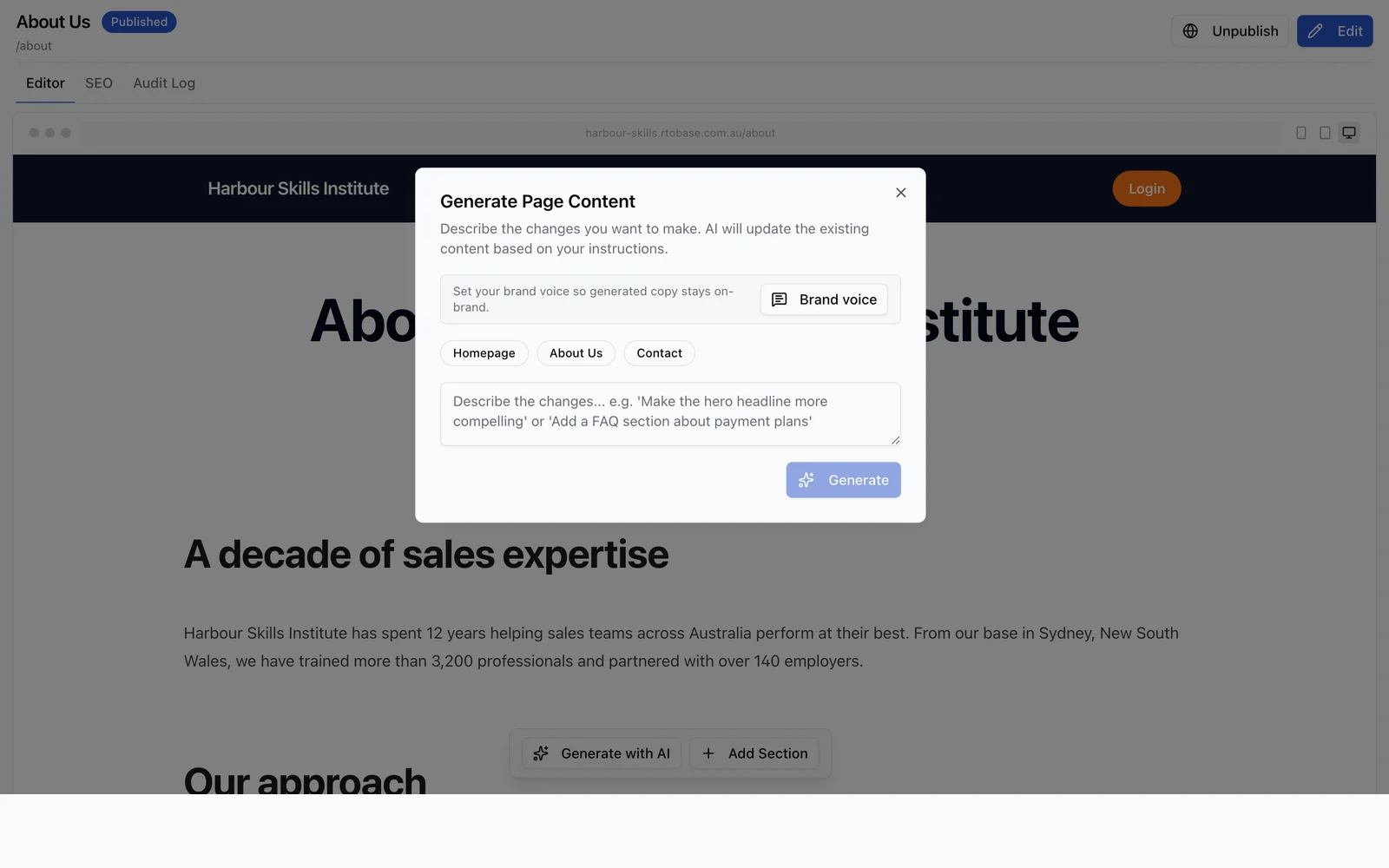
Everything included
Everything a course website needs.
Describe what you want and AI generates complete pages using your organisation’s context. Every page is editable, publishable and SEO-ready.
Prompt-to-page generation
Describe the page you need and AI generates it, layout, copy and sections, in seconds.
Branded to your RTO
Pages use your organisation name, courses, colours and context for authentic, on-brand content.
AI brand identity
No logo yet? AI generates a full identity from your name and courses, a colour palette, fonts, a logo and a matching app icon. Apply in one click or fine-tune any part.
Full drag-and-drop editor
Edit any section, reorder widgets, or regenerate specific parts. You control the final result.
Custom domain + SSL
Publish on your own domain with automatic SSL, your brand, your URL, no developer.
SEO built in
Editable meta titles and descriptions, Open Graph tags, and automatic sitemap generation.
Hosting included
Fast, secure hosting on Australian infrastructure, no separate hosting bill to manage.
Enrolment built in
Visitors find a course, enrol and pay on the same platform that runs your students, no bolt-ons.
Enquiries from your existing website
Keep your existing website and add a direct enquiry link or embedded form, with no RTObase website page required. Submissions reach the same leads inbox for assignment and follow-up. Hosted pages can use the same Forms.
Successful-action tracking
Optimise for a submitted enquiry, successful enrolment hand-off or completed payment instead of treating every click as a result.
Built-in site analytics
Visitors, visits, page views, top pages, traffic sources, devices and countries for your hosted website. Counted first-party without cookies, retained as bounded pseudonymous page-view records, with no stored IP address, name or full browser string.
Your analytics provider
Send PII-minimised built-in events to Google Ads, Google Analytics, PostHog or Meta Pixel. Tenant-controlled custom scripts remain subject to the vendor and your privacy settings.
Campaign results without a tracking stack
See which tagged campaigns produced enquiries, enrolments and paid enrolments from the records already in RTObase. First touch or latest touch, 30 or 90 days, payment value net of refunds. No analytics or advertising account required.
Affiliate programs and commission
Give each referrer a unique tracked link, then let successful live payments build a commission ledger you review before it becomes payable. Percentage or fixed commission, refunds adjust it, payouts you make outside RTObase are recorded for reconciliation.
Pages: articles & blog
Generate course descriptions, landing pages and SEO articles to bring students in at the Enrol stage.
How it works
From prompt to published in four steps.
01
Describe it
Tell the builder what you need, a homepage, a course page, an about page, in plain language.
02
AI drafts the page
AI generates layout, copy and sections using your organisation’s context. Edit anything.
03
Brand & refine
Let AI generate a brand identity, palette, logo and matching app icon, or apply your own colours and logo, then reorder widgets and regenerate any section until it’s right.
04
Publish & enrol
Go live on your custom domain, with enrolment and checkout wired in from day one.
AI brand identity
No logo yet? Generate the whole identity.
AI generates a full identity from your name and courses, a colour palette, fonts, a logo and a matching app icon. Apply it in one click, fine-tune any part, or bring your own colours and logo instead.
Palette, fonts, logo and app icon in one pass
Apply in one click, or fine-tune any part
Your own colours and logo, any time

The difference
A website that actually enrols students.
A generic website builder gives you a brochure. RTObase gives you a storefront: a visitor finds a course, enrols and pays, and lands as a student record on the same platform, ready to train. No separate site, form tool, and payment gateway stitched together.
Course pages link straight to enrolment and checkout
Payments via Stripe (BYO gateway on Custom plan)
New enrolments appear in your pipeline automatically
One login, one record, one bill

Admin Agent
AI doesn't stop at content.
Once your site is live, the AI Admin Agent helps you run the back office by chat. Ask it to look up your org's data, or to draft routine create and update actions, a new student, course, unit, location or class. Every change is shown as an approval card before it writes, under your own login, permissions and audit trail. Included on every plan.
Meet the Admin Agent →FAQ
Website builder questions
Common questions about building your RTO website in RTObase.
Yes. Share a direct enquiry-form link or copy an embed snippet into your existing site. Responses land in the same RTObase leads inbox, with no RTObase website page required. You can also embed your course catalogue, course pages and public booking calendar.
Yes. The website builder, hosting, custom domains and AI page generation are included on all plans, no separate website subscription and no developer required.
Yes. Connect your custom domain with automatic SSL, and every page ships with SEO meta tags, Open Graph tags for social sharing, and a generated sitemap.
No. Hosting is included. Your site is served fast and securely from Australian infrastructure, with no separate hosting bill to manage.
Yes, and this is the difference. Your public site connects straight to enrolment and checkout on the same platform that runs your students, so a visitor can find a course, enrol and pay without you wiring up a separate site, form tool and payment gateway.
Yes. Add Google Ads, Google Analytics, PostHog, Meta Pixel or a custom analytics integration from your website settings. For Google Ads, paste the conversion snippet and choose the successful action to measure. RTObase sends the event only after that action succeeds, not when somebody merely clicks a button.
RTObase records a bounded, pseudonymous row for each counted public page view and keeps it for up to 400 days so administrators can see aggregate visits, pages, sources, devices and countries. It stores a daily-rotating visitor key, sanitised path and broad traffic context, never the visitor’s name, IP address or full browser string. Events for a provider you configure go from the visitor’s browser to that provider under its own settings. Operational enquiries, enrolments and payments remain in RTObase because your team needs them to do the work.
Yes, and without an analytics account. Tag a link, share it, and Marketing > Performance reports the enquiries, enrolments and successful payments recorded in RTObase for each campaign, source and medium. Choose first-touch or latest-touch credit, a 30 or 90 day period and an optional course. Payment value is net of recorded refunds and counts AUD payments. Use an advertising platform as well when you also want clicks and ad costs.
Yes. Create a program with a percentage or fixed commission and an attribution window, then give each affiliate a unique tracked link that carries a code you choose, never their contact details. A commission is created only after a successful live AUD payment that the link is credited for, and refunds reduce it. A percentage applies to each payment; a fixed amount is earned once per enrolment. You review commission before it becomes payable, then record the payout you made through your bank or accounting system. RTObase keeps the ledger and does not transfer money to affiliates.
No, and they stay separate on purpose. Education agent agreements carry regulated international recruitment obligations and live in the International workflow. Affiliate marketing is for ordinary commercial referrers such as employers, gyms, community groups and content creators.
AI drafts complete pages, course descriptions and articles using your organisation’s context, name, courses and tone. Every page is fully editable; you review, refine and publish.
Yes. Each page has editable SEO meta titles and descriptions, Open Graph tags, and a sitemap is generated automatically, so your courses are discoverable on Google.
Yes. The AI Admin Agent works inside the back office on your own data. Ask it in plain English to look things up, or to draft routine create and update actions such as a new student, course, unit, location or class, a student update, or a logged complaint. Every change is shown as an approval card before it writes, under your own login, permissions and audit trail. It is available on every plan to admins and staff.
Launch a site that enrols, not just informs
AI-generated pages, your own domain, SEO and hosting, with enrolment and payments built in. Included on every plan.
No credit card required. Website builder included on all plans.