
Online lessons · included on all plans
Build and deliver online lessons without a separate LMS.
Create structured lessons with drag-and-drop content and assessments, or add existing SCORM 1.2 packages directly to a lesson. Delivery, learner progress and assessment submissions stay connected to the enrolment record.
One student portal · no separate LMS login · progress on the enrolment record
See all AI features →
30
content widget types
Reusable
versioned question banks
AI-drafted
topic content, reviewed by you
SCORM 1.2
embedded lesson delivery
Course design & qualifications
Build the course around the learning.
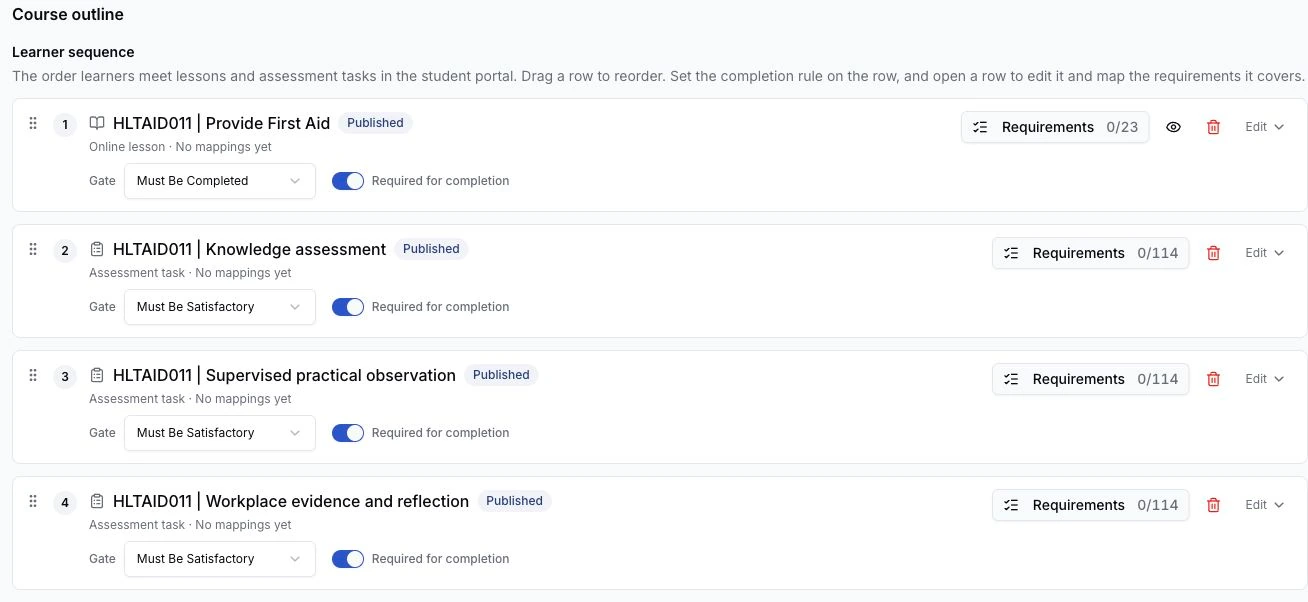
Arrange lessons and assessment tasks in one course outline. Map requirements to the learning and evidence, then review coverage before publishing.
Deliver a qualification through unit courses, with one enrolment
Share resources as files and links with descriptions
Add content to live courses while preserving learner records
Everything included
Everything you need to build and deliver.
A complete course-building toolkit, from content creation to student delivery, built right into your RTO platform.
Drag-and-drop widgets
Text, images, video, downloads and interactive exercises. Build each topic exactly the way you want, no code.
Course-linked delivery
Link online lessons to the relevant RTObase course so learner progress and assessment submissions stay with the enrolment.
Course design workspace
Arrange the course outline and map requirements to lesson pages, questions, assessment criteria and delivery activities. Review coverage before publication. Add content to a live course while keeping existing learner records.
Qualification unit courses
Arrange unit courses in delivery order and follow each learner through them, with one qualification enrolment carrying fees, results and completion.
Shared course resources
Give eligible learners files and links with descriptions in the portal. Resources follow the course access rules.
Archive, restore and reuse
Archive lessons to tidy the Learning library while courses already using them keep access. Restore them when needed, or safely delete unused drafts without removing learner history.
AI content generation
Generate topic content from a prompt, then review and refine. AI drafts; you keep creative control.
30 widget types
Banners, stats, quotes, FAQs, galleries, video embeds, CTAs and more, each with layout variants for polished topics.
Interactive exercises
Knowledge checks, matching, ordering, scales and scenario activities embedded right into topics and assessments.
Reusable question banks
Build knowledge questions with short and long text, single and multi choice, matching, ordering, true/false, tables, scales and fill-in-the-blank (cloze).
Progression modes
Sequential progression where topics unlock in order, or open mode where students navigate freely. Assessments gate progress.
Portal delivery
Courses are delivered through the RTObase student portal, no third-party LMS, no extra login.
Progress tracking
Track progress through modules, topics and assessments, and spot students who need support early.
Variations: revision & translation
Generate alternative versions of any widget, revise with custom instructions, or translate a topic.
SCORM inside lessons
Add SCORM 1.2 packages alongside native content and assessments. Published lessons pin the package version, with learner status, score and resume data returned to RTObase.
One learner record
Lesson progress and assessment submissions stay linked to the enrolment, alongside the rest of the learner’s delivery and completion workflow.
How it works
From first topic to published lesson in four steps.
01
Create your lesson
Set up modules and topics, then link the online lesson to the course it supports. Build a clear structure before adding content.
02
Build with widgets
Use the drag-and-drop editor to add text, images, video, downloads and interactive exercises to each topic.
03
Generate with AI
Let AI draft topic content from your prompt. Review, refine and customise it to match your training approach.
04
Publish & deliver
Publish, and students access the course through the RTObase portal. Track progress and completion in real time.
SCORM 1.2, built into lessons
Bring your existing SCORM content into the learner journey.
Add a SCORM 1.2 package directly to an online lesson. RTObase pins the exact package version when the lesson is published, so learners stay on the content they started while status, score and resume data flow back to the enrolment record.
Add SCORM alongside native content and assessments
Published lessons pin the exact package version
Status, score and resume data recorded per learner
What a published lesson locks in
One package, one pinned version, one record.
- Package
- SCORM 1.2 package and exact version
- Lesson
- Pinned into the published lesson snapshot
- Learner record
- Status, score and resume data returned per enrolment
Why build here
One platform beats separate tools.
Most RTOs bolt on a separate LMS. With RTObase, Online Lessons live inside your student management platform, no extra logins, no data syncing.
Standalone LMS
Separate LMS with its own login and billing
RTObase
Online Lessons built directly into your RTO platform
Standalone LMS
Existing SCORM content needs a separate LMS or a rebuild
RTObase
Add SCORM 1.2 inside lessons alongside native content and assessments
Standalone LMS
Write every page from scratch or copy-paste content
RTObase
AI drafts topic content, review, refine, and publish
Standalone LMS
Static text with basic formatting options
RTObase
30 widget types with layout variants for professional topics
Standalone LMS
Assessments need separate tools or paper-based workflows
RTObase
Reusable question banks for knowledge, with dedicated evidence and declaration widgets in Assessment Tasks
Standalone LMS
Limited integration with student records
RTObase
Progress tracking linked to enrolments and completions
Standalone LMS
Separate reporting and compliance tools
RTObase
Course delivery, student management and AVETMISS in one platform
The student experience
Courses your students actually want to complete.
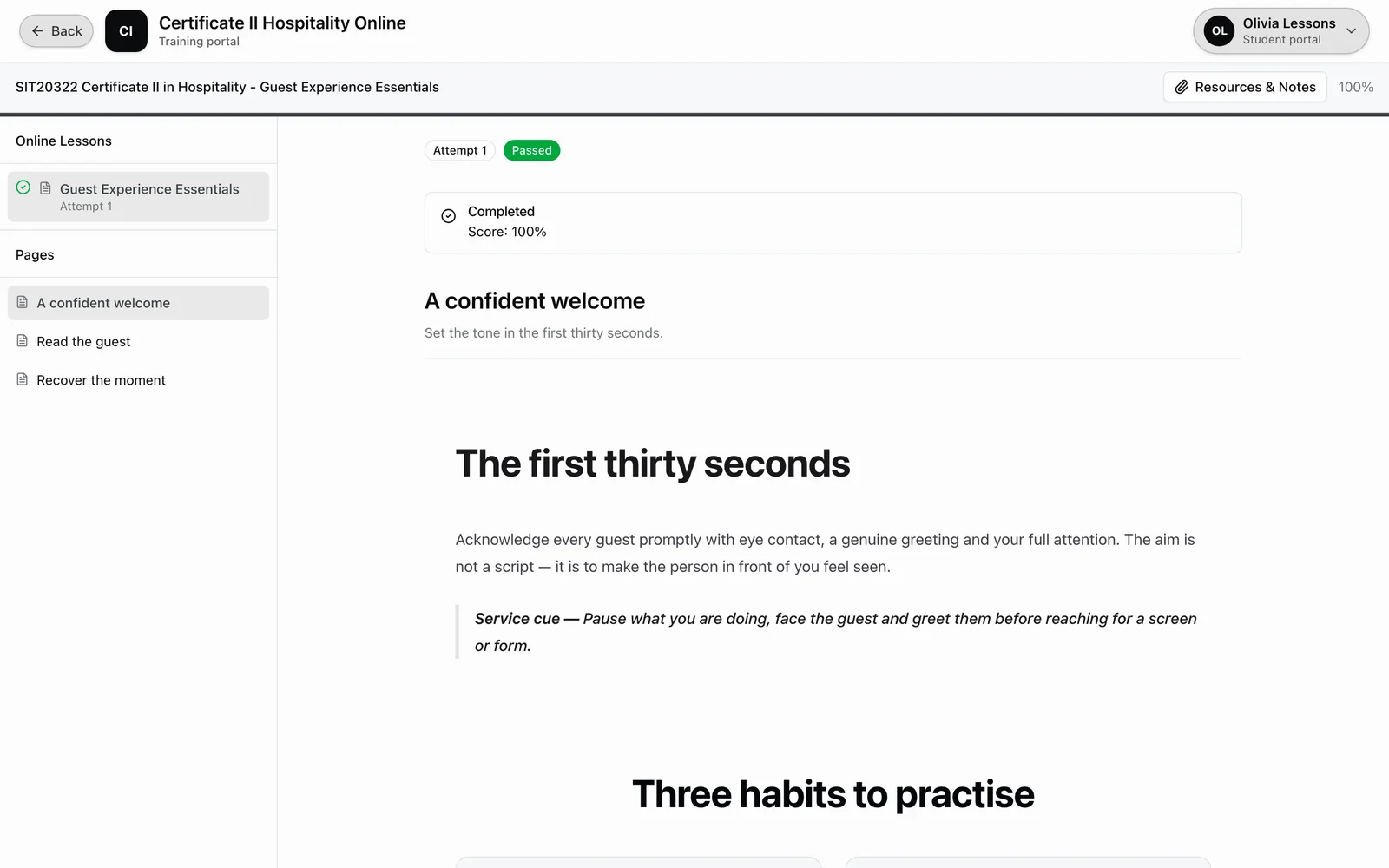
Courses are delivered through a polished portal with navigation, progress tracking and interactive exercises - a professional learning experience, not a cobbled-together set of pages.
Sidebar navigation with progress indicators
Interactive exercises, matching, ordering, scales
Sequential or open progression modes
Resume where you left off across topics and assessments
Admin Agent
AI doesn’t stop at content.
Once your courses are live, the AI Admin Agent helps you run the back office by chat. Ask it to look up your org’s data, or to draft routine create and update actions, a new student, course, unit, location or class. Every change is shown as an approval card before it writes, under your own login, permissions and audit trail. Included on every plan.
Meet the Admin Agent →FAQ
Online Lessons FAQs
Common questions about building and delivering online courses in RTObase.
No. Courses built in RTObase are delivered straight through your own student portal, the same login students use for enrolment, payments and certificates. No third-party LMS, no extra subscription, no data syncing.
Yes. Unlimited courses, AI content generation and online delivery are included on all plans, the builder and its AI are never gated behind a tier. Business is a flat monthly fee with no per-enrolment fees, and adds SMS and hands-on migration support.
Yes. Add existing SCORM 1.2 packages directly to online lessons. Each published lesson pins an exact package version, so learners continue with the content version they started. Status, score and resume data are saved with the enrolment record.
AI drafts lesson content from your instructions and the context you provide. You review, refine, regenerate sections, or translate. It speeds up the heavy lifting while you keep full editorial control; nothing is published without your sign-off.
Add assessments with reusable questions for short and long text, single and multi choice, matching, ordering, true/false, tables, scales and fill-in-the-blank (cloze). Formal Assessment Tasks use dedicated widgets to collect supporting evidence and signed declarations. Assessments can gate progression, and submissions flow to your trainers for marking with a gradebook.
Link each online lesson to the relevant course in RTObase. Learner progress and assessment evidence stay with the enrolment record, while units, outcomes and completion continue through your normal course workflow.
Yes. A qualification is a course with its unit courses arranged in delivery order. Learners enrol in the qualification once, then work through each unit course. Staff can follow their progress while fees, outcomes, completion documents and reporting stay connected to the qualification.
Yes. Use the same online lesson builder for accredited and non-accredited delivery. Lesson progress and assessment evidence stay connected to the enrolment, while competency decisions and completion documents continue through the normal course completion workflow.
Yes, the AI Admin Agent works inside the back office on your own data. Ask it in plain English to look things up, or to draft routine create and update actions such as a new student, course, unit, location or class, a student update, or a logged complaint. Every change is shown as an approval card before it writes, under your own login, permissions and audit trail. It is available on every plan to admins and staff.
Build your first online lesson this afternoon.
Drag-and-drop content, assessments and SCORM 1.2 sections, delivered through your own student portal and included on every plan.
No credit card required. Online Lessons included on all plans.