
LLND screening
Know where every learner stands, before training starts.
Reading, Writing, Numeracy, Oral Communication and Digital Literacy, each measured against the ACSF level your course expects, so a below-level result becomes a support action, not a rejection. Most RTO platforms offer no LLND screening at all. Included on all plans.
Per-skill ACSF reading · ACSF-mapped · No AI in the check · Reused across courses · Full audit trail

In the product
The gate, the reuse and the check, as your team sees them.

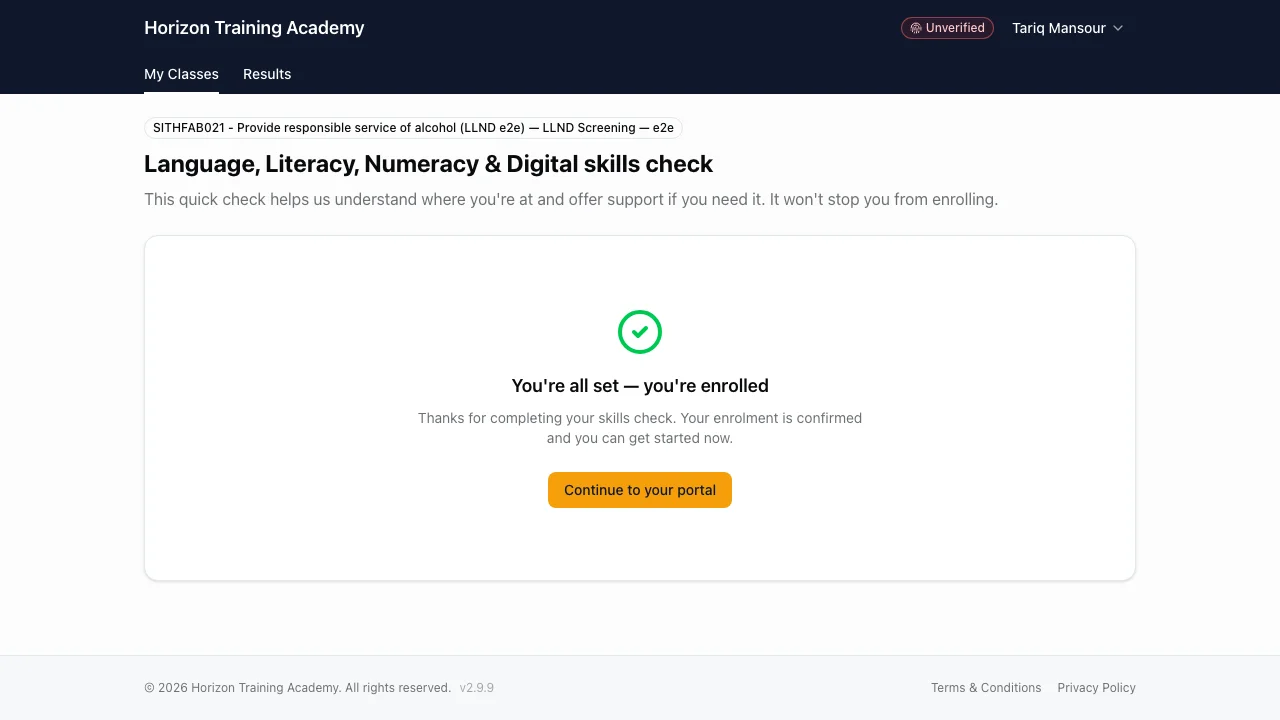
Enrolment gate
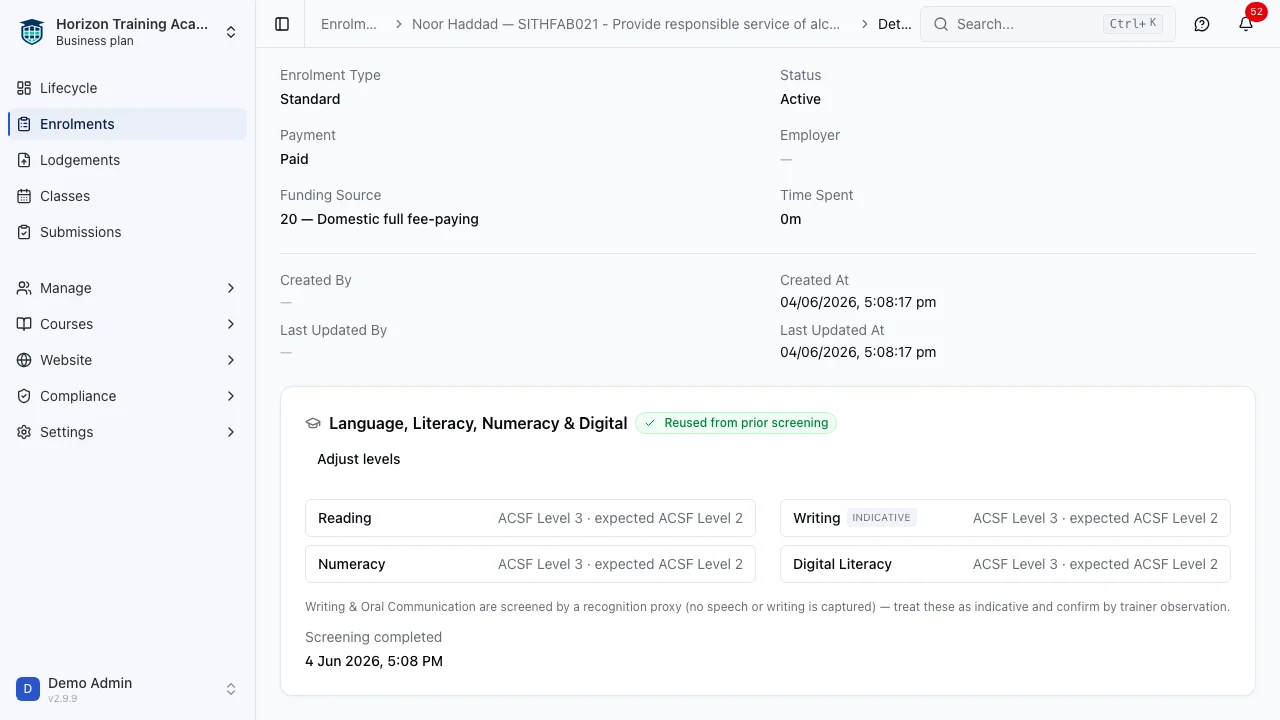
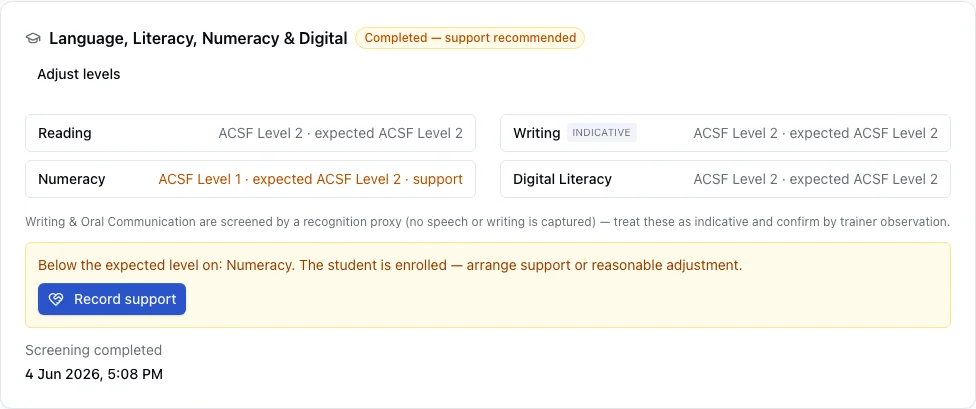
Each skill’s measured level sits against what the course expects, with any support concern flagged right on the enrolment.
A support tool, not a gate
A profiling screen, not a pass/fail test.
LLN is meant to identify support needs, not to grade a learner or lock them out. RTObase turns it from a gate into a signal your team can act on.
The old way
A graded test that can exclude
Pass marks and attempt caps that lock a paying student out
Reading and Numeracy only, no Writing, Oral or Digital
A separate portal page reached by a chase email after payment
An “ACSF Level” label with no item-to-indicator mapping behind it
The RTObase way
A screen that flags who needs support
Below-level becomes a recorded support need your team acts on
All of LLND: Reading, Writing, Numeracy, Oral, Digital, Learning
Completed inline, in the same session after payment
Every item mapped to an ACSF indicator for audit evidence
How it works
How the check works.
From payment to enrolled in one session, with the evidence captured automatically.
01
Pay & enrol
The student completes checkout as normal, no extra account, no second login.
02
Inline LLND check
Straight away, in the same session, they complete a short check drawn from the validated bank for the course’s skills.
03
Instant: repeatable result
Answers are marked against the answer key, no AI, producing a per-skill ACSF confidence reading.
04
Enrolled: support flagged
Each skill below the expected level is flagged to staff as a support action, so the right help is in place before training starts.
Validated question bank
ACSF-mapped items, rotated, not generated.
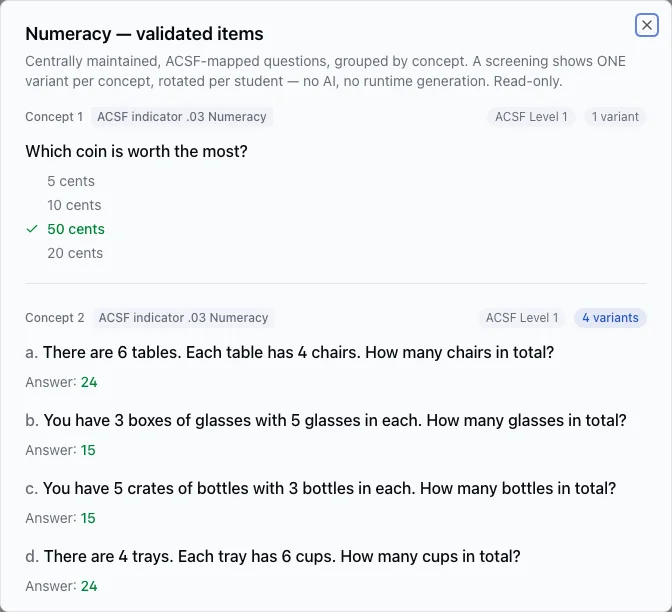
The bank is centrally maintained and read-only to your organisation. Each concept is mapped to an ACSF performance indicator and can carry several validated variants. A screening shows one variant per concept, rotated per student, so the paper varies while every item stays keyed and auditable.
Grouped by concept and ACSF indicator
Multiple validated variants per concept
One variant per concept, rotated per student
No AI, no runtime generation
Per-course setup
Set the expected ACSF level per skill.
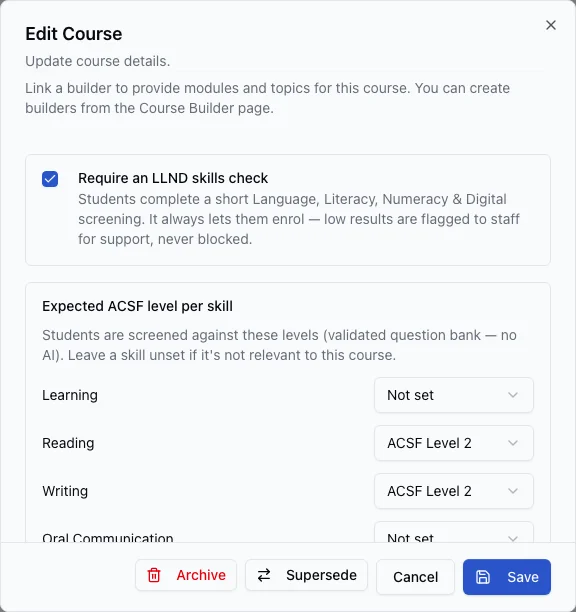
On each course, declare the expected ACSF level for the skills that matter and leave the rest unset. The screening selects validated items to match those levels. Courses with no expected levels keep working exactly as before.
Toggle the LLND check per course
Expected ACSF level for each skill
Unset skills are simply skipped
A clear explanation of what students see
On the enrolment
Confidence against expected, concerns made obvious.
The enrolment shows each skill’s measured level against what the course expects. Where a student is below level, a clearly-labelled support concern sits right there for your team to record against and act on. Writing is marked indicative for trainer confirmation; Oral Communication is rated by your staff from the student’s recorded speaking task.
Per-skill measured vs expected level
Below-level highlighted as a support need
Writing flagged INDICATIVE · Oral rated from real speech
Record support without leaving the enrolment
Across courses
Reuse a prior screening, top up only what’s harder.
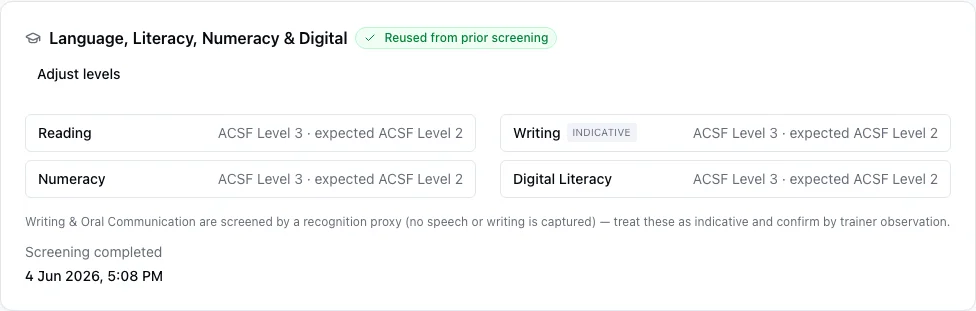
When a student enrols again, an earlier screening that already covers the new course’s skills and levels is reused automatically. If the new course expects more on a particular skill, only that skill is topped up, and the reuse is recorded as evidence on the new enrolment.
Auto-reuse when coverage is sufficient
Top-up only the higher-level skills
Per-student, within your RTO
Reuse captured in the audit trail
What the student sees
One short check, across every skill.
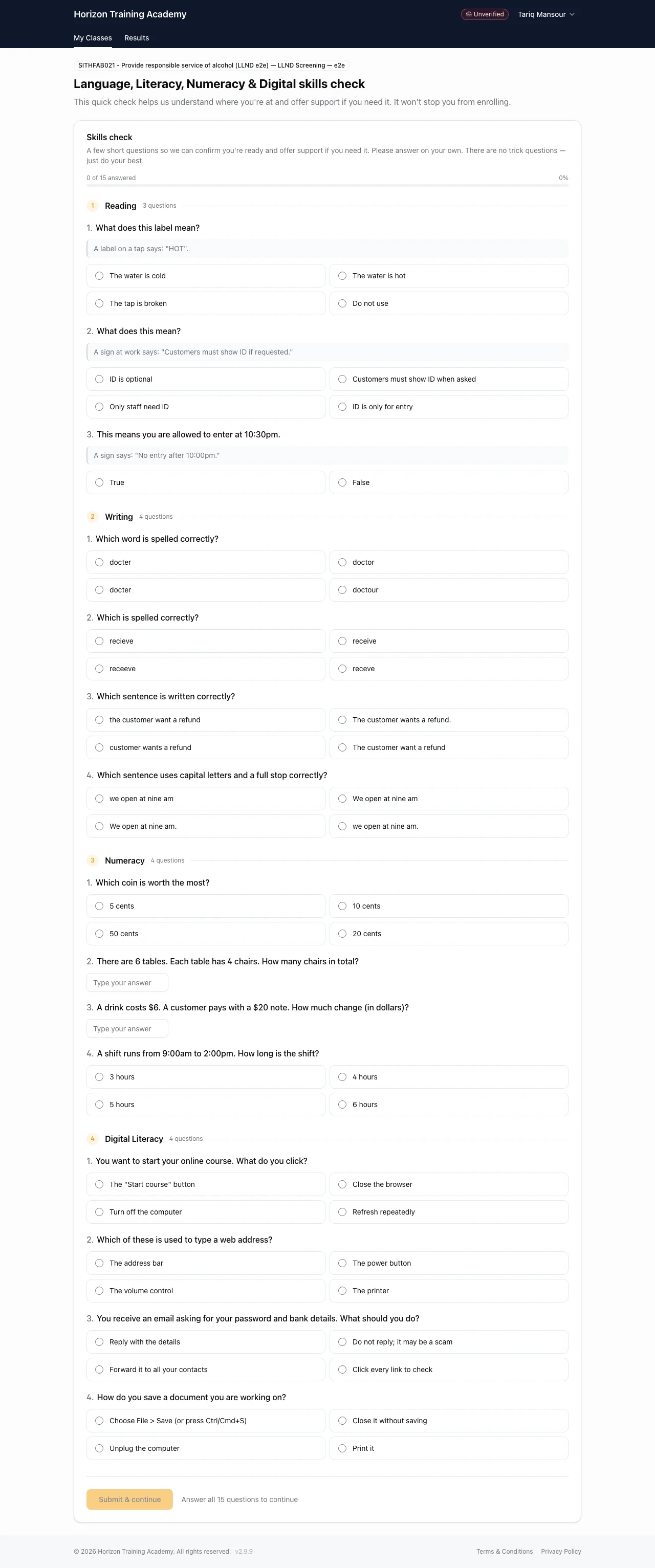
Clear, plain-language questions grouped by skill, framed as a short skills profile, not an exam, so the student stays at ease. Answers autosave, and the whole thing happens inline, no separate portal login, no chase email.
Reading, Writing, Numeracy and Digital in one pass
Plain-language items with real-world context
“A short profile, not a test”, stated up front
Autosaves as they go; submit when ready
A recorded speaking task follows when the course expects Oral, mic-checked with re-record before sending
Every part of LLND
Six skills, levels 1 to 5.
The five Australian Core Skills Framework skills plus Digital Literacy, each screened against the level your course expects.
Reading
ACSFSigns, instructions and everyday meaning, keyed multiple-choice and true/false items.
Writing
ACSF · indicativeSpelling, punctuation and capitalisation through recognition items. Confirmed by trainer observation.
Numeracy
ACSFMoney, measurement and everyday calculation, the numbers change between students, the concept doesn’t.
Oral Communication
ACSFA short recorded speaking task: learners answer spoken prompts in their own words, and your staff listen and rate against the ACSF.
Digital Literacy
DLSFNavigating online learning, email and online safety, essential for online and blended delivery.
Learning
ACSFOptional fifth ACSF core skill, enable it on a course only when it is relevant to delivery.
Everything included
Built to be auditable and humane.
Everything an RTO needs to screen LLND defensibly, without ever standing between a student and their course.
Validated: ACSF-mapped bank
Every item is centrally maintained by RTObase, versioned, and mapped to an ACSF performance indicator, the evidence an auditor wants to see.
Mapped to ACSF performance indicators · Centrally maintained and versioned · Read-only to your organisation · A snapshot of the exact questions used is kept as evidence
No AI in the check: fixed and repeatable by design
Questions follow fixed selection rules and are marked against a fixed answer key. Oral recordings are rated by your staff listening to real speech, never by a model.
Marked against a fixed answer key · Variants rotated per student · No generation, no AI marking · Oral rated by a person
A support tool: not a gate
LLN identifies support needs. It isn’t a pass/fail exam. A below-level result is a signal your team acts on, with the right help where it’s needed, so capability gaps are addressed rather than ignored or used to exclude on a number.
Per-skill support signals · No pass mark or attempt cap · Support recorded against the enrolment · Identify the need and respond
Per-skill confidence + concerns
Each skill gets a confidence reading against the course’s expected level. Anything below level becomes a non-blocking support action your team picks up.
Confidence vs expected, per skill · Below-level flagged for support · Routed to staff, never to the student · Recorded against the enrolment
Per-course expected levels
Declare the expected ACSF level for each skill on a course. The screening selects validated items that match, leave a skill unset if it is not relevant.
Expected ACSF level per skill · Items selected to match · Unset skills are skipped · Legacy courses behave as before
Reuse & top-up across courses
A prior screening that covers a new course’s skills and levels is reused automatically. Only the skills a harder course demands more of are topped up.
Auto-reuse when coverage is enough · Top-up only the higher skills · Per-student, within your RTO · Reuse recorded as evidence
Staff manual adjustment
Assessed a student over the phone or on paper? Set their levels directly, with a required reason and a full audit trail, and the gate clears.
Per-skill level entry · Required reason / evidence note · Recorded as a staff assessment · Full audit trail
Org-wide LLND view
See every LLND-required enrolment in one place, who is pending, screened, reused, and which results still need support, sliced by course.
Requires / pending / screened counts · Reused-from-prior visibility · Outstanding support surfaced · Breakdown by course
FAQ
LLND questions, answered
Common questions about how LLND screening works in RTObase.
It isn’t a pass/fail gate, there’s no automatic rejection on a score. The check gives you a per-skill reading against the course’s expected ACSF level, so a below-level result becomes a support action your team owns: put the right support in place, or, where a learner genuinely can’t be supported to succeed in that course, make an informed decision with them. That’s the balance the Standards expect: identify the need and respond to it, rather than excluding on a number or enrolling regardless.
No AI in the LLND check. The question bank is validated, centrally maintained by RTObase, and mapped to ACSF performance indicators. Item selection follows fixed rules, and answers are marked against a fixed answer key, not by a model. For integrity, each concept can carry several validated variants that are rotated per student, so two learners rarely see the identical paper while every item is still keyed and auditable. RTObase uses AI elsewhere by deliberate choice, the course builder and the admin assistant, but never inside the LLND screen, where validity and defensibility come first.
Because everything is static and traceable: a versioned, ACSF-indicator-mapped item bank, fixed answer-key marking, an evidence snapshot recorded against each enrolment, and a recorded support follow-up whenever a result is below level. That maps directly to the Standards for RTOs 2025 obligation to identify and respond to a learner’s support needs, without the validity and variability concerns that come with AI-generated or AI-marked assessment.
Writing is screened through recognition-proxy items, such as choosing the correctly spelled or punctuated option, clearly labelled INDICATIVE and confirmed by trainer observation. Oral Communication is screened with real speech: the student completes a short recorded speaking task in the portal, answering spoken prompts in their own words, and your staff listen and rate the recording against the ACSF. The rating is always made by a person, with no AI transcription and no automated scoring, so the judgement stays with your RTO.
Recordings are stored securely and are visible only to your organisation’s staff, never to other students, other RTOs, or any AI model. They’re kept as the evidence behind the rated Oral Communication level, so an auditor can trace a level back to the actual speech and the staff member who rated it. If a recording is unclear, staff can request a new one, and the earlier takes are retained as part of the record. Disposal follows your organisation’s request, in line with our retention policy.
Digital Literacy is screened as a first-class skill, important now that so much delivery is online and the 2025 Standards expect digital capability to be considered. Its items are aligned to the Digital Literacy Skills Framework and sit alongside the ACSF core skills in the same check.
No. A prior screening is reused automatically when it already covers a new course’s expected skills and levels. If a new course expects a higher level on a particular skill, only that skill is topped up, the student isn’t re-screened on everything. Reuse is recorded as evidence on the new enrolment.
Yes. Staff can set a student’s measured ACSF level per skill directly, for example after a phone or paper assessment, with a required reason and a full audit trail. This records a legitimate out-of-band assessment and clears any active LLND gate.
Inline, in the same authenticated session straight after payment, no separate portal login or chase email required. It also works for backoffice-created and imported enrolments, where the student completes it from the portal, or staff record it manually.
See exactly where every student needs support
A validated, ACSF-mapped check that reads confidence skill by skill, surfaces who needs support, and keeps the evidence for you. Included on every plan.
No credit card required. LLND screening included on all plans.