
RTO trainer management software · role-based portal
One RTO trainer platform for delivery, assessment and compliance.
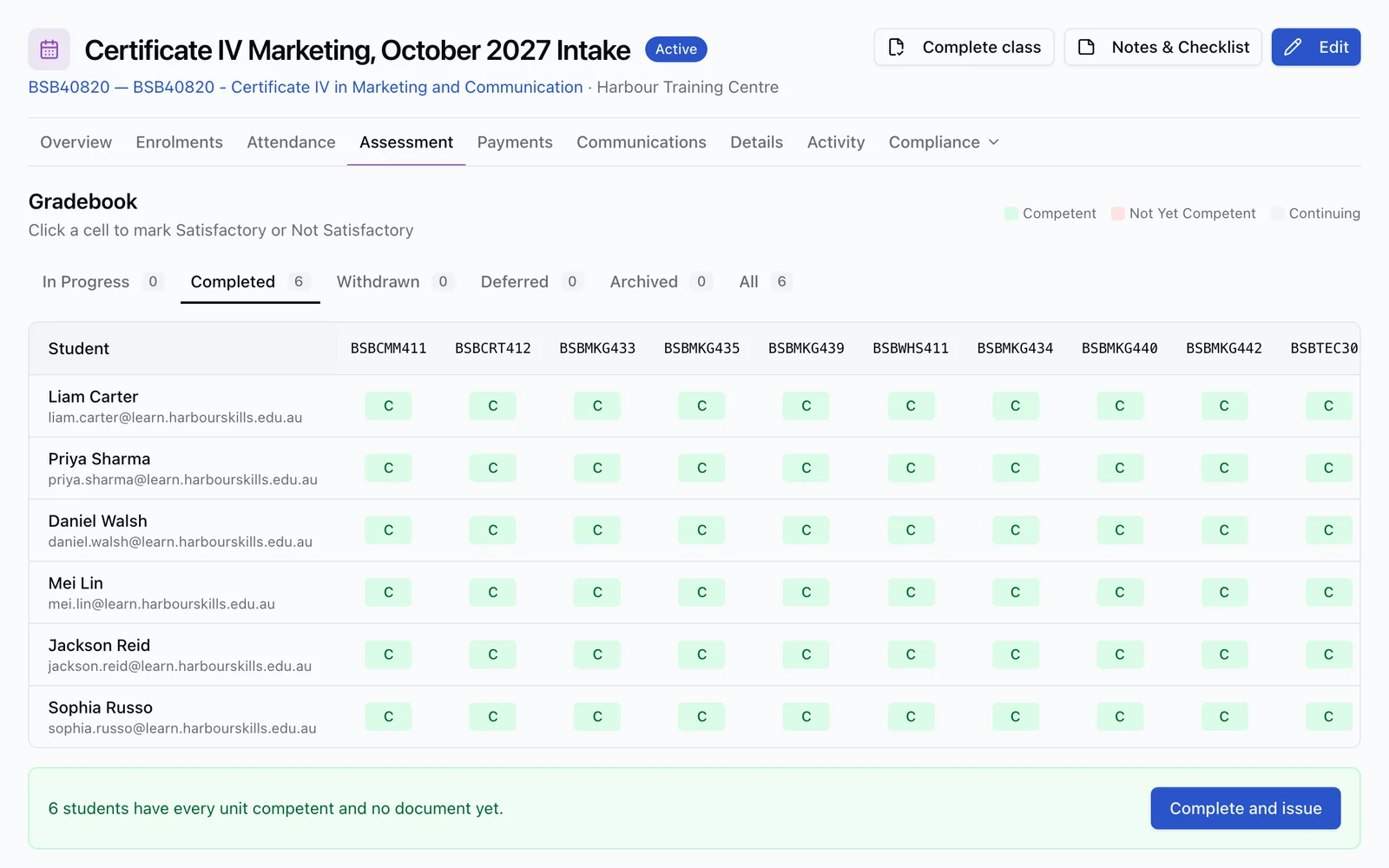
Run the training day from a phone or tablet. Today, Calendar and Requests bring assigned delivery, learner history, session records and sign-off together. Attendance, assessment evidence and office follow-up stay connected to the same learner records.
Trainer portal included on every plan · no separate seat or add-on licence
One login
classes, bookings, marking and currency
Role-based
trainer access without the admin workspace
4 states
Present, Absent, Late and Excused
All plans
no separate trainer portal licence
The trainer portal
The work a trainer owns, in one place.
A trainer should not need the RTO's whole back office just to see today's delivery, mark attendance or review an assessment. RTObase shows the work attached to that trainer and keeps the administrative boundaries clear.
Today, on your phone
See today’s assigned sessions, classes and work needing attention in a dedicated trainer app, with Today, Calendar and Requests navigation on desktop and mobile.
Classes and bookings
See assigned classes and individual sessions in Calendar, open the work for that day and subscribe from your own calendar app.
Attendance tracking
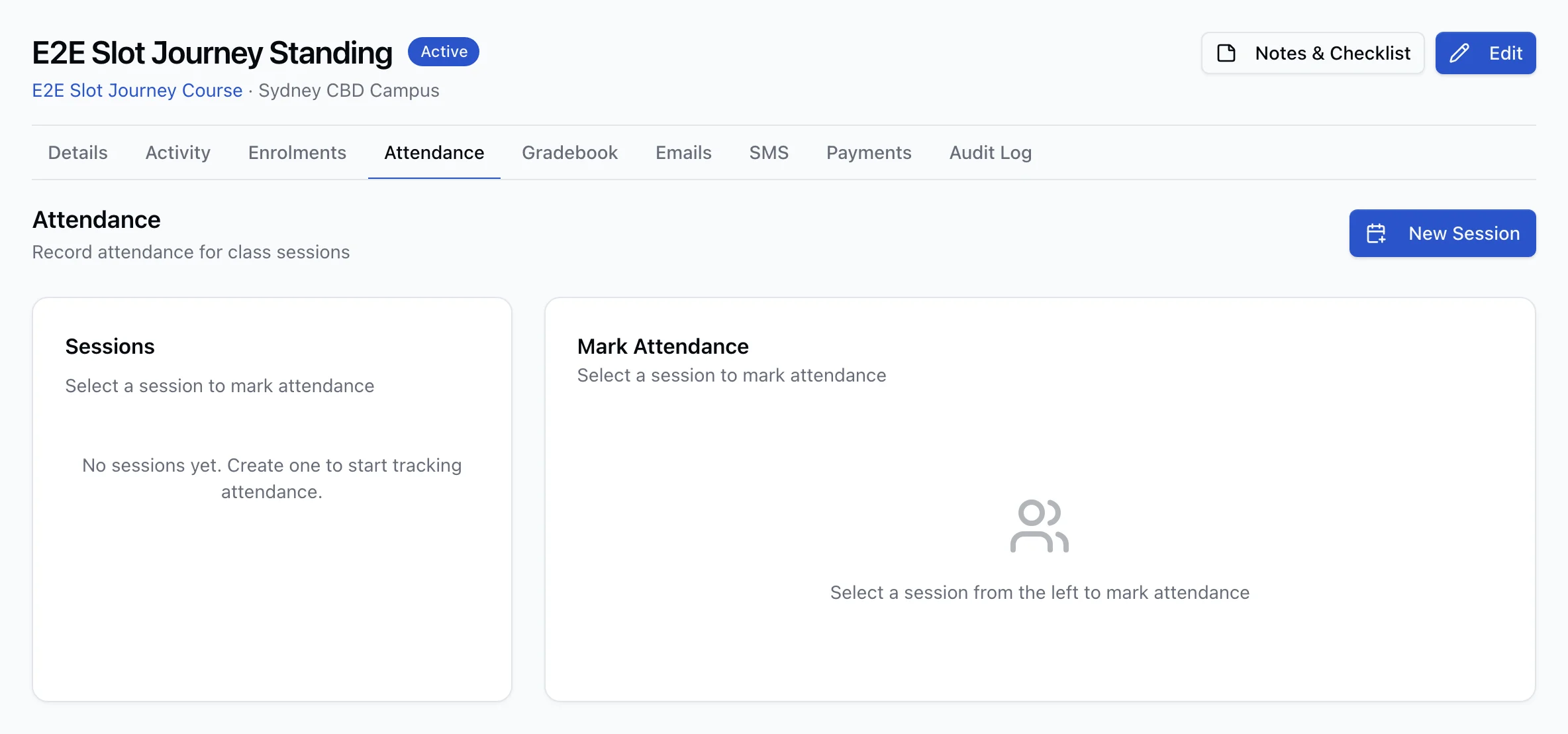
Open the assigned class day, mark the roll or use learner QR check-in, then save Present, Absent, Late or Excused attendance on the class record.
Class delivery evidence
Review learner Forms, record trainer-led activities and practical observations, and enter unit results where your Trainer Matrix authorisation allows it.
Assessment marking
Review the exact attempt a learner submitted, record marks and feedback, then finalise a Satisfactory or Not Satisfactory judgement.
Learner progress
Follow lesson completion, recorded activities and unit results from the assigned learner and class records.
Session records and sign-off
Prepare for a booked session, read earlier instructor entries, record training and next steps, then collect the course’s required signatures and learner Forms.
Requests to the office
Request leave, other work or a list, add a sick-leave certificate when needed and follow the office’s response from the same app.
Trainer currency
See authorisation gaps and expiry dates, then record professional development and industry-currency evidence for a colleague to confirm.
Classes and attendance
From today's class to the attendance record.
Open the assigned class day to take attendance, check learner Forms and record what was delivered. QR check-in, activities, practical observations and permitted unit results stay on the original records. Finish the day with a note and a delivery sign-off.
Email-verified learner check-in from the class QR
Present, Absent, Late and Excused attendance with a saved roll
Before-session and after-session Forms on the learner’s or trainer’s phone
Trainer-led activities and practical observations on the class day
Unit results only where Trainer Matrix authorisation allows them
Daily delivery sign-off with enrolment completion checks kept separate
Assessment and feedback
Mark the attempt the learner actually completed.
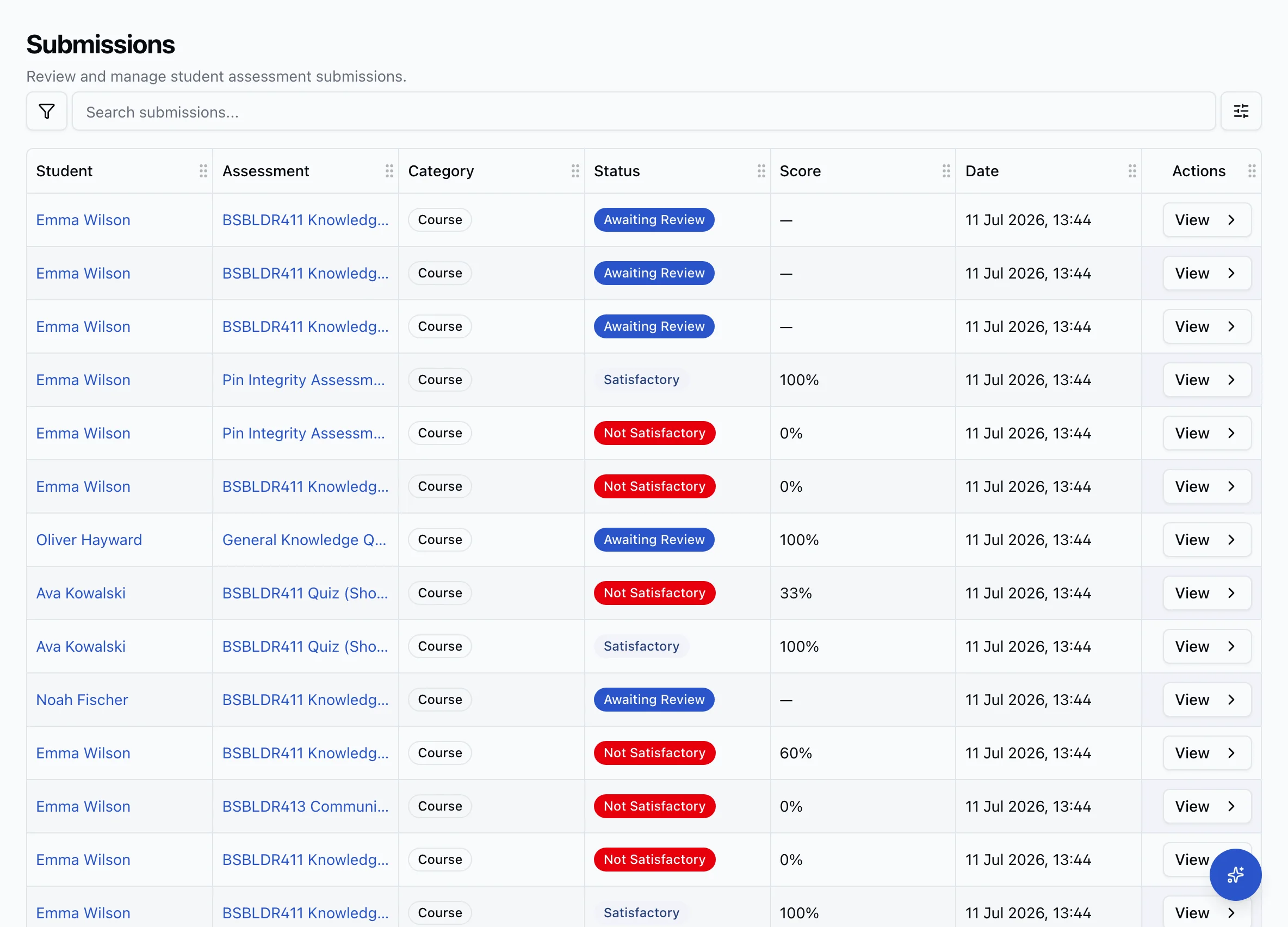
Submissions come from learners assigned through a trainer's classes or direct bookings. The review opens the immutable lesson attempt, the response, expected answer and assessor guidance together, so a judgement is made against the version the learner sat rather than whatever happens to be live today.
Start marking from Today and move through assigned assessment work
Per-question marks and feedback against the submitted attempt
Satisfactory and Not Satisfactory outcomes with previous attempts preserved
Automatic, manual and auto-with-review marking workflows
Office and payroll preparation
Prepare trainer hours from the schedule you already maintain.
Review a week, fortnight or custom date range and download a CSV. When the office corrects a scheduled time, the timesheet follows.
Bring the hours together
Review scheduled session hours alongside other work, professional development and leave. Class hours use timed sessions; date-only class days add no hours.
Find entries still owed
See ended sessions and class days still needing a trainer entry or sign-off, so the office can follow up before preparing its figures.
Take a CSV to payroll
Administrators export the selected range for review and payroll preparation. Pay rates, wage calculations and payroll processing remain in your payroll system.
Trainer management for the RTO
A portal for the trainer. A defensible record for the RTO.
The trainer-facing workflow is only half the system. Administrators and compliance staff need to know who is assigned, what they are declared to deliver or assess, and whether the evidence behind that position is current.
Connect the person and login
Invite a trainer into the organisation and link the account to the trainer record so assigned work appears under the correct identity.
Declare delivery and assessment scope
Use the trainer matrix to record the units and roles the RTO assigns to each trainer or assessor.
Check evidence-backed authorisation
Review the current position by trainer, training product or unit and role, including the reason behind every gap or expiring result.
Keep confirmation independent
Evidence a trainer records about themselves stays pending until another authorised person confirms it, and nobody can confirm their own.
My currency
Trainers can maintain their own evidence without approving their own evidence.
A trainer sees each unit or training product and role, their current authorisation position, what is missing and the earliest evidence expiry. They can record professional development or industry currency, but it remains pending until a colleague confirms it. The confirmer and confirmation time are fixed.
Learner progress
Delivery work and the student record do not drift apart.
Attendance, assessment attempts and trainer feedback stay attached to the class, enrolment and lesson they belong to. Trainers follow progress in their assigned learner and class records; administrators see the same facts flow into completion and reporting work.
One learner and enrolment record across delivery and administration
Assessment evidence stays linked to the published lesson version
Class progress and competency outcomes visible together
AVETMISS outcomes remain a separate recorded competency decision, not an automatic side effect of marking
Connected platform
Follow the workflow in either direction.
Trainer management touches delivery, scheduling, compliance and the student record. Each is part of the same RTObase platform.
RTO LMS
Online lessons, SCORM 1.2 and assessment workflows whose submissions trainers review.
ExploreScheduling and bookings
Match qualified trainers to one-to-one sessions, locations and assets without double-booking.
ExploreContinuous Assurance
Evidence-backed trainer authorisation inside the wider plan for all 23 Outcome Standards.
ExploreEmployer portal
Team enrolment and employer requests that feed the classes, bookings and learner work trainers see.
ExploreRTO trainer platform FAQ
Questions RTOs ask about trainer portals.
Yes. Trainer timesheets bring scheduled session hours, other work, professional development, leave and sessions still needing an entry together for a week, fortnight or custom date range. Administrators can download a CSV for payroll preparation. The figures follow recorded schedule times; RTObase does not calculate wages or run payroll.
An RTO trainer platform is software that gives trainers and assessors a secure place to see the training they are assigned, record attendance, review assessment evidence, give learner feedback and keep their own currency evidence current. For the RTO, it should connect that work to the student record, trainer matrix and compliance evidence instead of leaving it across spreadsheets, email and a separate LMS. RTObase combines the trainer portal and trainer management system in the same platform as enrolments, delivery and AVETMISS reporting.
Yes. Trainers have a dedicated app with Today, Calendar and Requests, with navigation within reach on a phone. They see assigned sessions and classes, record delivery and attendance, review assessment work and maintain their currency evidence. Office administration and payments stay with staff who have the required permissions.
Yes. Assigned trainers can review Online Lessons submissions from learners linked through their classes or direct bookings. They see the immutable attempt the learner completed, record per-question marks and feedback, and finalise the attempt as Satisfactory or Not Satisfactory. Objective questions can be scored automatically, while manual and auto-with-review modes keep the assessor judgement in the workflow.
Yes. Trainers open an assigned class day from Today or Calendar, mark learners Present, Absent, Late or Excused and save the roll. They can mark everyone present in one action, with email-verified QR check-in available for learners. Attendance stays attached to the class and enrolments.
Yes. The trainer matrix records declared delivery and assessment scope. RTObase also projects an evidence-backed authorisation position for each trainer, unit or training product and role, including missing or expiring evidence. Trainers can record their own professional development and industry-currency evidence, but it does not count until an authorised colleague confirms it. Nobody can confirm their own evidence.
Yes. Calendar shows assigned classes and one-to-one sessions together, with a calendar subscription for the trainer’s own calendar app. Today brings current delivery and work needing attention together. Trainers record what happened in their sessions; rescheduling, reassignment and cancellation remain office-controlled.
Yes. The session workflow brings together preparation, previous instructor entries, training notes, next steps and the sign-off configured for the course. Course Forms can collect learner declarations before or after a session. Requests lets trainers send leave, other-work and list requests to the office and follow their status.
Yes. Trainer logins, classes, attendance, assessment review, learner progress, the trainer matrix and trainer currency workflows are included on the Startup, Business and Custom plans. RTObase does not charge a separate trainer-portal licence or gate the trainer workflow behind an add-on.
Give the people delivering training a portal built around the work they own.
Start with the trainer dashboard, classes, attendance, assessment review and currency evidence included. No separate trainer portal licence.
Trainer portal included on every plan. No separate seat or add-on licence.