RTObaseRTObase
AVETMISS 8.0 · ASQA Standards 2025

Run your RTO in one connected platform.

Run student management and learning together, with bookings, payments and reporting. Connect your AI assistant to your live RTO records.

$0/month to start · no credit card · NAT file import available

Student management, online learning, websites and AVETMISS reporting. Every core feature, on every plan.

RTObase / Course design
A real RTObase course outline with an online lesson, knowledge assessment, supervised practical observation and workplace evidence
Course design
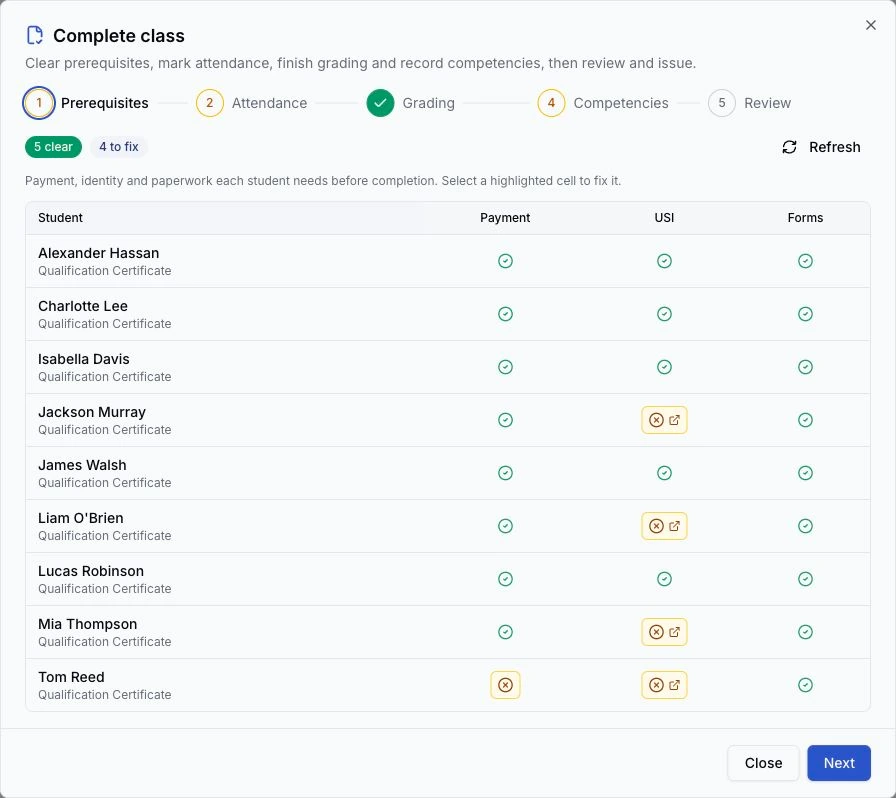
The Complete class wizard showing each learner's payment, USI and form checks

One outline. One completion workflow.

“We ran three separate systems for 15 years, a student management system, a Moodle instance, and an old website, that cost thousands a year and didn’t talk to each other. RTObase replaced all three.”

Peter White, Director, Centre for Training

26

fixed compliance checks

4 systems

replaced by one platform

30 years

record retention, hosted in Australia

$0

monthly cost on the Startup plan

Inside RTObase

More of the work, in one place.

Design the course, run the venue and finish the class. The same learner records connect the work your team does each day.

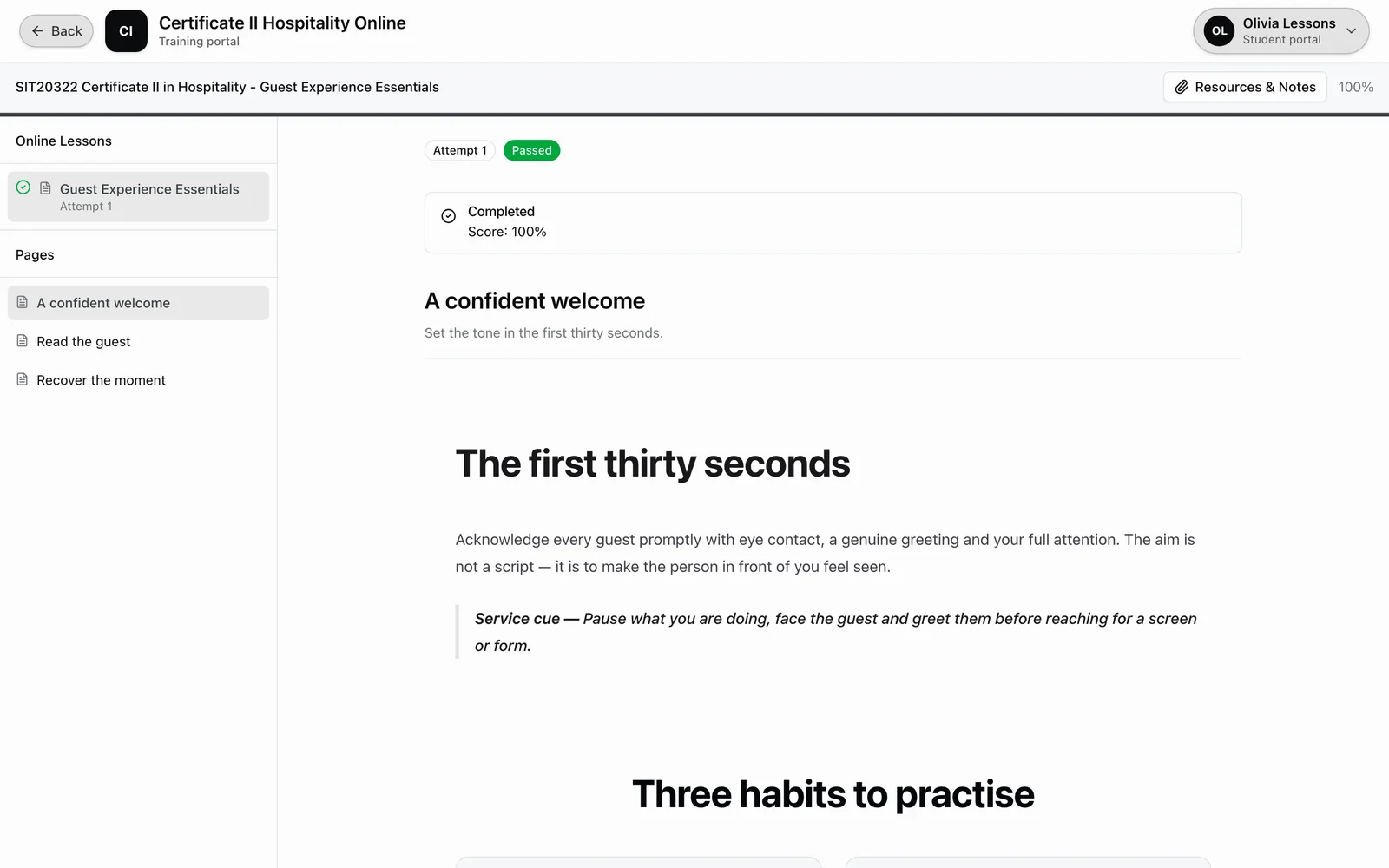
RTObase / Learning and assessment outline
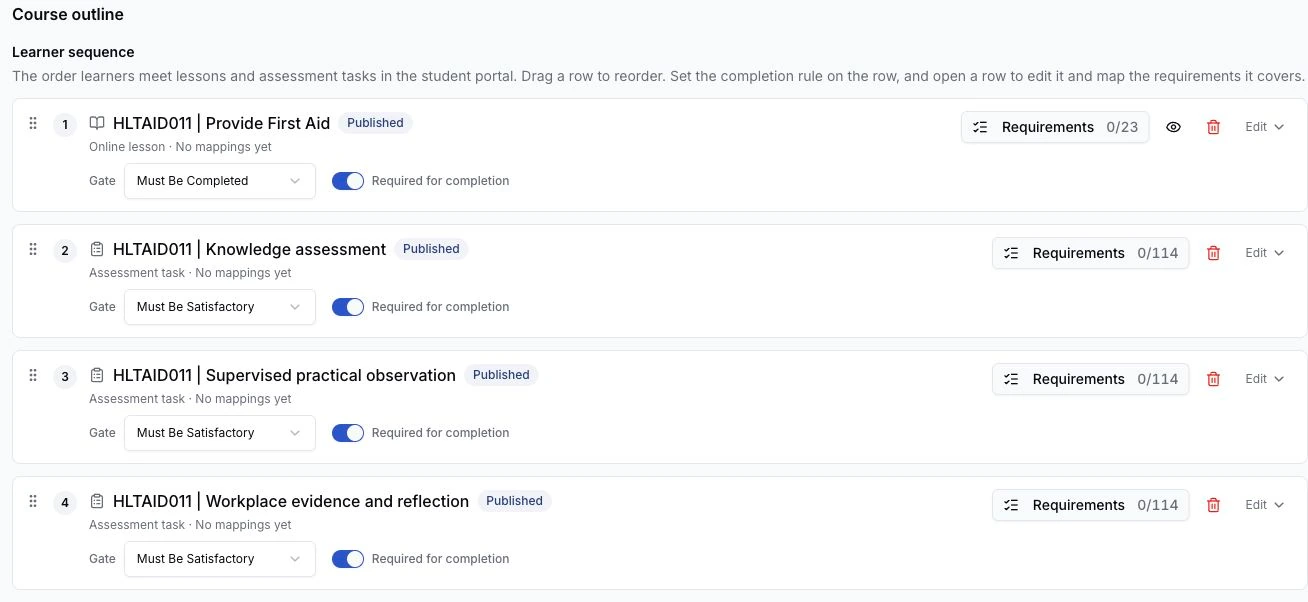
An RTObase course outline joining a published lesson, knowledge assessment, practical observation and workplace evidence
Learning and assessment outline

Course design & qualifications

Give every course a connected outline.

Arrange lessons and assessment tasks, map requirements and review coverage. Deliver a qualification through its unit courses, with one enrolment and progress through the units.

Explore course design →

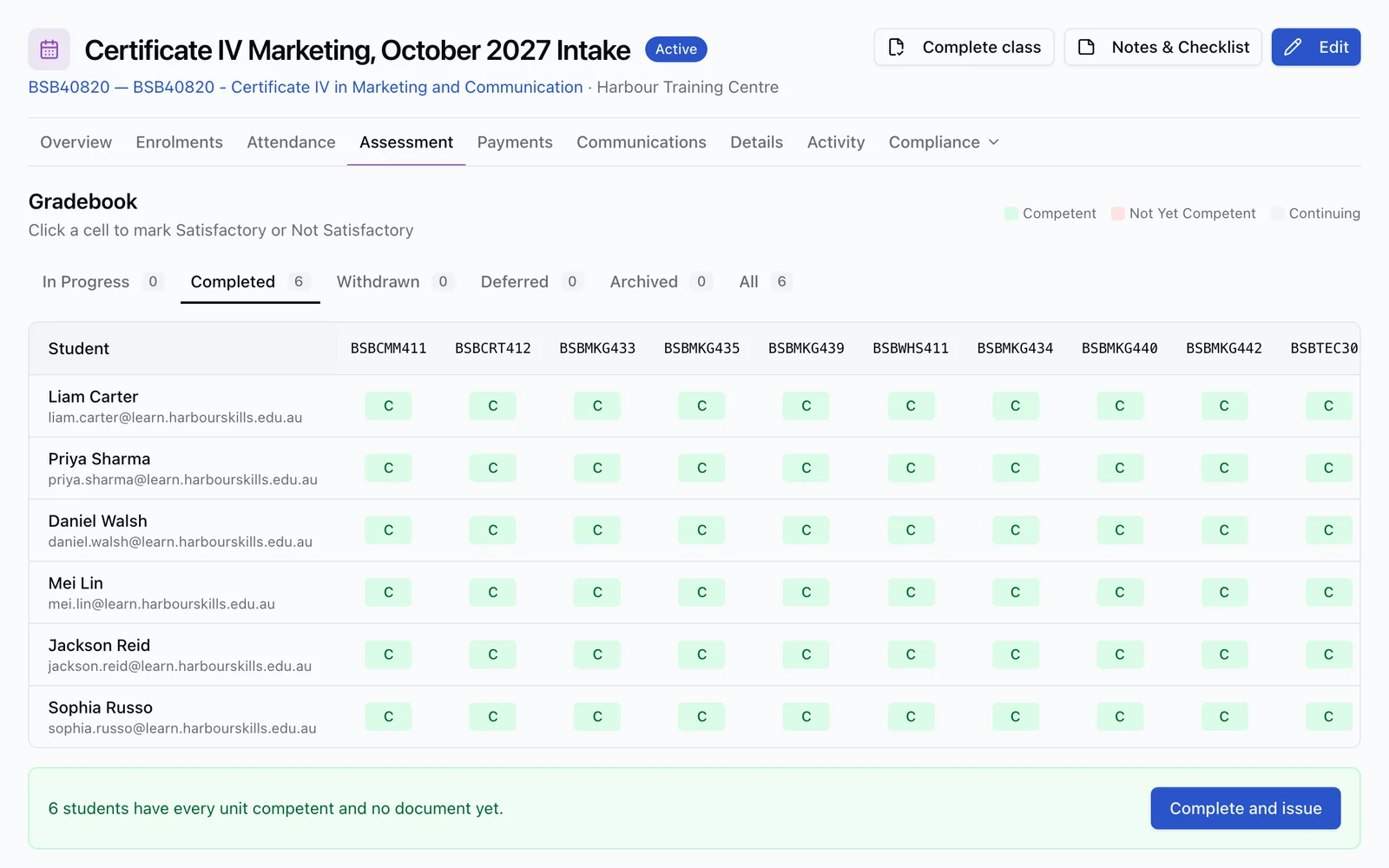
RTObase / Whole-class completion
The Complete class wizard with five stages and per-learner prerequisite checks, including highlighted items that need attention
Whole-class completion

Class completion

Finish the class, with each check in view.

Review prerequisites, attendance, grading and competencies in one wizard. Open the records that need attention, then issue completion documents for the learners who are ready.

See the completion workflow →

Screens & venue operations

Put the day's training on the wall.

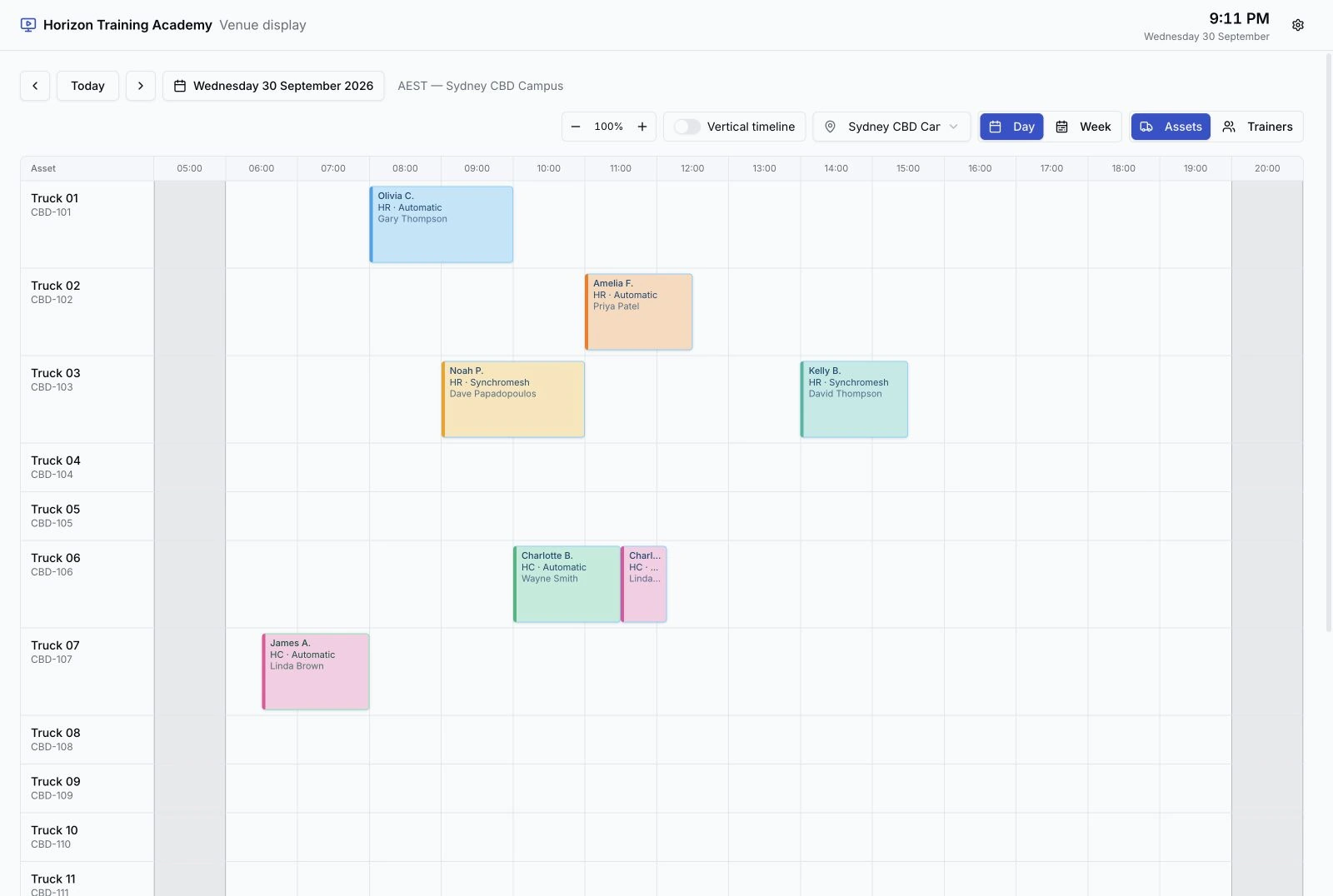
Pair a TV or tablet by code. Show live bookings, today's classes or asset readiness, with no staff login on the device.

Choose the venue and views for each screen

Hide sensitive learner details in public areas

See daily pre-start checks beside the assets in use

Explore live screens →
A public-area RTObase display showing the Sydney venue's live truck bookings with learner first names and last initials
Live venue display / Public area

Asset readiness / Daily check reminders

Asset readiness cards showing a daily pre-start due for Truck 12 and the booking count for each asset

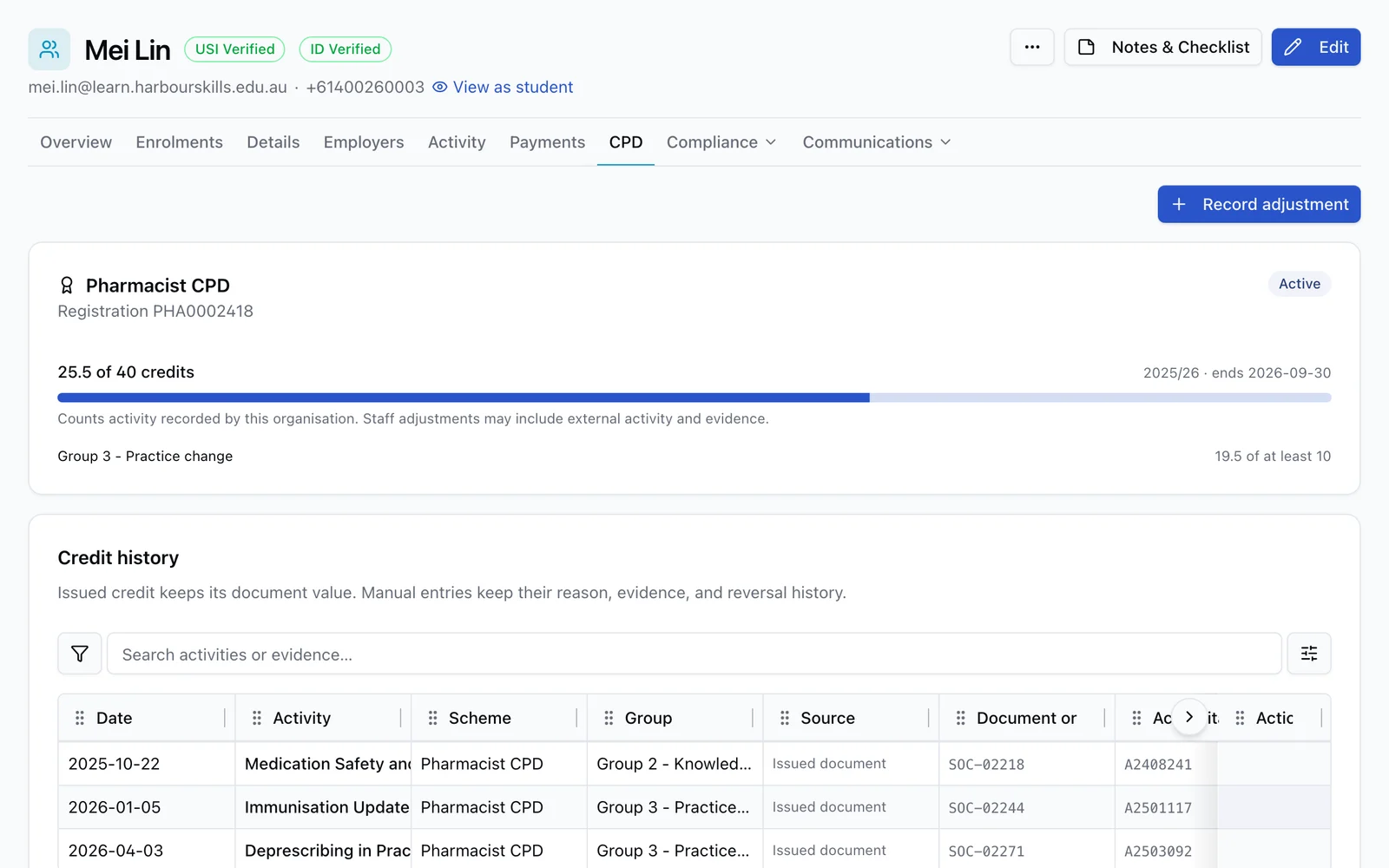
CPD tracking

Show learners where their credit stands.

Track recurring schemes, course credit and reviewed adjustments. Give learners a branded statement, with issued credit preserved on the completion document.

Explore CPD tracking →
RTObase / Learner CPD record
A learner's CPD record showing progress through the current cycle and a dated credit history
Learner CPD record

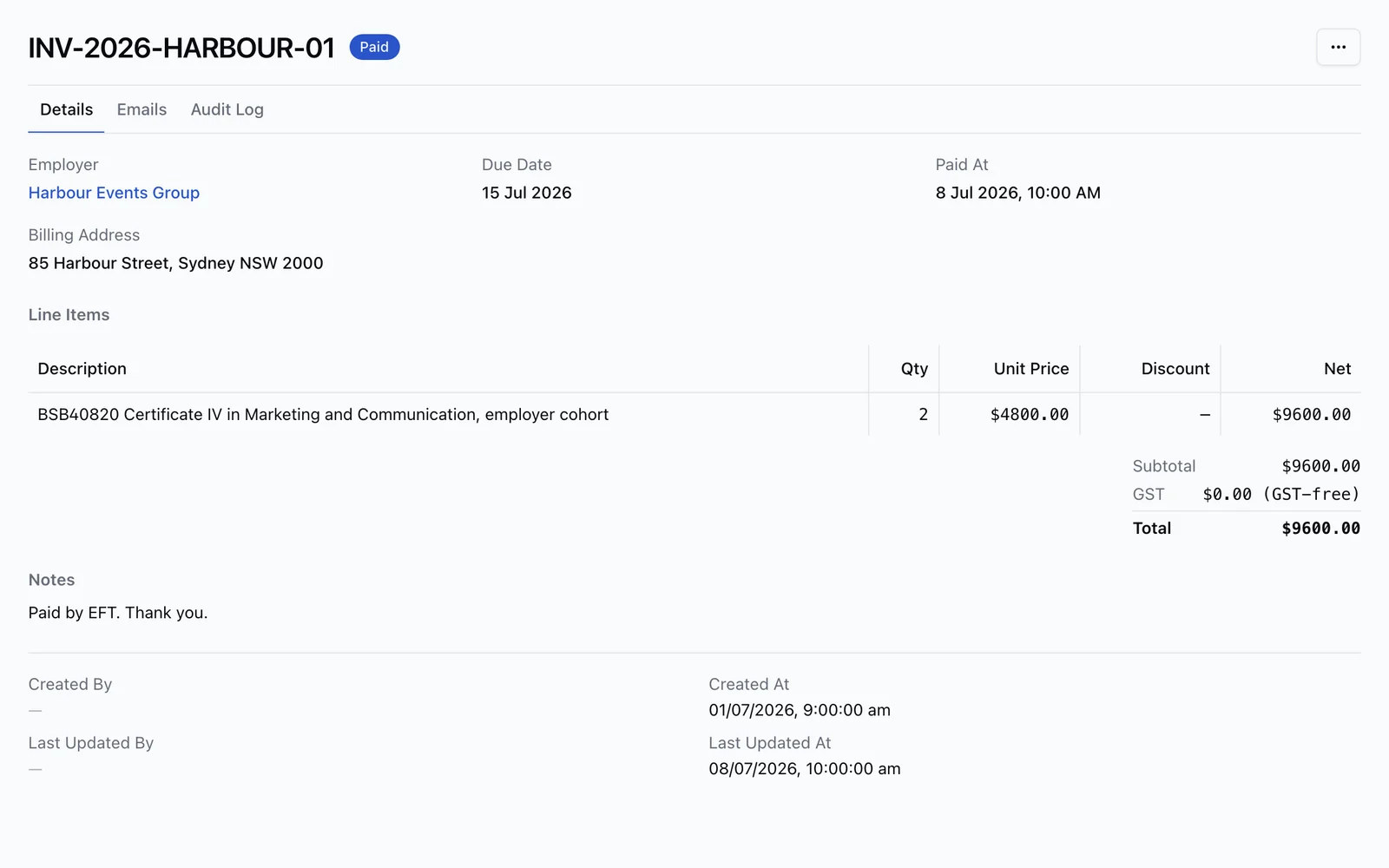
Invoicing & Xero

Keep training and accounts connected.

Invoice employers from enrolment records. Sync invoices and optional payments to Xero, with revenue accounts per course and tracking per location.

Explore Xero sync →
RTObase / Employer invoice in RTObase
An RTObase employer invoice with course line items, totals and a paid status
Employer invoice in RTObase

Run your training day from your phone.

Today, Calendar and Requests give trainers one place for assigned delivery, learner history, session notes and the course’s required sign-off. The office works from the same records.

Explore the trainer app →

Collect payment as training happens.

Charge each booked lesson, test and retest at its own fee. Send or renew the right payment request, set a custom amount and see what remains outstanding.

Explore session payments →

Keep the class day and its evidence together.

Take attendance, let learners check in by QR, collect course Forms and record activities, practical observations and authorised unit results on the class day.

Explore class delivery →

Keep employers informed between sessions.

Employers request training, follow employee progress and see trainer recommendations. Session notes and next steps appear only when the trainer chooses to share them.

Explore the employer portal →

Actual product views with illustrative demo data.

The full lifecycle

Follow each student from enquiry to renewal.

Keep enrolments, learning progress and communications connected, so staff can follow up from the student's record.

A public RTObase course page with course details, upcoming dates and online enrolment

Enrol online

A branded course page turns interest into a paid enrolment without re-keying the learner later.

One platform

The rest of your RTO, connected.

AI · included on all plans

Ask for help. Review each change.

Ask the Admin Agent to find records or prepare an update. Review its proposed changes before approving them. Or connect Claude, ChatGPT, Codex or another compatible assistant to your live student and learning records. Connections are included on every plan.

Uses your login and permissions to read records

Shows proposed updates for you to check

Records supported changes in the audit trail

Connected AI uses the access you choose, limited by your role

Meet the Admin Agent →Connect your AI assistant →
The RTObase Admin Agent open beside an enrolment with page-aware suggested actions

Compliance · included

See what needs attention before your next review.

Automatic record checks bring gaps into a shared work plan. Once a year your team signs the Standards from one summary of what RTObase holds.

Open the records behind each finding

Sign the 23 Outcome Standards once a year, ahead of ASQA's Annual Declaration

Download an audit pack made from the signed copy

Learn about compliance →
RTObase Continuous Assurance dashboard showing grouped work and review progress

Compare

Compare the details before you switch.

Check features, pricing and migration requirements side by side. Use the buyer's guide to prepare questions for your shortlist.

RTObaseSeparate systems
Monthly cost to start$0$400 to $900
Website + online enrolmentIncludedSeparate vendor
Online course deliveryIncludedSeparate LMS
AVETMISS validationBuilt inManual / add-on
MigrationNAT file importPaid onboarding

Pricing

Simple, transparent pricing.

No hidden fees. No seat-based pricing. Start free and only pay when students enrol.

Startup

$0 + GST/mo

2% + 30c per enrolment, capped at $4 + GST

Everything you need to manage students, take payments, and prepare AVETMISS reporting, zero upfront cost.

Start for free
Most popular

Business

$499 + GST/mo

No per-enrolment fees

No cap on student records or enrolments. Business includes up to 1,000 outgoing text messages per month under fair use, hands-on migration support, and custom roadmap features.

Get started

Need a BYO payment gateway, unlimited outgoing text messages, or dedicated support and SLAs? Ask about Custom

FAQ

Common questions

About pricing, AVETMISS, and moving from your current system. More in the docs.

RTObase starts at $0/month on the Startup plan. You only pay 2% + 30c per enrolment, capped at $4 + GST. Every core platform feature is included. The Business plan is $499 + GST/month flat with no per-enrolment fees, outgoing text messaging included, and hands-on migration support. No lock-in contracts, no setup fees.

See how your RTO could work in RTObase.

Walk through enrolment, delivery and reporting with us, and discuss bringing your records across.