
Platform
RTO software for enrolment, delivery and reporting.
Connect student records, course delivery, bookings, payments and reporting. Browse by stage below, or open a product page for its workflow and screenshots.


One enrolment record
The learner, course, progress, payments and completion work stay together from start to finish.
Explore the platform
Every module, one platform.
Core modules are included on every plan. Turn on optional tools such as Scheduling when you need them. CRICOS and funded VET compliance modules are included on Business.
Student Management System
One record per student: enrolments, outcomes, USIs, certificates and payments.
ExploreLMS for RTOs
Online lessons, SCORM 1.2 and assessment marking against units of competency.
ExploreRTO Software Guide
What the category covers in Australia, and what to ask any vendor.
ExploreTrainer Portal
Run the training day from a phone and prepare trainer timesheet CSVs from the same schedule.
ExploreEmployer Portal
Team enrolment, training requests, employee progress, invoices and completion documents.
ExploreScheduling & Bookings
One-on-one sessions against trainers and assets, never double-booked.
ExploreOnline Lessons
Online courses delivered in your student portal.
ExploreWebsite Builder
Drag-and-drop pages, SEO and enrolment on your own domain.
ExploreBuild with AI
Pages, articles and course topics, drafted on brand.
ExploreAdmin Agent
Work by chat in RTObase or connect your own AI assistant to live records.
ExploreRoles & API access
Custom team permissions and scoped developer API keys on Business and Custom.
ExploreASQA Compliance
Compliance checks from live records and one Standards sign-off a year.
ExploreAVETMISS Reporting
Validated NAT files and USI verification.
ExploreCRICOS & International
ESOS written agreements, CoE and visa tracking, and agent governance. Included on Business.
ExploreCPD tracking
Course credit, recurring cycles, learner statements and activity exports.
ExploreXero accounting
Employer invoices and optional payment sync, with course accounts and location tracking.
ExploreLive display screens
Booking boards, today's classes and asset readiness on a paired TV or tablet.
ExploreReports & exports
Course activity, completions, unit outcomes and financial-year CSV exports.
ExploreLLND Screening
Per-skill ACSF confidence reading, not pass/fail.
ExploreLodgement & Renewals
HRWL, RSA/RCG, FSS, SLED and WA LAPS exports.
ExploreThe lifecycle loop
Six stages. One record per learner.
Follow enrolment, training, completion and the work that comes after it. Progress, communications and renewals stay linked to the same learner.
01 · Enrol
From first enquiry to enrolled, without the re-keying.
Capture enquiries, take payment, verify USIs and onboard, all branded to your RTO, all landing on one record.
Guided data migration
Upload your AVETMISS NAT files and RTObase brings across your organisation, student, program, unit, enrolment and training-activity data. You review the result before going live. Website pages can be imported separately from a URL, with hands-on migration support included on Business.
Embedded enrolment
Add one line of code to your existing website. Your web person can do it in minutes. Embed your whole course catalogue, a single course page, or a public booking calendar with live availability. Students browse, enrol, pay and onboard without leaving your brand.
Enquiry forms on any website
Share a direct enquiry link or copy an embed snippet for your existing website. Responses arrive in the same leads inbox, with no RTObase website page required.
ExploreEnrol my team (bulk enrolment)
An employer books several seats in one public checkout and pays once. Each attendee completes their own USI, details and any LLN via a secure login link sent by email, no passwords, nobody shares a login. GST applies per line, and a tax invoice lands in the employer portal.
Payments & invoicing
Collect online payments, offer bank-transfer instructions, record receipts and track invoices on the same student record. Booking courses can charge each lesson or test separately, including retests, with staff able to send, renew or waive a session payment request.
Learner credentials
Record first aid certificates, security licences and other credentials with their issuer, number, dates and renewal history. Courses list the credentials learners need, and missing or expired credentials are flagged for staff to review.
Approve a previous-certificate upload and record its credential together
Keep the evidence and renewal history on the learner record
RTO-specific custom fields
Define the extra student and enrolment information your RTO genuinely needs, validate dropdown values, and carry those fields through operational views and CSV exports.
Student and enrolment field definitions
Text, date, number, checkbox and dropdown values
Included in CSV exports
Organisation-scoped access and audit history
Website builder
A professional site with a drag-and-drop editor, SEO-optimised pages, enquiry forms that feed a leads inbox, automatic sitemap and robots.txt. Custom domains on every plan.
ExploreCampaign results and affiliate programs
Tag a link and see which campaigns produced enquiries, enrolments and paid enrolments from your own records, with no analytics or advertising account required. Run affiliate programs on the same attribution: each referrer gets a unique tracked link, successful live payments build a commission ledger you review, and payouts you make outside RTObase are recorded for reconciliation.
First-touch or latest-touch credit over 30 or 90 days
Payment value net of recorded refunds
Percentage or fixed commission with an attribution window
Separate from regulated CRICOS education agents
LLN screening
Language, literacy, numeracy and digital screening at enrolment, read as per-skill ACSF confidence, support needs recorded before training starts, not a pass/fail gate.
Explore02 · Train
Deliver training from the same record you enrolled on.
Run classes, deliver online learning and assess, engagement signals flow straight back into each student record.
Online Lessons
Build online courses with modules, topics and 30 content widget types. Reuse knowledge-question banks, collect practical evidence and learner declarations, and draft topic content with AI. Archive lessons to keep the library tidy while existing courses retain access, restore them later or safely delete unused drafts.
ExploreCourse design & qualification delivery
Build the course outline, link lessons and assessment tasks, and review the design in one workspace. A qualification is a course with unit courses in delivery order. Learners enrol once, with progress through the units linked to the qualification's fees, outcomes and completion.
Map requirements to lesson pages, questions, assessment criteria and delivery activities
Add content to a live course while preserving existing learner records
Share course resources as files and links with descriptions
Keep existing learners studying through a superseded qualification's teach-out
Practical evidence, including video
Collect the evidence a practical assessment actually needs: files, photos, learner declarations and video recorded on the spot from a phone or laptop, stored against the attempt rather than emailed around. Criteria can require several observations of the same skill, and the assessor sees every attempt and observation together when they mark.
Video captured in the browser, no separate app
Assessor photos and documents retained with the practical judgement
Oral responses, question results and feedback recorded during observation
Repeat observations per criterion where a skill must be shown more than once
Evidence stays attached to the attempt for audit
SCORM in Online Lessons
Add SCORM 1.2 content directly to a lesson. RTObase pins the published package version and keeps learner status, score and resume data on the enrolment record.
ExploreStudent portal
Every student gets a branded portal: magic-link login, enrolment summary, online courses, assessments, payments and certificate downloads, from any device.
ExploreTrainer app and class-day delivery
Today, Calendar and Requests bring assigned work to the trainer’s phone or tablet. Record session notes and sign-off, take class attendance with QR check-in, collect course Forms and record activities, practical observations and authorised unit results.
ExploreEmployer portal
Employers enrol teams, request workplace classes before naming learners, track employee progress and see trainer recommendations. Session summaries and next steps appear only when shared by the trainer. Employers can pay invoices and download completion documents from the same portal.
ExploreState-aware & offshore online delivery
Restrict online access to the Australian states you choose, or enable an offshore pathway that records the learner declaration and overseas address evidence required for the overseas-student USI exemption (INTOFF), per enrolment.
Australian state access restrictions
Offshore and state-restricted modes cannot overlap
Enrolment-specific INTOFF evidence snapshot
USI reminders stop only for an approved exemption
Asset register & operational history
Track vehicles, rooms and equipment with capability tags, maintenance or incident activities, evidence, temporary moves and return-to-service decisions that feed booking availability.
Capabilities and operational status
Daily pre-start reminders for assets with bookings that day
Capture checks from the board with required answers and failure evidence
Maintenance, inspection and incident history
Evidence and temporary-location tracking
Booking-aware unavailability
Scheduling & bookings
Book driving lessons, practical assessments and equipment-based training on an asset or trainer board. Find a continuous available slot, reserve assets and staff with a hold, resize sessions and block maintenance time. Learners and employers can book offered slots in their portals or request a preferred time.
Location hours, closures and time zones apply to every new booking
Named breaks for all sites or individual venues
Calendar invitations and subscribed schedules
Live display screens
Show the booking board, today's classes or asset readiness on a TV or tablet. Pair it with a one-time code, choose a location and let the views update automatically. Screens are read-only. Public-area screens show learners as first name and last initial and hide sensitive booking details.
One-time pairing code, no staff login on the device
Rotate between booking board, classes and asset readiness views
Choose a venue and staff-area or public-area privacy
Revoke or replace a device from Settings
Enrolment insights
Every active enrolment carries an AI-generated outlook, on track, monitor, at risk, with the single next best action and a predicted completion date. Scan a whole cohort from the sortable Outlook column.
Admin Agent
Ask RTObase to do back-office work in plain English. A copilot on every page reads your live data and proposes each change as an approval card before it runs, under your own login, permissions and audit trail.
ExploreConnect your AI assistant
Connect Claude, ChatGPT, Codex or another compatible assistant to live SMS and LMS records. Find learners, check progress, update everyday records and arrange bookings within your connection’s access and your role. Included on every plan, with organisation AI opt-in required.
Payment and invoice changes, refunds, certificate issuance, lodgement and new assessment submission reviews stay in RTObase. Your assistant is instructed to ask before changes.
Explore03 · Complete
Certificates, reporting and evidence, signed off properly.
Issue certificates, prepare NCVER reporting and issuing-authority lodgement exports, and lock down evidence for the full retention window.
AVETMISS reporting & validation wizard
A guided wizard from generate to lodge. Pre-flight checks catch errors before export, and when AVS sends a rejection back you import its report, every error mapped to the exact student and field, with a deep-link to fix it.
ExploreFunded VET reportingBusiness+
Keep funding contracts and jurisdiction details on enrolments, prepare reporting extracts and record authority responses. Queensland includes a documented ATA layout, LUI and prior-qualification checks. NSW adds Commitment ID and program-status fields.
Included on Business and Custom when enabled. Queensland still needs authority validation on upload; NSW and other states use data extracts. Staff lodge and record the response.
ExploreCertificates & statements
Certificates and statements of attainment for accredited training, or a Statement of Completion for non-accredited courses, each with the right branding. Void and reissue with a recorded reason. Issued documents and assessment evidence stay linked to the student record.
Complete a class together
Review prerequisites, attendance, grading and competencies in the Complete class wizard. See who is ready and open the records that need attention, then issue the appropriate certificates or statements for ready learners. Complete bookings and online enrolments from the course too.
CPD credit & learner statements
Set up professional development schemes, recurring cycles and course credit. Credit is frozen on the completion document when issued. Learners see progress and download a branded statement, while staff can record evidence-backed adjustments and export the activity log.
ExploreCompliance built in
Compliance checks run 26 fixed rules over your records and track regulator dates, registers and dated commitments. Turn on Standards reviews for one sign-off a year across all 23 ASQA 2025 Outcome Standards and the fee rules.
Plain-language alerts and next actions
Total VET Activity, Annual Declaration, Quality Indicator and Annual Registration Charge dates
Trainer authorisation reads the existing Trainer matrix scope
Verified product transitions explain what changes and who is affected
Signing freezes the summary as a downloadable audit pack
Alerts resolve when the source record is fixed. A Standard's status comes only from open rule alerts, and an admin signs.
ExploreIssuing-authority lodgement
Some courses answer to a regulator, not just NCVER. RTObase records the assessment and the accredited assessor, then builds ready-made lodgement files, High Risk Work Licence, Liquor & Gaming NSW, NSW Food Authority, NSW Police SLED and Department of Transport WA pathways.
Explore04 · Monitor
See what happens after sign-off.
Engagement, expiring credentials and at-risk learners stay visible long after the certificate is issued.
Post-completion monitoring
See who logs in, who finishes, who stalls, and whose credentials expire soon. Because the LMS is part of the platform, engagement signals flow into the same student record.
Business reports & CSV exports
Review enrolments, completions and unit outcomes by course, with monthly trends and certificate totals. Export the underlying records, or compare enrolments and completions per course across financial years, including the current year to date.
Xero invoices & payment sync
Connect Xero to sync employer invoices and employer details. Enable online invoice payments, staff-recorded employer payments or manual student payments to the Xero accounts you choose. Course revenue accounts and location tracking keep the accounting tied to the training.
Payments and credits recorded in Xero update the invoice settlement here
Invoices settled in Xero are protected against edits and repeat full payment
A warning flags a possible duplicate payment for review
Trainer timesheets for payroll preparation
Bring scheduled session hours, other work, professional development, leave and missing entries together for a week, fortnight or custom range. Administrators download a CSV for review and payroll preparation. Pay rates and wage calculations stay in your payroll system.
ExploreLifecycle analytics
Real-time dashboards for enrolment trends, completion rates, revenue and renewal pipeline volume, with Google Analytics, Meta Pixel and PostHog tracking.
Unified student record
One record per learner, from first enquiry through five-year renewal. Every email, login, payment and submission is attached, no integrations, no data drift.
ExploreAnnual Standards sign-off
Opens 1 February and is due 15 March, two weeks before ASQA's Annual Declaration closes. Admins get one email when it opens and one when it is due soon. Signing gives one audit pack ZIP with a readable PDF and the supporting files.
Explore05 · Re-engage
Reach alumni before their credentials expire.
Automated touchpoints reach alumni before their qualifications lapse, from your own branded sender.
Automated email sequences
Renewal reminders, check-ins and re-marketing sequences on a schedule or triggered by lifecycle signals, with open and click tracking and a template library.
AI-powered outreach
Generate renewal microsites, alumni newsletters and re-engagement pages with AI, using your organisation’s own courses, branding and contact details, and iterate on existing content.
Automated text messagesBusiness+
Time-sensitive nudges, expiring qualifications, payment reminders, class confirmations, direct to mobile from a registered sender identity students recognise. Business includes up to 1,000 outgoing text messages per month under fair use.
06 · Re-enrol
Turn alumni back into active students.
Keep returning alumni connected to the same student record as they move back into active training.
Renewal horizon
Every alumnus with a qualification expiring in the next six months, on one screen, expiry volume curve, per-alumni message history, conversion funnel metrics and capacity planning.
Re-enrolment tracking
Track returning alumni on the same student record and avoid creating duplicates as they move back into active training.
AI · included on all plans
AI runs across the lifecycle, never an upsell.
AI lesson content, Enrolment Insights, AI-powered outreach, the support assistant and the Admin Agent are included on every plan, startup, business and custom. AI is never gated behind a tier.
AI lesson content
Draft topic content and assessments from a unit of competency.
Enrolment Insights
An at-risk outlook and next best action on every enrolment.
AI-powered outreach
Generate renewal pages and newsletters in your org context.
AI support assistant
Answer staff and learner questions from docs and permitted org data.
Admin Agent
Run routine back-office tasks by chat, every change approved by you.
Connect your AI assistant
Use your own compatible assistant with live records and the access you choose.
Admin & staff portal
Run your entire RTO from one dashboard.
Manage students, enrolments, classes, payments, compliance and your website, all from a single dashboard your whole team shares.
Student management with AVETMISS fields and USI verification
Enrolment lifecycle, create, complete, withdraw, defer
Class scheduling with trainer assignment
Payment processing via Stripe (eWAY BYO on Custom plan)
AVETMISS NAT file generation with validation
Email and SMS System Messages with individual controls and an organisation-wide pause
AI website builder and content generation
Certificate generation and delivery
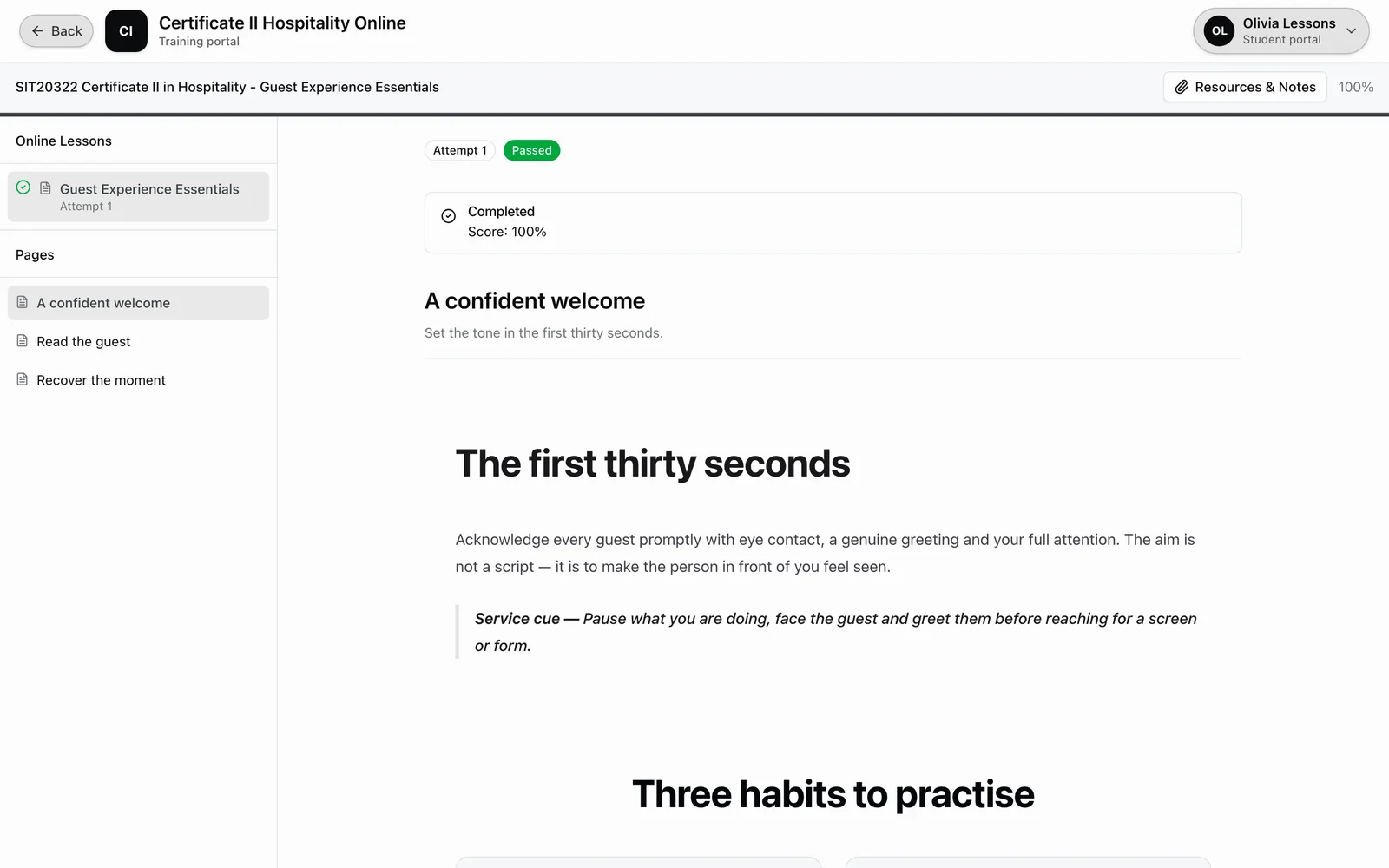
Student portal
A branded portal students actually use.
Students access their enrolments, complete online courses, submit assessments, make payments and download certificates, all from a portal branded to your RTO.
View enrolments, classes and progress
Access online courses with 30 widget types
Complete and submit assessments
Make payments and view invoices
Download certificates and statements of attainment
Works on desktop and mobile
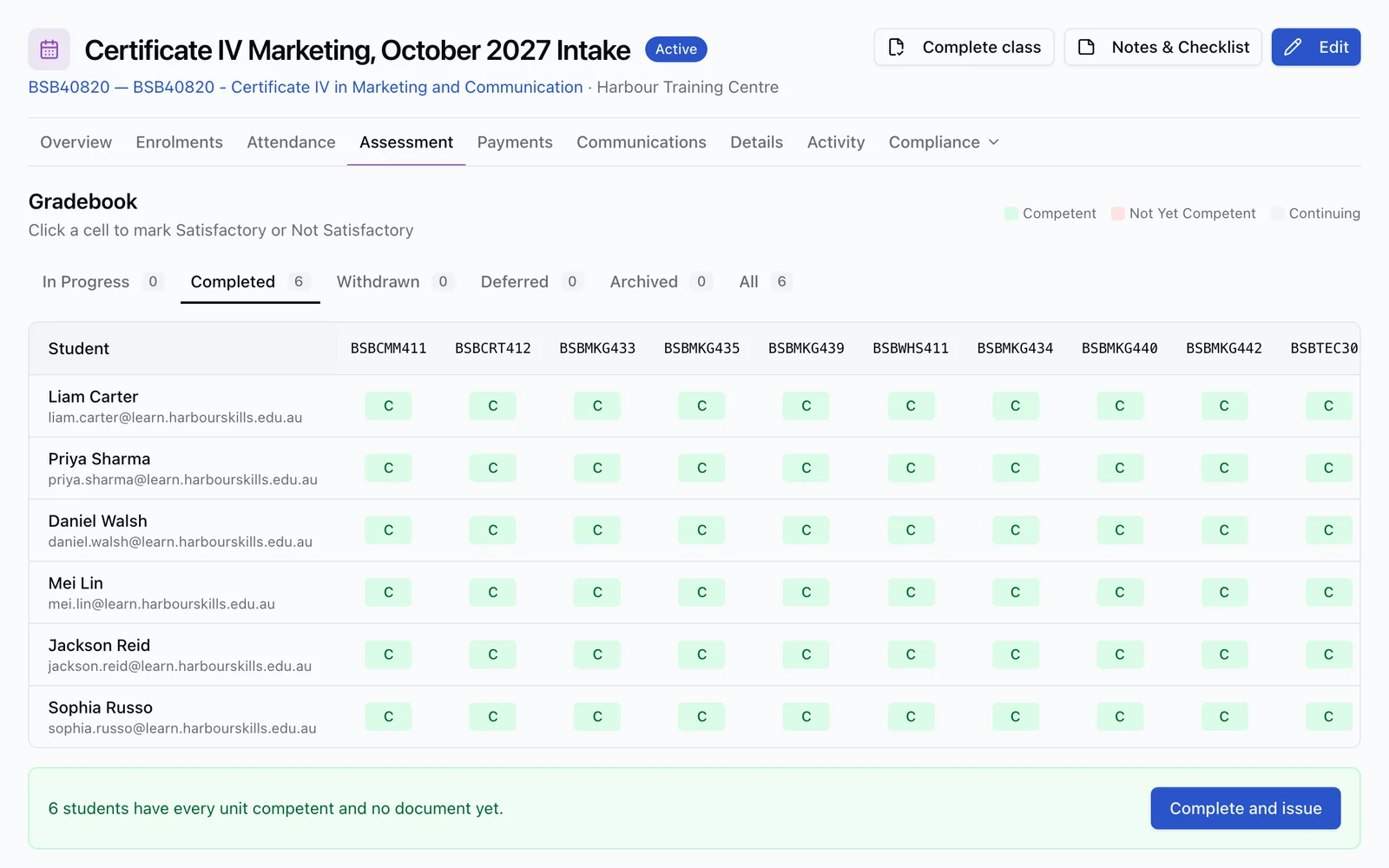
Trainer portal
Give trainers the tools they need.
Trainers log in to see their classes, mark attendance, review assessment submissions and track student progress, without needing full admin access.
Today, Calendar and Requests in a dedicated trainer app
Session records, course Forms and configured sign-off
Mark attendance with one-click bulk actions
Review and mark assessment submissions
Track student progress via the gradebook
Manage trainer credentials and qualifications
Calendar subscriptions and requests to the office
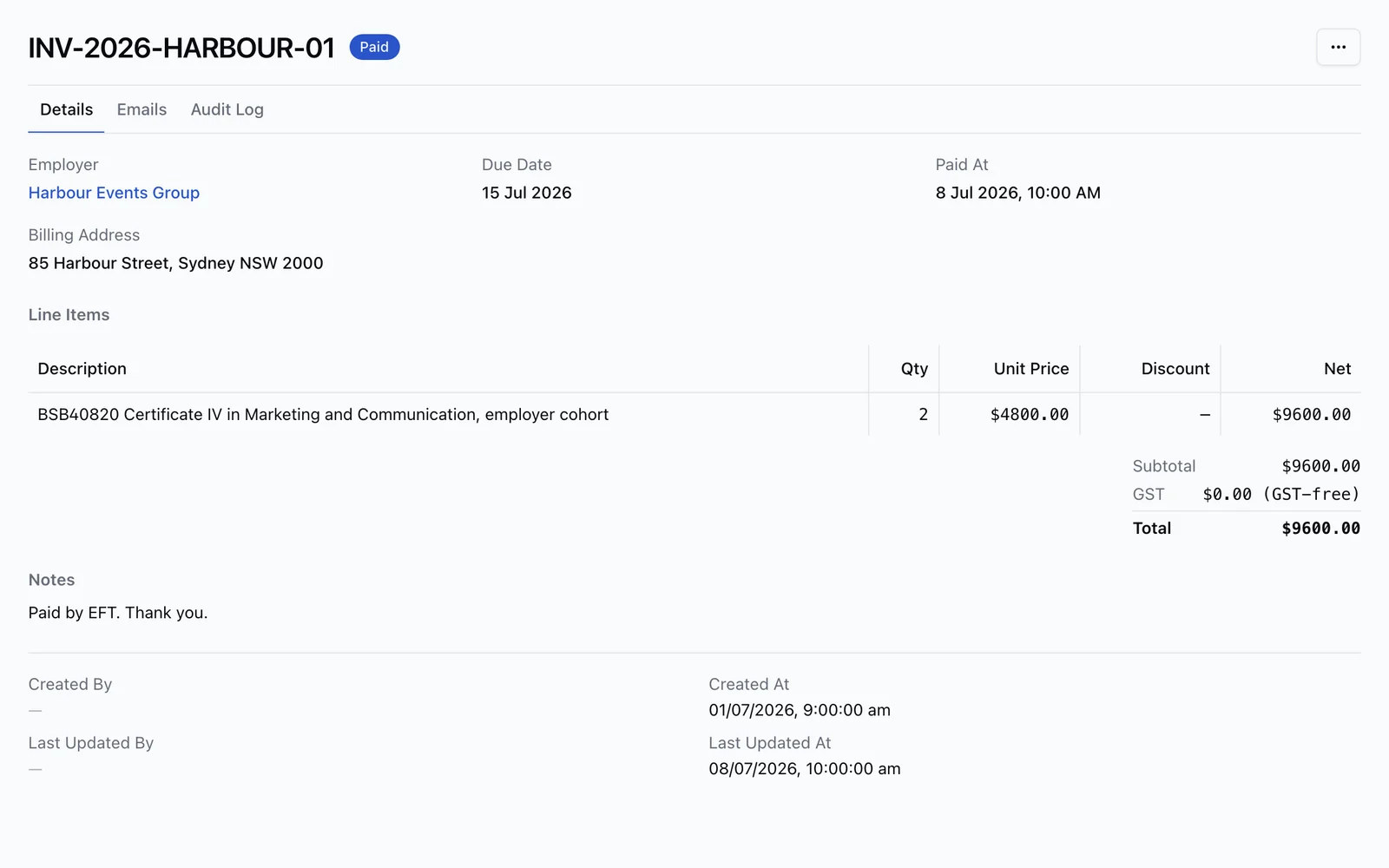
Employer portal
Keep employers in the loop.
Employers access a dedicated portal to view their employees’ training progress, manage invoices and submit training requests, without calling your admin team.
View employee enrolments, recorded sessions and trainer recommendations
Read session notes and next steps when deliberately shared by the trainer
Access and pay invoices online
Submit training requests for employees
Manage employer contacts and billing details
Magic link access, no password required

Integrations
Works with your existing tools.
RTObase connects with the tools and systems your RTO already relies on, from payments to government reporting.
Accept payments via Stripe or eWAY (BYO gateway on Custom plan)
Sync employer invoices and optional payments to Xero, with course accounts and location tracking
Track engagement with Google Analytics, Meta Pixel and PostHog
AVETMISS Release 8.0 exports for NCVER reporting
Embed enrolment forms into any website
Verify a branded email sender domain separately from your website domain
Connect your own compatible AI assistant on every plan
Build integrations with scoped developer API keys on Business and Custom
Team access · Business and Custom
Give each person the access their job needs.
Set up role-based access control (RBAC) with View, Edit or Manage permissions for each area. The same role limits apply across the dashboard, Admin Agent and connected tools.
Build roles around real work
Give finance staff invoice access or course designers authoring access. Choose View, Edit or Manage for each area. Built-in roles remain available on every plan.
Connect your own systems
Create scoped API keys for integrations, use the REST API and OpenAPI reference, and revoke a key when it is no longer needed. A key cannot exceed its creator’s role permissions.
Keep administration protected
Members, roles, billing, organisation settings and API keys remain admin-only. Changes to core records retain their audit history.
See the whole platform with your own data in it.
Upload your AVETMISS NAT files and see your own students, courses and enrolments inside RTObase, then review everything before going live.