
RTO LMS · online delivery and assessment
An RTO LMS that knows what a unit of competency is.
Build online lessons, import SCORM 1.2, run assessments with real marking, and track every learner through to competency. Because the LMS is part of the platform that holds the student record, the delivery evidence and the compliance record are the same record. Included on all plans.
One learner login · no separate LMS licence · outcomes land on the enrolment
See the course builder →
Reusable
versioned question banks
SCORM 1.2
packages imported into lessons
3
marking modes: automatic, manual, auto with review
One record
delivery evidence and the compliance record
In the product
Author, deliver, mark, complete.
The same four steps a training lead already runs, without handing the learner between two systems in the middle of them.
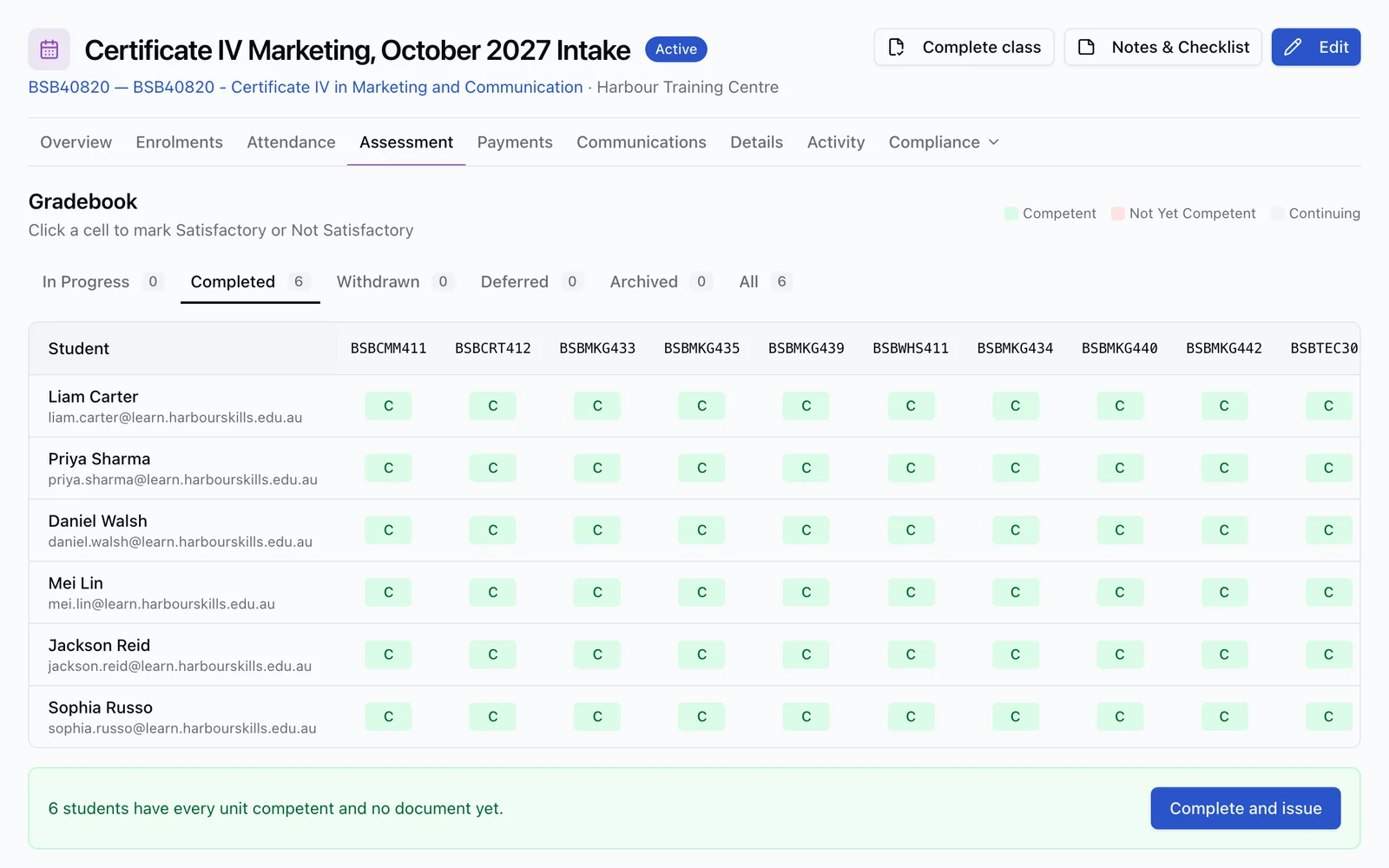
Author
Build modules and topics, add content sections, knowledge checks, formal assessments and SCORM activities, then preview the learner experience before you publish.
Built for VET
What a training organisation needs that a generic LMS never had to.
A general-purpose LMS was designed to teach and score. An RTO also has to prove who was assessed, against which unit, by whom, on what evidence, and then report it.
Units of competency, not just courses
Assessment evidence attaches to the units on the enrolment, and every unit carries its own record of attempts, assessor, date and evidence notes.
Satisfactory and Not Satisfactory
Attempts finalise on competency-based outcomes rather than a percentage alone, and Not Satisfactory opens a reassessment rather than closing the door.
Frozen versions for audit
Publishing freezes the lesson, its question banks and any SCORM package together. A learner mid-attempt stays on the version they started.
Qualification delivery through unit courses
Arrange unit courses in delivery order and follow each learner through them. One qualification enrolment connects the fees, results, certificate and reporting.
One combined progress measure
Course units, concluded training sessions and published lessons are counted together, so a learner is only complete when every part of delivery is.
Jurisdiction-aware access
Restrict learner content to selected Australian states, or allow completion outside Australia against a nominated Australian delivery site with a location code.
Reporting is downstream, not separate
Recorded competency results derive the AVETMISS outcome codes that reach your NAT files, so nothing is re-keyed between delivery and reporting.
Authoring
Lessons, topics and modules, plus the SCORM you already own.
Lessons are structured as modules of topics, and each topic holds ordered sections: content, knowledge checks, formal assessments and SCORM activities. Lessons are reusable, so one lesson can serve several courses and each course sets its own order. RTObase imports SCORM 1.2 packages into a lesson. It does not export SCORM for use elsewhere.
Drag-and-drop content sections, with AI able to draft a topic you then review
SCORM 1.2 packages sit alongside native content, with status, score and resume data recorded
Preview the learner experience without creating any progress
Republishing creates a new immutable version, and a learner mid-attempt stays on the one they started
What publishing freezes
One publish, three versions locked together.
- Lesson
- The topic and section structure as published
- Question banks
- The current published version of every linked bank
- SCORM
- The exact SCORM 1.2 package version
The learner portal
One login for the course, the assessment and the certificate.
Learners open their training in a portal branded to your RTO, using the same login they used to enrol and pay. There is no second account to issue, no enrolment key to email, and no learner sitting in one system while their record sits in another.
Ordered lessons with page-level navigation and linked resources
Practice knowledge checks, then formal assessments with attempt history
Linear mode redirects a locked deep link to the first incomplete lesson, or free mode opens any published lesson
Enrolments, results, payments and certificate downloads in the same portal
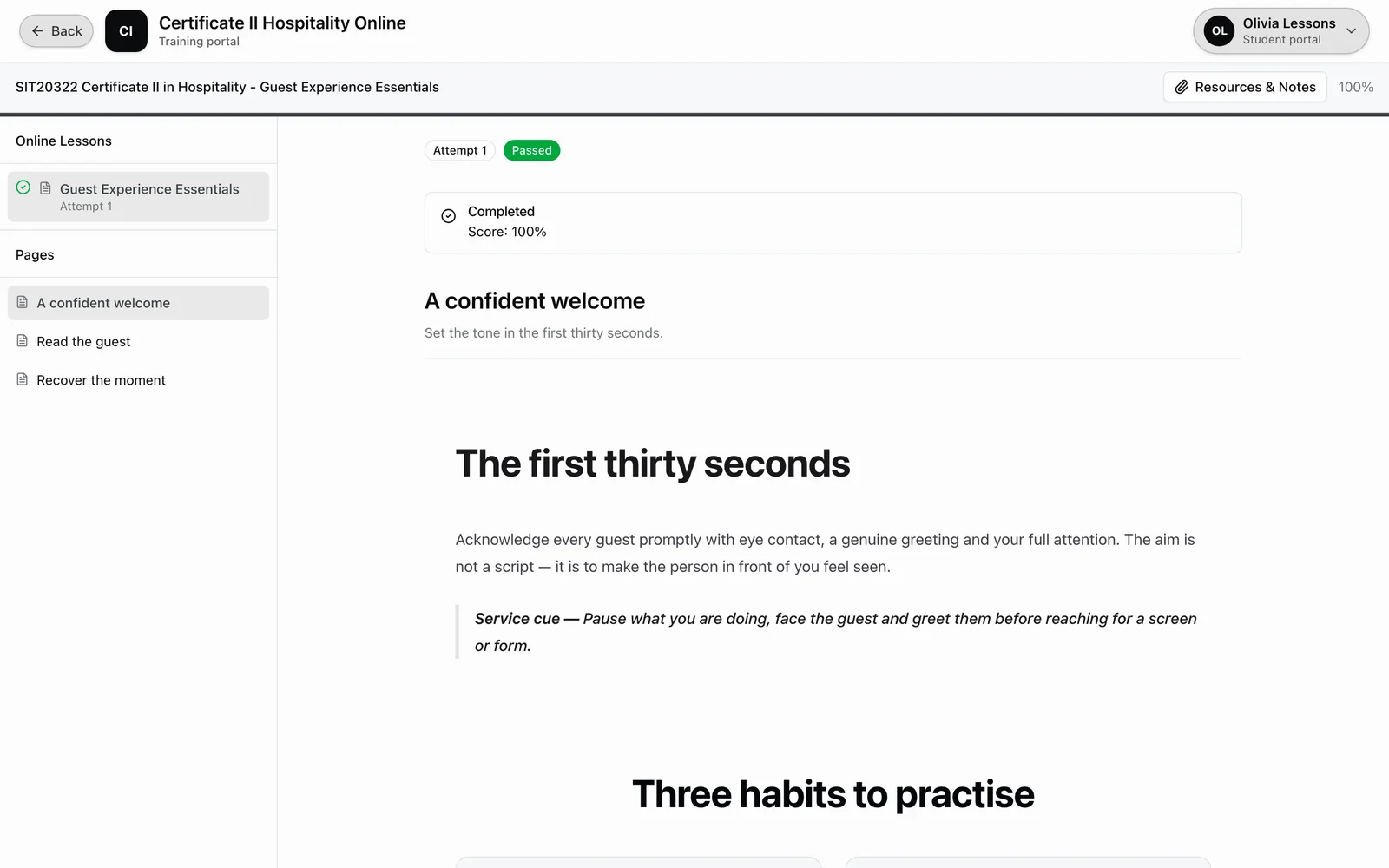
Assessment
Marking that produces a judgement, not just a score.
Assessments draw knowledge questions from reusable, versioned question banks, while dedicated Assessment Task widgets collect evidence, evidence tables and signed declarations. How each section is marked is set on the assessment, not on the bank, so the same questions can be used strictly in one course and as practice in another.
Automatic
Objective question types are scored as soon as the learner submits: single and multiple choice, true/false, matching, ordering and fill-in-the-blank with per-blank partial credit.
Auto with Review
The system marks first, then an assessor confirms before the result stands. Review is always required in this mode, so an automatic score is never the final word.
Manual
The assessor marks every response against the criteria. Use it for long text, evidence widgets, evidence tables and signed declaration widgets, where a person has to make the judgement.
Pass mark, attempt limit, marking mode and whether review is required all sit on the assessment section. Draw every question from a bank, hand-pick specific ones, or pull a random set each attempt so re-sits are not the same paper twice.
Consistent judgements
Model answers and assessor guidance, on the screen where marking happens.
Two assessors marking the same evidence differently is the quiet risk in every RTO. RTObase grounds the decision in what your team wrote down: assessor instructions on the assessment, assessor guidance on each criterion, and the expected answer for a question pulled from the frozen published snapshot the learner actually sat.
Expected answers shown to the assessor only, taken from the published version of the question
Criterion-level guidance, including criteria marked as a critical fail
Per-question marks and written feedback recorded on the attempt
Finalised Satisfactory or Not Satisfactory, with previous attempts preserved
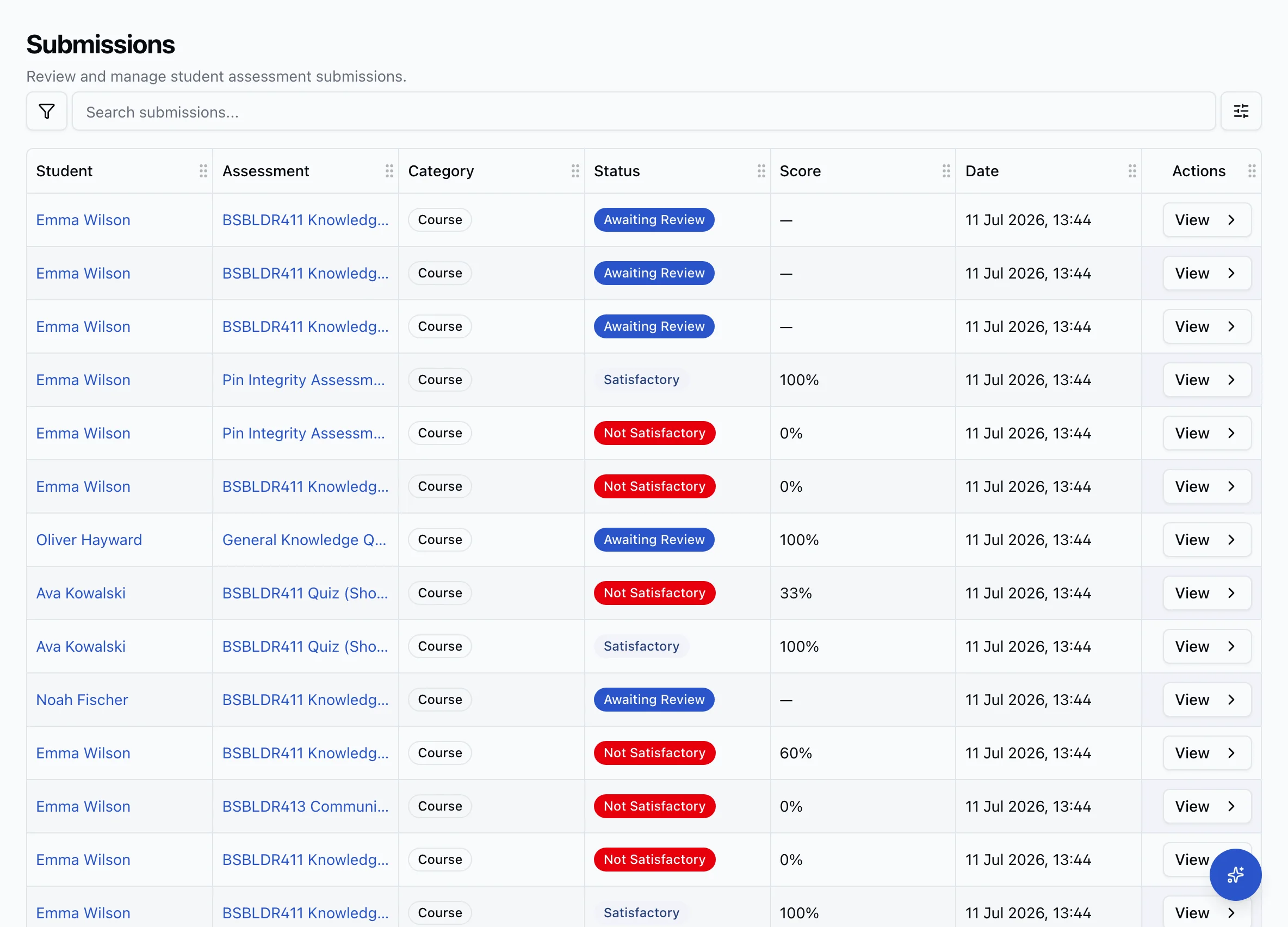
Validation and moderation
Sample it, review it, prove it changed something.
Marking consistently is one half. Showing a regulator you check your own marking is the other. The Assessment Validation workbench keeps a row per training product in scope and walks a panel through the review, one product at a time.
A representative sample of completed assessments, with a recorded reason per item
Panel credentials, current expertise and a declared independence position
Findings, the change implemented in the screen that owns it, then verified effectiveness
Signed off against an immutable evidence manifest
Before delivery starts
Know who needs support before the first topic opens.
Online delivery is unforgiving of a learner who was never going to cope with the reading level. RTObase screens Language, Literacy, Numeracy and Digital skill by skill against the level the course expects, using the ACSF for the core skills and the Digital Literacy Skills Framework for Digital, rather than returning one pass or fail.
A below-level skill becomes a recorded support action on the enrolment, never an automatic rejection
A prior screening that already covers the new course is reused instead of repeated
Validated, framework-mapped items marked against a fixed answer key, with no AI in the check
The join that breaks
The gap between your LMS and your SMS is where audits go wrong.
When delivery lives in one product and the student record lives in another, someone has to carry results across. That is the point where a completed attempt never becomes a competency outcome, where a unit shows continuing months after the learner finished, and where an auditor asks for the evidence behind a result that no longer links to anything.
Lesson progress and assessment attempts stay attached to the enrolment they belong to
A finalised attempt contributes to the unit competency evidence on that enrolment
Recording the competency result derives the AVETMISS outcome code, with no second entry
Progress across units, sessions and lessons is counted once and drives portal, dashboard and completion gates alike

Generic LMS vs RTObase
The same lesson. A very different record.
A generic LMS can absolutely deliver your content. The question is what it leaves behind once the learner clicks finish.
| What a VET delivery lead needs | Generic LMS | RTObase |
|---|---|---|
| Units of competency on the record | Courses and quizzes only | Evidence attaches to units |
| Competency outcomes | Pass mark or percentage | Satisfactory / Not Satisfactory |
| AVETMISS awareness | Not a concept, export and convert | NAT files from the same data |
| USI on the learner record | Not a concept | Verified when configured |
| SCORM 1.2 import | Usually supported | Supported, version pinned |
| LLND screening before training | Not a typical LMS feature | Per-skill against expected levels |
| Trainer authorisation | Course author permissions | Trainer matrix by unit and role |
| ASQA evidence for the delivery | Reports you assemble by hand | Audit log and validation workbench |
| Statements of Attainment | Generic completion certificate | Issued from the enrolment |
“Generic LMS” here means a general-purpose learning platform that was not built for Australian VET. Individual products differ, and VET-specific platforms cover some of these rows.
The rest of the platform
Delivery is one part of the system.
The LMS writes into the same records your admin team, your compliance lead and your reporting run on.
Trainer portal
Schedules, attendance, submissions, learner progress and trainer currency in one role-based workspace.
See trainer management →Student management system
The students, enrolments, classes and completions the LMS writes its evidence into.
See student management →RTO software
The whole platform: website, enrolment, delivery, compliance and reporting.
See RTO software →Course builder
Modules, topics, widgets, AI-drafted content and SCORM sections, in detail.
See the course builder →AVETMISS reporting
Validated NAT files from the same enrolment and outcome data delivery produces.
See AVETMISS reporting →LLND screening
Per-skill ACSF screening before training starts, so support is in place early.
See LLND screening →Pricing
Online delivery is included on every plan. No separate LMS licence, no per-seat fee.
See pricing →FAQ
RTO LMS questions
Common questions about online delivery, SCORM, marking and how it all reaches your reporting.
Yes. Connect a compatible assistant such as Claude, ChatGPT or Codex to your live student, enrolment and learning-progress records. Connected AI is included on every RTObase plan and needs organisation AI opt-in. Each connection is limited by your chosen access and role. New assessment submission reviews and certificate issuance stay in RTObase.
Yes. Archive a lesson to remove it from the Learning library while courses already using it keep access. Restore it when needed. Unused drafts can be safely deleted; lessons with learner history remain protected.
An RTO LMS is a learning management system used by an Australian Registered Training Organisation to deliver training online and collect assessment evidence. A general-purpose LMS handles lessons, quizzes and progress. An RTO also has to tie that activity to units of competency, Satisfactory and Not Satisfactory judgements, the learner record, USI details and AVETMISS reporting. In RTObase the LMS is part of the platform that already holds those records, so delivery evidence and the compliance record are the same record.
No. Most RTOs run an LMS bolted onto a separate student management system, and the join between them is where evidence goes missing: progress lives in one product, competency outcomes in another, and someone re-keys results between the two. RTObase delivers online lessons, marks the assessments and keeps the enrolment, competency and AVETMISS record in one place, so there is nothing to sync and nothing to reconcile before an audit.
RTObase imports SCORM 1.2 packages. Add a package directly to an online lesson alongside native content and assessments. Publishing the lesson pins the exact package version, so learners continue with the content version they started, and status, score and resume data are recorded against the enrolment. RTObase does not export SCORM packages for use in another LMS.
Yes. In RTObase, assessment activity awaiting an assessor judgement collects in the Work queue, and assigned trainers can also review from the trainer portal Submissions page. Objective question types are scored automatically. Written and evidence responses are marked by the assessor, per the marking mode set on that assessment section: Automatic, Manual, or Auto with Review, where the system marks first and an assessor confirms before the result stands. Assessors record per-question marks and feedback, then finalise the attempt as Satisfactory or Not Satisfactory.
Yes. Learners enrol once in the qualification and progress through its unit courses in delivery order. Each unit course can carry its own learning and assessment, while staff follow progress and keep qualification fees, results, completion documents and reporting together.
Directly, with no export step. A finalised attempt contributes to the unit competency evidence on the enrolment it belongs to. When you record the competency result against the unit, RTObase derives the AVETMISS outcome code from it, competency achieved, competency not achieved, RPL granted, credit transfer or withdrawn, and that outcome flows into the NAT files at reporting time. Nothing is re-keyed between a learning system and a reporting system, because there is only one system.
In RTObase, publishing an online lesson freezes the lesson, question bank and SCORM package versions together, and published question-bank versions are immutable. An attempt already in progress stays pinned to the version the learner started, so an exam can never change underneath a learner. The Audit Log records lesson authoring and review evidence, and the Assessment Validation workbench keeps the sampled review of completed assessments, panel independence, findings and effectiveness against the training product.
Yes. In RTObase, trainers log in to a trainer portal that shows their classes, attendance, learner progress and the submissions from learners assigned to them through classes or direct bookings. They review responses, record marks and feedback and set the outcome, without needing administrator access to the rest of the organisation.
Yes. RTObase includes online lessons, online course delivery and AI content generation on the Startup, Business and Custom plans, and the builder is never gated behind a tier. Business is a flat monthly fee with no per-enrolment fees, and adds text messaging under a fair-use allowance plus hands-on migration support.
Deliver the training where the record already lives
Online lessons, SCORM 1.2 import, real assessment marking and learner progress that becomes your compliance evidence rather than a report you have to reconcile.
No credit card required. Online delivery included on all plans.