
RTO student management system
Student management for every stage of training.
RTObase is a student management system built for Australian RTOs. Enrolments, unit outcomes, USI verification, AVETMISS Release 8.0 reporting, certificates and payments all live on the same record, so nothing has to be synced between systems or reconciled before an audit.
$0/month to start · no credit card · migrate from your AVETMISS NAT files
See AVETMISS reporting →
Release 8.0
AVETMISS NAT files, generated and validated
One record
student, enrolment, outcome and certificate
$0/mo
to start on the Startup plan
Australia
primary data hosting, encrypted
The Australian job description
What a student management system has to do here.
An Australian RTO is not just tracking learners. It is holding a national identifier, reporting a prescribed data set, issuing nationally recognised certification and keeping the evidence behind all three. That is the bar this category has to clear before any feature comparison matters.
One student record
Name, contact details, address, date of birth, USI and the AVETMISS fields NCVER asks for, held once and used everywhere instead of retyped into each new system.
Enrolments and outcomes
Enrol a student into a course or class, carry the units, record the competency outcome on each one, and handle completion, withdrawal and deferral without losing the history.
Qualification delivery
Learners enrol once in a qualification and move through its unit courses in delivery order. Fees, results, reporting and the qualification certificate stay connected to that enrolment.
Learner credentials
Keep first aid certificates, security licences and other credentials with their evidence, expiry dates and renewal history. Flag missing or expired course prerequisites for staff review.
USI collection and verification
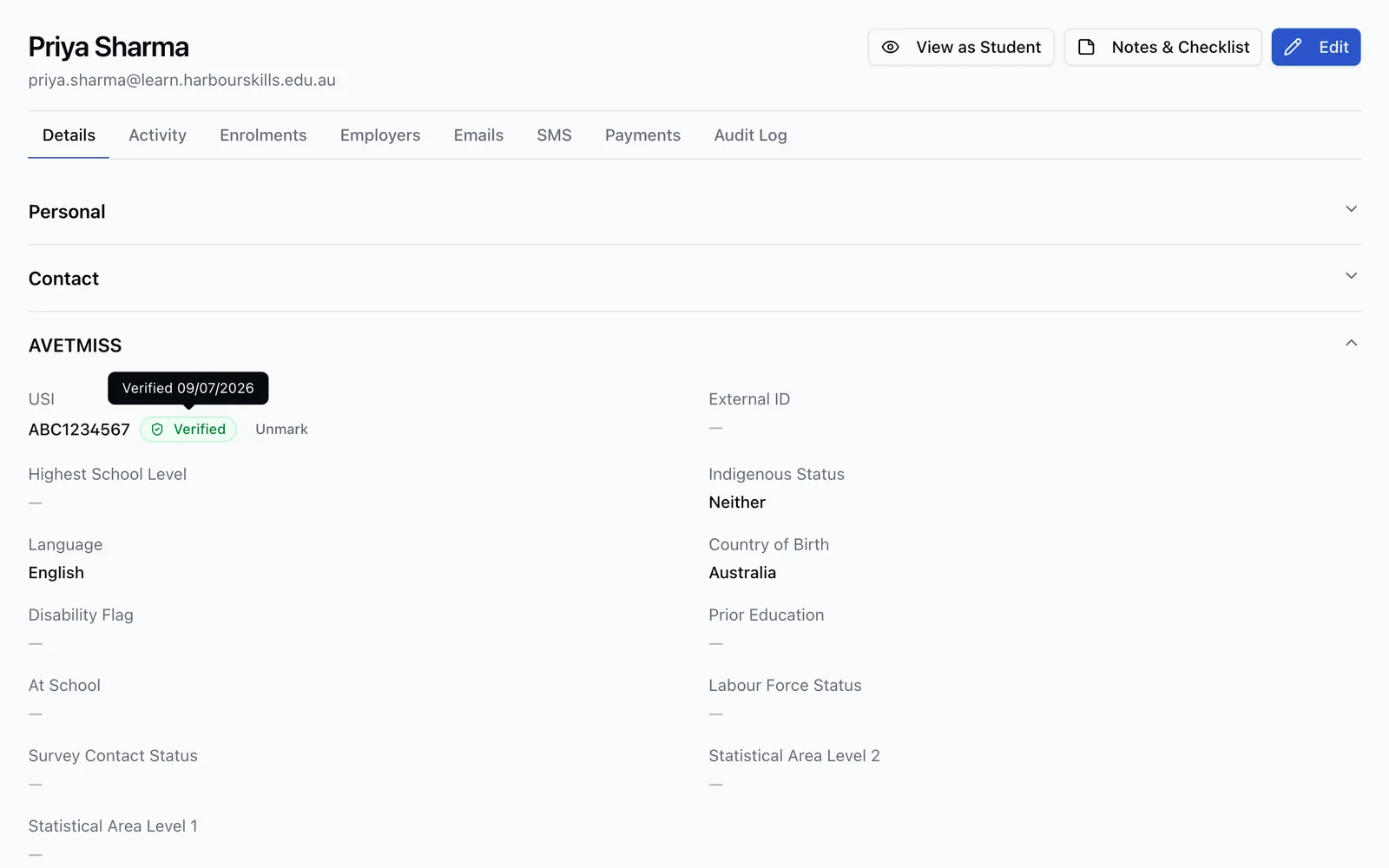
Collect the Unique Student Identifier a nationally recognised qualification requires, verify it against the Registry, and keep the verification date on file.
AVETMISS reporting
Produce the Release 8.0 NAT file set for the collection period, validate it before submission, and lodge fee-for-service activity through NCVER AVS.
Certificates and statements
Issue qualifications and statements of attainment for accredited training, or a statement of completion for non-accredited courses, and void or reissue with a recorded reason.
Evidence that survives an audit
Keep the change history, the assessment evidence and the documents behind each decision for the retention window, ready for the Standards for RTOs 2025.
The single-record model
Not integrated. The same record.
Most RTOs run a student management system, a learning platform, a website and a payment tool, then spend real time keeping four copies of the same student in agreement. In RTObase the student, the enrolment, the class, the outcome and the certificate are one chain of records. There is no sync to fail and no drift to explain.
Personal, contact and AVETMISS fields on the profile itself
Enrolments, unit outcomes and progress against the same student
Emails, SMS and activity history attached, not sitting in an inbox
Payments and invoices linked to the training that was delivered
A change history on core records, with who changed what and when

Reporting and identity
The reporting comes out of the records you already keep.
Every enrolment, outcome, USI and payment is captured in AVETMISS-aware fields as it happens, so the Release 8.0 NAT file set is generated from live data rather than assembled from exports at collection time. Validation runs first and flags missing USIs, invalid postcodes and impossible dates against the exact record to fix.
NAT files. The full Release 8.0 set for a standard submission, exported together in the prescribed format for upload to NCVER AVS.
AVS rejections. Import the AVS validation report and every error is mapped to the exact student and field, with a deep link to fix it and mark it off.
USI verification. Once the RTO has completed USI Registry machine-to-machine setup, a supplied USI is verified against the Australian Government Registry automatically, with the result recorded in the student activity feed.
Funded activity. The funded VET reporting module on Business and Custom keeps funding source, contract and jurisdiction on the enrolment for your state training authority submissions.
Day to day
The rest of the RTO, on the same record.
A student management system that stops at the database leaves your team working in four other tools. These are part of the same platform, so a class, a lesson, an invoice and a NAT file all point back at one student.
Trainer portal and management
Give trainers their assigned classes, schedule, attendance, marking queue and currency evidence without opening the full admin workspace.
ExploreEmployer portal and team bookings
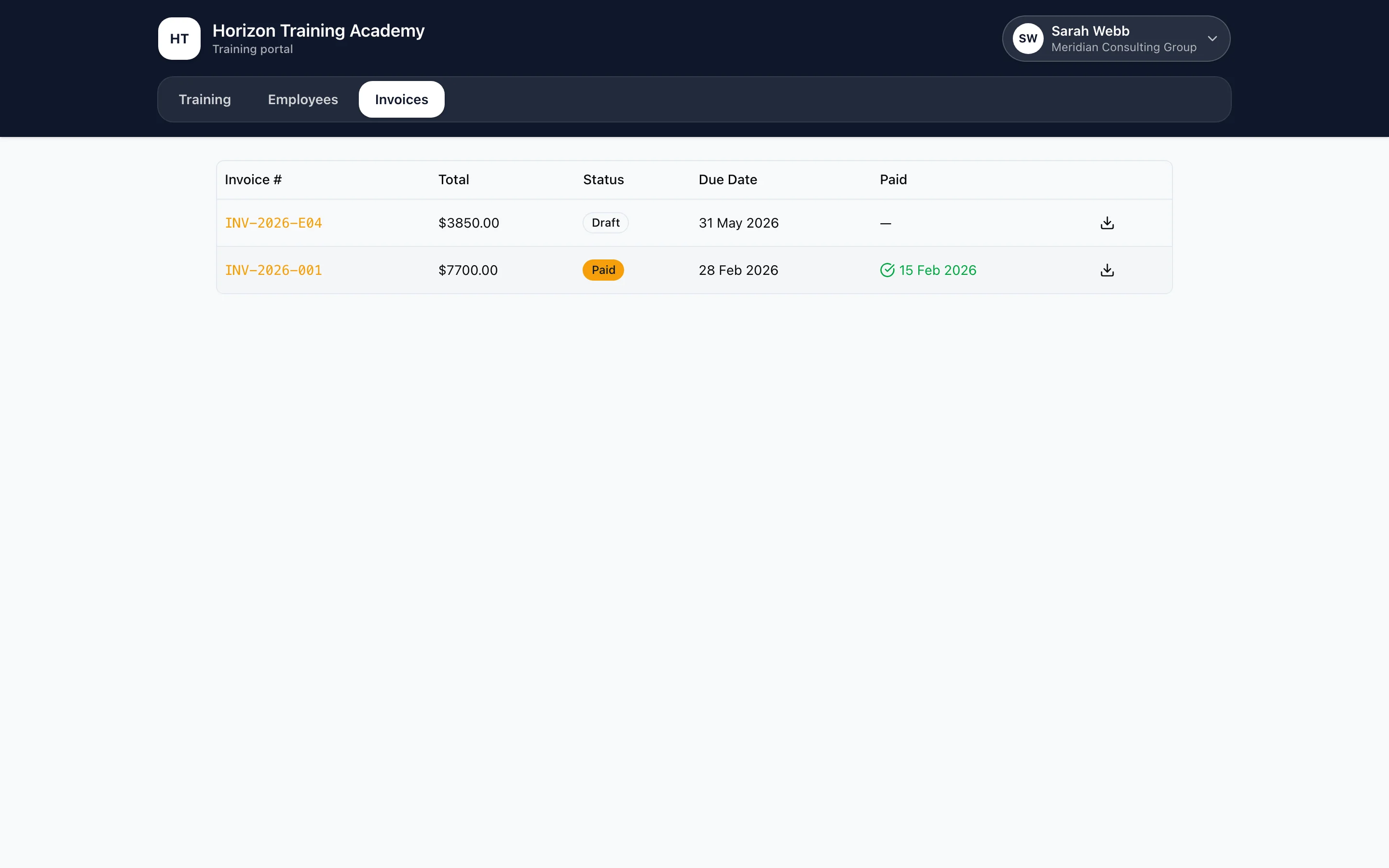
Let workplace clients enrol teams, request training, follow employee progress, view invoices and download completion documents.
ExploreClasses, trainers and attendance
Run classes against a course, assign trainers, mark attendance in bulk, and switch on the optional Scheduling module when you book one student at a time.
ExploreCourse delivery and assessment
Online lessons, SCORM 1.2 packages and assessments delivered in the same student portal, with progress tied to the enrolment.
ExploreWebsite and online enrolment
A course catalogue on your own domain where visitors enrol and pay, arriving as a complete student record rather than an email to re-key.
ExploreAVETMISS and NAT files
Release 8.0 files generated from live data, pre-flight validation, and an AVS error wizard that deep-links every rejection to the record behind it.
ExploreCompliance and audit readiness
Automated rules over your live records, one yearly sign-off across all 23 Outcome Standards, and an audit pack made from the signed copy.
ExplorePlans and pricing
Start at $0 per month and pay per enrolment, or move to a flat monthly price with no metering. Everything core is included on both.
ExplorePayments and invoicing
The money stays attached to the training.
Students pay by card at enrolment through Stripe, invoices raise themselves, and payment plans and deposits are tracked against the same student record the training runs on. When an employer is paying, they get their own portal to view and pay eligible invoices online. Connect Xero to keep invoices and employer details in your accounting system, then choose which payment flows to sync.
Online card payments, payment plans and deposits
Automatic invoicing against the enrolment that generated it
Employers book several seats in one checkout and pay once
Employer portal for progress, invoices and training requests
Sync employer invoices and details to Xero
Enable payment sync for online invoices, manual employer payments and manual student payments
Map course revenue accounts and location tracking in Xero
Migration
Bring your NAT files. Leave with your RTO set up.
The reason RTOs stay on a system they have outgrown is the fear of moving. Because AVETMISS reporting is mandatory, your current system almost certainly already produces NAT files, or a converter you use does, which means you are holding the migration file without knowing it.
Export what you already lodge
Pull the AVETMISS NAT files out of your current system. No custom extract, no vendor ticket, no proprietary format to reverse engineer.
Upload and watch it build
A progress view runs through locations, units and courses, then students, enrolments and assessment records, then compliance checks over everything it created.
Review before you go live
Resolve any student conflicts matched by USI, check the import history, and delete the import to reverse every record it created if the result is not what you expected.
AVETMISS files carry students, courses, units and enrolments. Documents, notes, payment history and past communications are not part of the standard, so plan to bring those across separately. Hands-on migration support is included on the Business plan.
Traditional SMS vs RTObase
Same core job. A wider footprint.
A traditional student management system does the records and the reporting well. The difference shows up in what sits either side of it: the learning platform, the website, the price of getting started and what happens once the certificate is issued.
| Traditional SMS | RTObase | |
|---|---|---|
| Student, enrolment and outcome records | Core function | Core function |
| AVETMISS NAT files | Typically included | Release 8.0, validated before export |
| Online course delivery | Often a separate module or product | Included |
| Branded website on your own domain | Usually a separate website vendor | Included |
| Where learner progress lives | Synced between systems | On the same enrolment record |
| Monthly cost to start | Usually a paid subscription | $0 on the Startup plan |
| Getting your data in | Often a vendor-assisted migration | Import your own AVETMISS NAT files |
| After the certificate is issued | Usually out of scope | Monitoring, renewal and re-enrolment |
The middle column describes the general shape of the category, not any particular product. Individual systems differ, and several Australian ones do include a learning platform or online enrolment. For named, dated, sourced comparisons see the compare pages.
Beyond the certificate
Most systems close the record. This one keeps going.
Keep the learner record after completion. See who is still engaged, whose credential expires soon and who is due for renewal. Returning learners use the same record, so staff can follow their training history.
Post-completion engagement visible on the same student record
Expiring credentials surfaced before the student needs reminding
Automated renewal sequences from your own branded sender
Returning alumni tracked on the existing record, not a duplicate

Go deeper
Every part of this, in detail.
RTO software
The whole platform, module by module.
ExploreLMS for RTOs
Course delivery inside the student portal.
ExploreAVETMISS reporting
Release 8.0 NAT files and USI verification.
ExploreASQA compliance
Compliance checks and the yearly Standards sign-off.
ExploreWebsite builder
Your site, catalogue and online enrolment.
ExploreCompare systems
RTObase against the systems you already know.
ExplorePricing
Startup and Business plans, in full.
ExploreFAQ
Student management system questions
What the category covers in Australia, what it costs, and how to move off the system you are on now.
Yes. Connect your own compatible AI assistant to find records, check progress and handle everyday updates within your permissions. It is included on every plan and requires organisation AI opt-in. Business and Custom add scoped developer API keys and custom roles with View, Edit or Manage access per area. Payment and invoice changes, certificate issuance and new assessment submission reviews stay in the app.
An RTO student management system (SMS) is the core software an Australian Registered Training Organisation uses to hold one record per student and run training on it: enrolments, unit outcomes, Unique Student Identifiers, class scheduling, payments, certificates and AVETMISS reporting. Because national VET reporting is mandatory, an Australian SMS has to store data in AVETMISS shape rather than as generic contact fields, so the reporting files come out of the same records staff use every day. RTObase is an RTO student management system that also includes online course delivery, a public website with online enrolment, and compliance monitoring on the same record.
Not with RTObase. Course delivery is part of the platform, so learners open their online lessons in the same branded portal they use for enrolment, payments and certificates, and their progress sits on the same enrolment record staff report from. You can also bring existing SCORM 1.2 packages into an online lesson. Running a separate LMS means a second subscription, a second login for learners and a sync between two systems that has to be reconciled at audit time.
Export your AVETMISS NAT files from your current system and upload them to RTObase under Settings, then Import. The import brings across locations, units, courses, students, enrolments and training activity, creates any unit referenced by a NAT00120 enrolment that is missing, and checks imported units against training.gov.au for supersession. Students that match an existing record by USI are shown in a merge dialog so you decide field by field. You review the whole result before going live, and an import can be deleted to reverse every record it created. The Business plan includes hands-on migration support.
RTObase generates AVETMISS Release 8.0 NAT files directly from your live student and enrolment data, validates them first, and flags issues such as missing USIs, invalid postcodes and impossible dates against the exact record to fix. You download the validated set and upload it to NCVER AVS for fee-for-service activity. If AVS rejects something, you import its validation report and every error is mapped to the student and field to correct. AVETMISS reporting is included on every plan, including the free Startup plan. Government-funded activity is always lodged with your state or territory training authority rather than directly with NCVER.
Yes, once the RTO has completed USI Registry machine-to-machine setup. After that, RTObase verifies supplied USIs against the Australian Government USI Registry automatically in the background, without anyone pressing a button, and staff can trigger verification immediately from the student profile when they need the result now. Each verification is recorded in the student's activity feed with a date, and both standard and single-name students are handled. RTOs that verify through the USI portal instead can mark a USI as verified manually.
Yes. In RTObase you create classes against a course, assign trainers, mark attendance and track progress and outcomes through a gradebook, all linked back to the enrolment. RTOs that deliver one student at a time, such as driving schools, practical assessments or simulator time, can switch on the optional Scheduling module, which matches a qualified trainer to the right vehicle, room or equipment and refuses to save a booking that would double-book a trainer, assessor, asset or student.
RTObase starts at $0 per month on the Startup plan, where you pay 2% + 30c per enrolment, capped at $4 + GST. The Business plan is $499 + GST per month flat with no per-enrolment fees, text messaging under a fair-use allowance, and hands-on migration support. There is no seat-based pricing, no setup fee and no lock-in contract, and the website builder, course delivery, AVETMISS reporting and AI features are included rather than sold as add-ons.
Primary RTObase data is stored in Australian data centres and encrypted at rest and in transit, with automatic backups and audited change history across core student, enrolment, training and assessment records. Selected subprocessors are used for features such as AI, communications, payments and analytics, as disclosed in our Privacy Policy. RTObase supports long-term record-retention workflows, and each RTO remains responsible for applying the retention and disposal requirements that apply to its own records.
See your own students inside it
Upload the AVETMISS NAT files you already lodge and RTObase builds your students, courses, units and enrolments from them. Review everything before you go live.
No credit card required. AVETMISS reporting included on all plans.