
Standards for RTOs 2025
Compliance checks from live records. One Standards sign-off a year.
RTObase checks your records against the rules and tracks the dates your regulators set. Once a year, an admin reads one summary across the 23 Outcome Standards, adds required changes and signs. The signed copy becomes your audit pack.
$0/month to start · no credit card · shipped compliance monitoring on every plan
See all features →
23 Standards
summarised in one sign-off a year
26 rules
automatic record-level compliance checks
One ZIP
audit pack with a readable PDF and supporting files
$0/month
compliance monitoring included on every plan
Included on all plans
Automate the checking. Guide the judgment.
RTObase runs 26 rules over your live records. An alert clears when you fix the owning record. The judgment and the yearly Standards signature stay with your people.
Trainer credentials
4 checksKnow before ASQA does if a trainer's TAE or industry currency has lapsed.
Course & unit currency
2 checksStop enrolling students into superseded qualifications past their transition date.
Assessment coverage
3 checksEnsure every course has assessment tools and every competent unit has evidence on file, including practical files, photos, declarations and video recorded during the assessment.
Dates & delivery activity
5 checksCatch impossible sequences and delivery activity outside the dates recorded for training.
AVETMISS & record completeness
6 checksFlag the missing fields that cause NAT file validation failures before you hit submit.
Governance & learner support
5 checksSurface overdue policies, care plans, complaint SLAs, risk reviews, and governance meetings.
Fix the issue. The alert resolves itself.
No manual dismissals, no ticking off checklists. RTObase monitors the underlying data and resolves alerts automatically when the issue is corrected.
Issue detected
When a trainer's credential expires, RTObase adds a plain-language alert and next action to your compliance checks.
You fix it
Upload the renewed credential in the trainer profile. That's the only action you need to take.
Alert resolves automatically
RTObase detects the fix and resolves the alert. No manual dismissal, no stale alerts cluttering your dashboard.
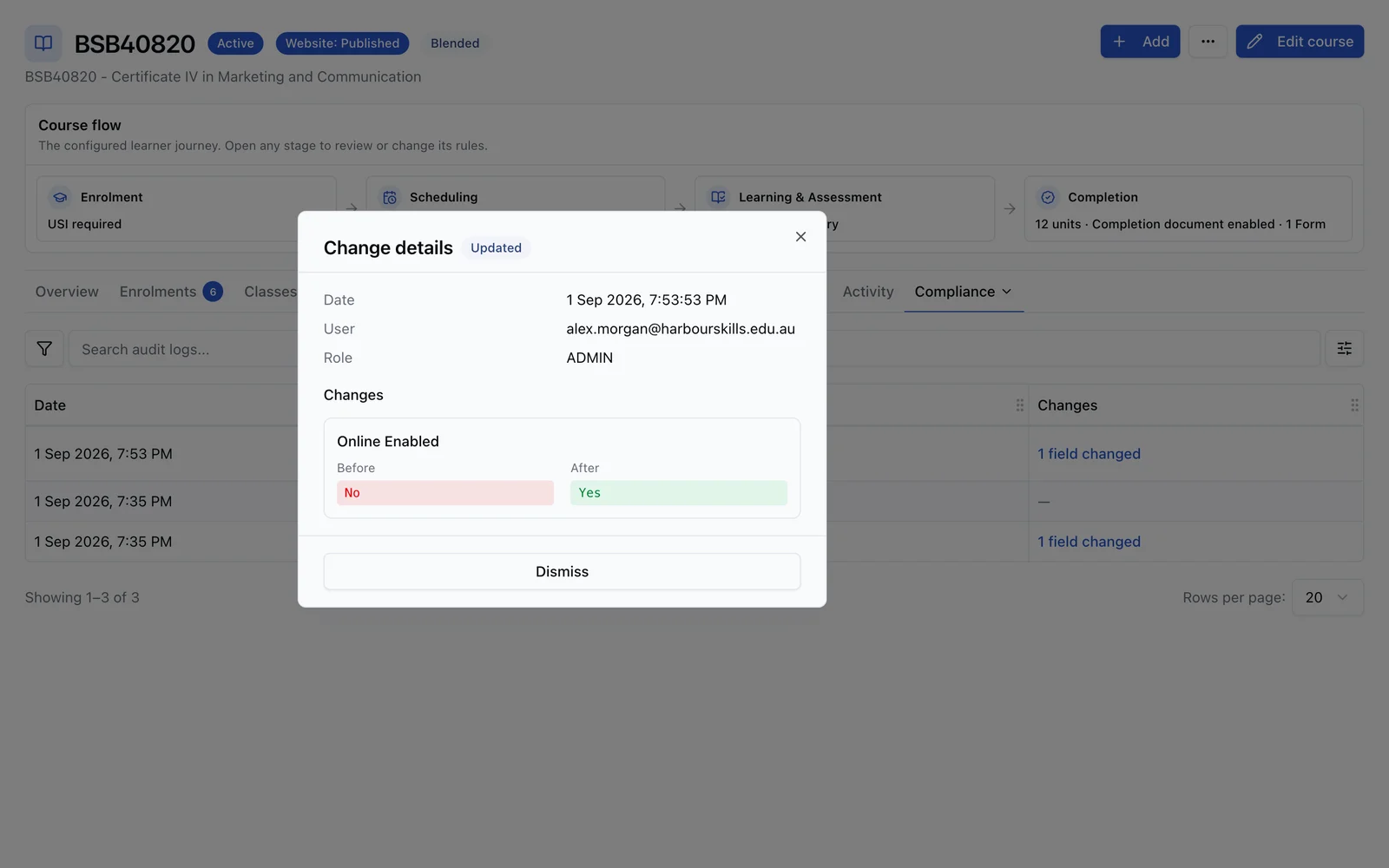
Audit trail
A clear change history for core records, including approved AI changes.
RTObase records who changed core operational data and when. The AI assistant follows the same permissions and approval path: it proposes a change, you approve it, and supported writes land in the same audited records.
Audited change history across core student, enrolment, training and assessment records
Access logs, with export for audits
Every AI change is propose → approve → execute. Nothing writes until you approve
AI-driven actions tagged distinctly; no deletes, no reaching another organisation
One calm path from finding to defensible evidence.
Use the records you already keep. Fix what the checks find, add a required change where something needs work, and sign once a year. The signed copy is kept as your audit pack.
Automated compliance alerts
RTObase watches for the issues that cause ASQA findings and NCVER rejections, expired credentials, impossible dates, missing fields. Fix the problem and the alert resolves itself.
Flags issues before your next audit
Catches AVETMISS errors before submission
Alerts resolve when you fix the data
One Compliance checks page
Included on all plans
AVETMISS Release 8.0
A guided wizard generates AVETMISS Release 8.0 NAT files from your live data, then helps you validate, fix and lodge. Built-in checks catch errors before submission.

Standard Release 8.0 NAT file set supported for current AVETMISS exports
Guided generate → validate → fix → lodge wizard
Pre-submission validation with per-record fixes
Import AVS errors, each mapped to the student and field to fix
AVS-ready national submission format
USI verification
Verify student USIs against the Australian Government USI Registry once Registry access is set up. Manual attestation is available for RTOs that verify through the USI portal.
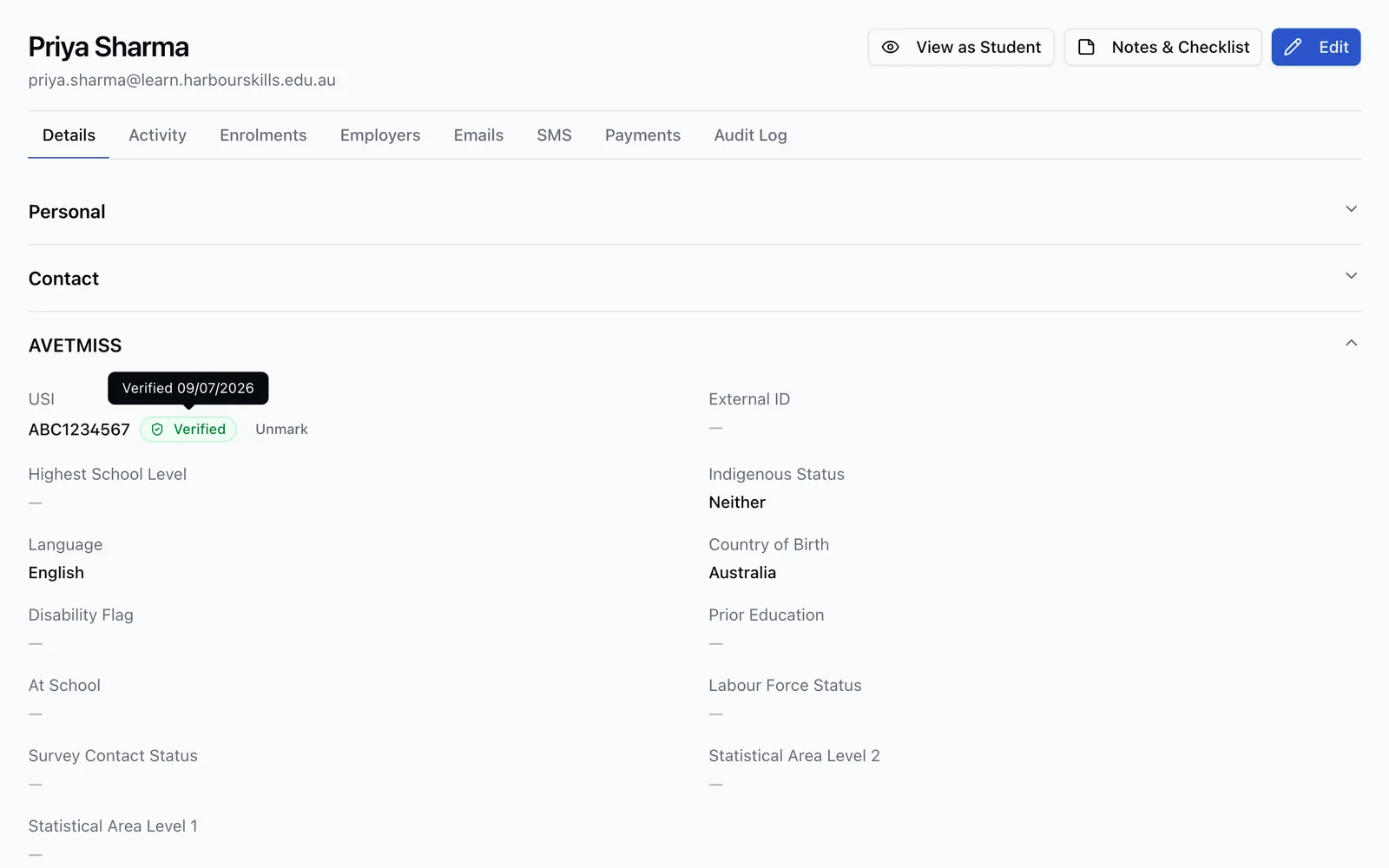
Registry verification available after RTO setup is complete
Automatic checks using the Australian Government’s own authentication, once set up
Verified badge with date on every confirmed student
Every verification recorded in the student activity feed for audit
Manual mark-as-verified fallback while RAM setup is in progress
Handles both standard and single-name students
A work plan your team can act on
Compliance checks put rule alerts, regulator dates, registers and dated commitments from your records in one list. Each item says what is wrong, which records it affects, when it is due and where to fix it.
Total VET Activity, Annual Declaration, Quality Indicator and Annual Registration Charge dates
Validation due dates, trainer credential expiry and policy review dates
ESOS welfare and monitoring reviews for CRICOS providers
One grouped alert instead of thousands of repeated issues
Plain-language reasons and next actions
One Standards sign-off a year
Turn on Standards reviews in Settings. An admin reads one summary of what RTObase holds for each of the 23 Outcome Standards and the fee rules, adds a required change for anything that needs fixing, and signs once.
Covers 1 January to 31 December of the year before
Opens 1 February, due 15 March, two weeks before ASQA's Annual Declaration closes
A Standard's status comes only from open rule alerts
Parts you do not use in RTObase show as not used, never as a gap
Prepaid fees above $1,500 per learner, terms and refund page, and the ESOS 50% rule
Two reminder emails to admins: when it opens and when it is due soon
Trainer authorisation from the Trainer matrix
The Trainer matrix still declares who can deliver or assess each unit or product. The assurance workbench reads that scope and turns missing evidence into clear actions instead of exposing internal tables or reason codes.
One scope shared with the existing Trainer matrix
Separate deliver and assess authorisation
Credential, competence, currency and professional development checks
Under-direction and supervision evidence where required
Direct guidance for every Not authorised result
Guided training product transitions
A transition is the managed response to a verified national register change, not a student transfer. RTObase guides the team from confirming the replacement through impact review, activation and closure.
Verified national register change before action begins
Affected offerings, assessments, trainers and learners grouped together
Prepare changes without moving live delivery too early
Guarded approval and activation
Downstream verification before closure
Your CEO still declares to ASQA
RTObase does not lodge ASQA's Annual Declaration on Compliance. The signed sign-off gives your CEO one checked summary to read before they declare on ASQA's own portal.
Sign after your AVETMISS submission so the summary counts cleaned data
Required changes stay on the list until they are done
Earlier sign-offs and audit packs stay in the history
An admin, or a member who can manage compliance, signs
An audit pack from the signed copy
Signing freezes the summary. Download audit pack gives one ZIP with a readable PDF and the supporting files. The pack is stored, so every download returns the same file.
Cover, RTO profile, scope and locations
The 23 Standards by quality area, fees and missing facts
Required changes and the signed declaration
CSVs, published policy files and uploaded final TAS files
Validation programme list
Secure data storage
Primary student records stored securely in Australia with encryption at rest and in transit. Support your data retention obligations with export and audit-history workflows.
Australian primary data hosting
Encrypted storage
Automatic backups
30-year record retention support
Privacy-policy and subprocessor disclosure support
Document management
Store and manage student documents, evidence of competency, and training records with proper version control.
Student document uploads
Assessment evidence storage
Version history
Secure access controls
Bulk document handling
Issuing-authority lodgement
For licence courses that lodge with a regulator alongside, or instead of, NCVER. RTObase records the assessment against an accredited assessor and produces a ready-made lodgement export for review and submission.
High Risk Work Licence, state and territory WHS regulator workflows
Regulator-accredited assessor register
Notice of Satisfactory Assessment tracking
Liquor & Gaming NSW (RSA / RCG)
NSW Food Authority (Food Safety Supervisor)
AVETMISS
Reporting to NCVER? That has its own page.
AVETMISS Release 8.0 NAT files, USI verification, pre-submission validation and STARS readiness all live on the AVETMISS reporting page, files from your live records, with validation issues flagged before upload.
See AVETMISS reporting →Regulatory alignment
Built around the Standards for RTOs 2025.
The Standards summary is built from records RTObase already holds. A Standard's status comes only from open rule alerts. Parts you do not use in RTObase show as not used, never as a gap.
Training quality
Shows enrolments, classes and learner and employer feedback for the year.
Standard 1.1
Assessment validation
Shows validation programmes that are current, planned, overdue or due in the next 12 months.
Standard 1.5
Information and suitability
Shows your public information, published policies and pre-enrolment screening.
Standards 2.1 and 2.2
Feedback: complaints and appeals
Shows complaints and appeals received, those still open and your published policy.
Standards 2.7 and 2.8
VET workforce
Shows active trainers, their authorisations and industry currency expiring soon.
Standards 3.1 to 3.3
FAQ
Compliance questions
Common questions about AVETMISS, USIs, and regulatory compliance.
RTObase automatically maps your student and enrolment data to the AVETMISS Release 8.0 format. When you're ready to submit, click "Generate NAT Files" and RTObase validates your data, highlights issues, and produces NAT files for your review and upload.
RTObase runs validation checks before generating NAT files. If errors are found, you'll see clear explanations of what's wrong and where to fix it. Common issues like missing USIs, invalid postcodes, or incomplete enrolment data are flagged immediately so you can correct them before submission.
VET Data Streamlining is moving national VET reporting toward API-based reporting through NCVER's STARS program. RTObase generates AVETMISS Release 8.0 files today and keeps enrolment, outcome and payment data in a structured model that is intended to support VDS-era reporting as official specifications mature.
Where an RTO has completed USI Registry setup, RTObase can verify student USIs against the Australian Government USI Registry automatically, using the government's machine-to-machine (M2M) credential, the same setup the USI Registry requires. Each successful Registry verification is recorded in the student's activity feed. RTOs can also manually attest verification when they use the USI portal directly.
Compliance checks are included for every RTObase organisation. Turn on Standards reviews and you also get one Standards sign-off a year across the 23 Outcome Standards and the fee rules. Signing freezes the summary, and the audit pack is one ZIP with a readable PDF and the supporting files.
RTObase automates selected repeat checks and lists the remaining work. The Standards summary is built from records RTObase already holds. Professional judgement and the signature stay with an authorised person.
Existing policy documents and course TAS files stay where they are. The audit pack includes your published policy files and uploaded final TAS files. Parts of a Standard you do not use in RTObase show as not used, never as a gap.
It is the guided response to a verified national register change, such as a unit or qualification being replaced. It is not a student transfer. RTObase helps your team confirm the regulatory path, identify affected offerings and learners, prepare each change, activate it at the right time and verify the result.
No. Your CEO still makes ASQA's Annual Declaration on ASQA's own portal. The RTObase Standards sign-off opens on 1 February and is due on 15 March, two weeks before ASQA's window closes on 31 March. Administrators get one email when it opens and one when it is due soon.
Primary RTObase data is stored in Australian data centres with encryption at rest and in transit. Some product features use disclosed subprocessors, including AI, communications, payments and analytics providers. We support long-term student-record retention workflows, but each RTO remains responsible for its own retention obligations.
Yes. RTObase lets you export student records, enrolment history, audit evidence and AVETMISS NAT files. Fee-for-service AVETMISS exports are prepared for review and upload to NCVER AVS.
Yes. For CRICOS-registered providers, the CRICOS & international student support module on the Business and Custom plans runs Standard 3 written agreements with every required section, education-agent governance with commission-ban checks, CoE and visa tracking, welfare arrangements for under-18 students, and statutory refund clocks. Everything lives against the same student record as your domestic delivery.
Yes. RTObase handles courses that lodge with a WHS regulator, not just NCVER. You record each assessment against a regulator-accredited assessor. RTObase keeps a register of which licence classes each assessor is accredited for and blocks a satisfactory result from an unaccredited or expired assessor. When a cohort is ready, RTObase produces a ready-made Assessment Summary export for your team to review and submit. State and territory WHS regulator workflows are supported, along with Liquor & Gaming NSW (RSA/RCG) and the NSW Food Authority.
No. The AI assistant runs under your own login and permissions. It can only see and touch what you can, enforced by the same access rules as your account. Every change it makes is propose → approve → execute. Nothing writes until you approve the change, and it lands in the same audit trail as a manual edit, tagged so AI-driven actions are distinguishable. It cannot delete records, cannot reach another organisation's data, and is available to STAFF and ADMIN users only.
Replace compliance admin, not accountable judgment
RTObase automates repeat checks, regulator dates and transition detection. Once a year your team reads one summary, adds required changes and signs.
No credit card required. AVETMISS reporting included on all plans.