
Offer payment plans and keep follow-up with the enrolment
Offer eligible learners instalments, review the full schedule and find unpaid parts alongside their enrolment.
Published 20 Nov 2026 · Vincent Lo
You can offer instalments without rebuilding the payment schedule in a spreadsheet. RTObase keeps each part's amount, due date and payment status with the learner's enrolment, so your team can see what needs attention.
This guide covers fixed payment plans introduced in October: a first payment followed by class-session or monthly payments. It suits eligible learners paying their own fee-for-service fees. Employer-funded and funded-contract arrangements use their own payment workflows.
Decide the schedule before offering it
Confirm the course price, first payment, remaining amount and intended payment dates. For a session plan, check the class sessions that determine the schedule. For a monthly plan, decide how many instalments follow the first payment.
In this fictional example, Harbour Skills Institute offers a $900 course with $300 at enrolment and three monthly payments of $200. The four parts add up to $900. Your own course eligibility and fee-protection arrangements still need to support the proposed schedule.
Offer a fixed plan during online enrolment
Open your course's Course design > Price. On an eligible class course using RTObase Payments, enter Payment at enrolment and choose One instalment per class session or Monthly instalments. For a monthly plan, enter the number of instalments after enrolment.
Review Payment schedule before saving. Check the first payment, every remaining amount and the total. Eligible learners can review the schedule during enrolment and choose payment in full where permitted.
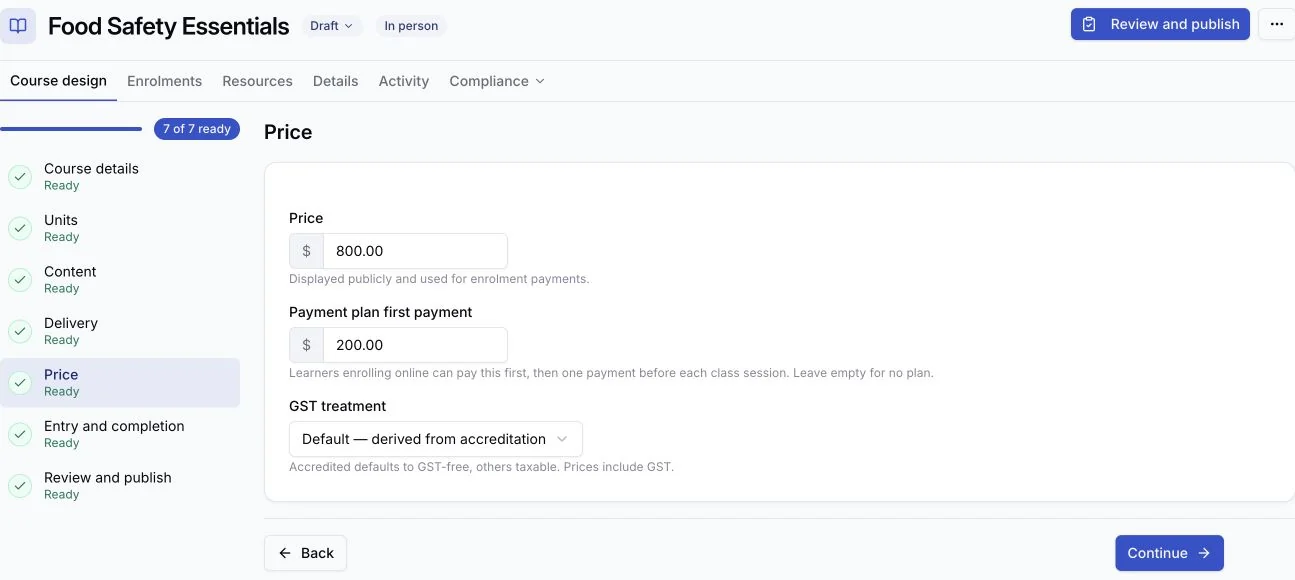
The October course Price screen shows the first-payment setting. Your saved schedule determines the amounts learners receive.
For an existing eligible enrolment, open Payments > Set up payment plan instead. Enter the first payment and cadence, review the dates and amounts, then save. Saving the plan does not send every payment link at once.
Keep automatic payments a clear learner choice
On an eligible RTObase Payments link or checkout, your learner can authorise automatic card payments for later parts. They see the authorisation and the covered schedule. A payment due today is paid through the current link; automatic payments cover later dates.
RTObase follows the part's due date and retains its payment outcome. If an automatic payment fails, the part returns to its payment link and appears in your Work Queue. You can follow the amount that remains owing from the enrolment.
Your learner can cancel automatic payments. That stops automatic collection; unpaid instalments remain due and can be paid through their payment links.
Follow the balance from Payments
Open the enrolment's Payments tab to see which parts are paid, waived, due or scheduled for automatic payment. Review the payment-plan messages in Communications > System Messages so the wording suits your team.
Use Change plan when the unpaid balance needs a different schedule. Earlier receipts remain part of the payment history. Changing a plan with paid parts requires the appropriate finance access.
For session-based plans, check the schedule again when class sessions change. A session plan should follow the delivery dates you intend to use. Separate per-session booking charges remain attached to those booked sessions; choose that workflow when you charge for individual lessons or tests.
Check the plan your learner will receive
Before offering the plan, confirm that the parts equal the enrolment price and that the first and final dates match your intention. Inspect an eligible checkout preview in a test environment, then find the same schedule from the enrolment's Payments tab.
Your final check is practical: can your team identify the next unpaid amount and explain how the learner will pay it? That is the information you need when a learner calls about their balance.
See Payment plans for current eligibility, access and payment controls.
More from the blog
3 Nov 2026 · Product
October at RTObase: trainer app, payment plans and employer training
Run training from a phone, offer payment plans, manage employer training and turn existing course materials into drafts your team can review.
Read →
13 Nov 2026 · Product
Run your trainer day and keep session records together
Give your trainers a phone-friendly place to take attendance, record delivery and leave the office a useful learner record.
Read →
6 Nov 2026 · Product
Watch RTObase in action: our new YouTube video guides
RTObase now has a YouTube channel. Start with a three-minute tour of the whole system, then follow short guides in the order an RTO works.
Read →