
Let an employer enrol a team in one public order
A practical guide to preparing a course for team purchase, taking one employer payment and collecting each attendee's details securely.
Published 25 Sept 2026 · Vincent Lo
An employer buying training for ten people should not have to complete the same single-learner checkout ten times. The RTO still needs one enrolment record for each attendee, but the buyer needs one order and one payment.
RTObase public team enrolment keeps those two needs together. It works for scheduled classes and for class-free online, self-paced or booking-based courses.
The fictional example
Junction Workplace Training offers a first aid class with 16 places at $180 per attendee. Redgum Services wants to enrol eight staff members and pay once by card. The workplace coordinator will not attend.
The organisations, people and values are fictional. The public team enrolment workflow is from RTObase.
Before you start
Check the public offer before sending employers to it:
- the course or class is published and open for enrolment;
- the price and GST treatment are correct;
- class capacity is correct where a class applies;
- the payment gateway is ready;
- employer discounts are current; and
- the course page clearly offers Enrol my team.
For a scheduled class, make sure the date, location and remaining places suit a group purchase. For a class-free course, check that the online, self-paced or booking journey is ready for each learner after enrolment.
1. The coordinator starts the team order
From the public course or class page, the coordinator chooses Enrol my team. They verify their email through a magic link, then enter the business name, ABN and contact details.
The ABN is checksum-validated. If the coordinator will also attend, they can take one of the seats rather than being entered twice.
2. Add attendees and review the order
The coordinator adds each attendee's name and email, up to 50 people in one order. They review the course, class where applicable, quantity, price and any employer discount before payment.
Use a work email for each attendee where possible. Unique addresses make the secure self-completion step easier to manage and reduce the chance that one person opens another learner's link.
For the fictional order:
| Item | Value |
|---|---|
| Course | Provide First Aid |
| Class | Toowoomba, 18 November |
| Attendees | 8 |
| Price per attendee | $180 |
| Team payment | $1,440 |
3. Pay once and create individual enrolments
The coordinator pays once through the RTO's configured gateway. On successful payment, RTObase creates one enrolment per attendee and a paid employer tax invoice with one line per enrolled seat.
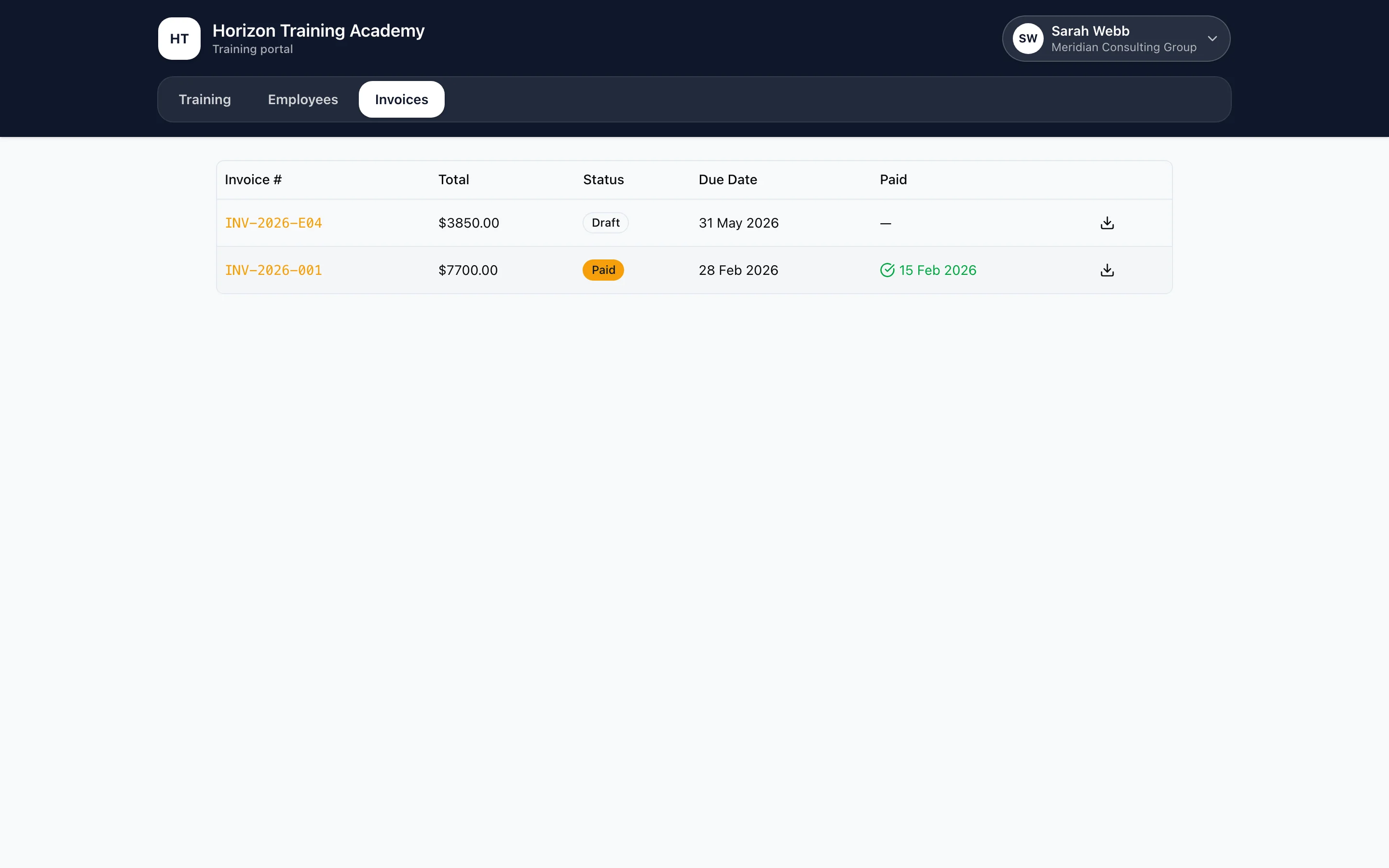
Course GST treatment applies to each line. Accredited course fees are recorded as GST-free, while other products follow their configured treatment.
4. Let each attendee complete their own details
The coordinator receives the order confirmation. Each attendee receives a secure single-purpose link to provide their own date of birth, USI, address, phone and other required details.
The link remains valid for 30 days and locks after submission. The coordinator can track completion and resend a missing link. Resending creates a new link and invalidates the old one.

This keeps payment and coordination with the buyer while asking each learner to provide their own personal and compliance details.
5. Review an existing employer match
If the ABN matches an existing employer and the email is already an approved contact, the order connects to that employer.
If the email is new, RTObase quarantines the contact. They can see only their own team orders until staff approve them from the employer's Contacts tab. Do not approve a contact based only on possession of the ABN, because business ABNs are public.
6. Handle capacity changes
RTObase checks class capacity before payment and checks it again afterwards. A simultaneous purchase can take the last places between those checks.
If a paid seat cannot be enrolled, it is marked Seat unavailable and staff receive an employer activity alert with the transaction reference and amount. Process the refund in the payment gateway, then record the seat refund with the supplied reference.
The tax invoice includes only seats that were actually enrolled. Capacity-rejected seats do not appear on it.
Adapt the setup to your RTO
Use scheduled team enrolment when the employer is buying named seats in a fixed class. Use a class-free course when each attendee will begin online study, arrange an individual booking or follow another non-cohort delivery path.
For larger or negotiated workplace programs that need scoping before purchase, use an employer enquiry or training request first. Move to public team enrolment when the offer, price and learner path are ready for direct checkout.
Common mistakes
- Asking the coordinator to complete each learner's personal details.
- Publishing team enrolment before the gateway, price or capacity is ready.
- Approving a quarantined employer contact without verifying authority.
- Assuming a pre-payment capacity check reserves every seat.
- Refunding an overflow seat without recording the reference in RTObase.
- Using one shared attendee email address for the whole team.
- Expecting the team order to replace individual learner enrolment records.
Final check
Run a controlled test order and confirm that:
- The coordinator can verify their email and enter the business details.
- The order total matches the attendee count, price, discount and GST treatment.
- One enrolment is created for each attendee.
- The employer receives one paid invoice for enrolled seats.
- Each attendee receives a separate secure completion link.
- A new contact on an existing ABN is quarantined.
- Staff know how to handle a capacity-related refund.
The employer gets one buying process. The RTO keeps the individual records needed for delivery, compliance, payment and follow-up.
More from the blog
15 Sept 2026 · Product
Schedule individual bookings around trainers, locations and assets
A practical guide to configuring one-to-one training bookings so trainer capability, location availability and required assets are checked together.
Read →
19 Aug 2026 · Product
How to get more value from your RTO website
A practical RTObase walkthrough for building a clear brand, matching the website to your delivery model and turning visits into the right next step.
Read →
22 Sept 2026 · Product
Create a TAS from the course records you already maintain
A practical guide to preparing course evidence, generating a TAS draft, confirming professional judgement and approving a fixed final version.
Read →