
Run AVETMISS readiness before generating NAT files
A practical guide to selecting a reporting period, fixing source data, validating through AVS and recording the final AVETMISS lodgement.
Published 29 Sept 2026 · Vincent Lo
AVETMISS errors are easier to fix in the student, enrolment or training record that owns the value than in a rejected NAT file.
RTObase puts a readiness step before export, then maps AVS errors back to the source field. This guide covers the supported fee-for-service path to NCVER through AVS. Government-funded activity follows the relevant state or territory authority's requirements, and RTObase does not guarantee a portal-ready state format.
The fictional example
Harbour Skills Institute is preparing its third-quarter fee-for-service collection. Readiness finds a missing USI, one postcode and state mismatch, and an invalid outcome date before the files are generated.
The organisation and records are fictional. The Release 8.0 workflow is from RTObase.
Before you start
Confirm the collection year, reporting period and jurisdiction. Check that the organisation, locations, courses, units, students, enrolments and training activity are current.
Decide whether the activity belongs in the NCVER-direct fee-for-service submission. Do not include government-funded activity in this path unless the relevant authority's process says to do so.
1. Select the reporting period
Go to Reports → AVETMISS Reporting. The workflow follows five steps:
Period → Readiness → Generate → Validate & fix → Lodge
Choose the collection year and reporting period. RTObase warns when the same period is already recorded as lodged.
2. Run readiness
Start the readiness check before generating files. RTObase checks the selected collection against AVETMISS Release 8.0 rules and common pre-flight problems, including:
- missing or invalid postcodes;
- postcode and state mismatches;
- missing USIs where required;
- invalid dates of birth or activity dates;
- missing classifications; and
- incomplete training activity or outcome data.

Use Fix this to open the record that owns the value. Correct the source and rerun readiness. This preserves one reliable value across reporting, learner records and later exports.
For the fictional collection, staff add the required USI, correct the postcode and state pair, and fix the outcome date in the enrolment activity record.
3. Generate the NAT file set
Generate the files when the collection is ready for external validation. RTObase builds the NAT files on the server and streams a ZIP to the browser. The generated files are not stored, so you can regenerate them from current data after making corrections.
The file set can include the relevant organisation, location, program, subject, client, contact, disability, prior education, enrolment and training activity records.
Generation may continue when you knowingly need AVS to reveal further issues. That is different from being ready to lodge. A collection with known omissions or unresolved AVS errors cannot pass the final lodgement gate.
4. Validate through AVS and bring the result back
Upload the generated ZIP to NCVER's AVETMISS Validation Software. After AVS processes it, download the detailedReport and, when available, the CollectionProcessingSummaryReport.
Return to Validate & fix in RTObase and upload the reports. RTObase maps each AVS error to the relevant record and field.
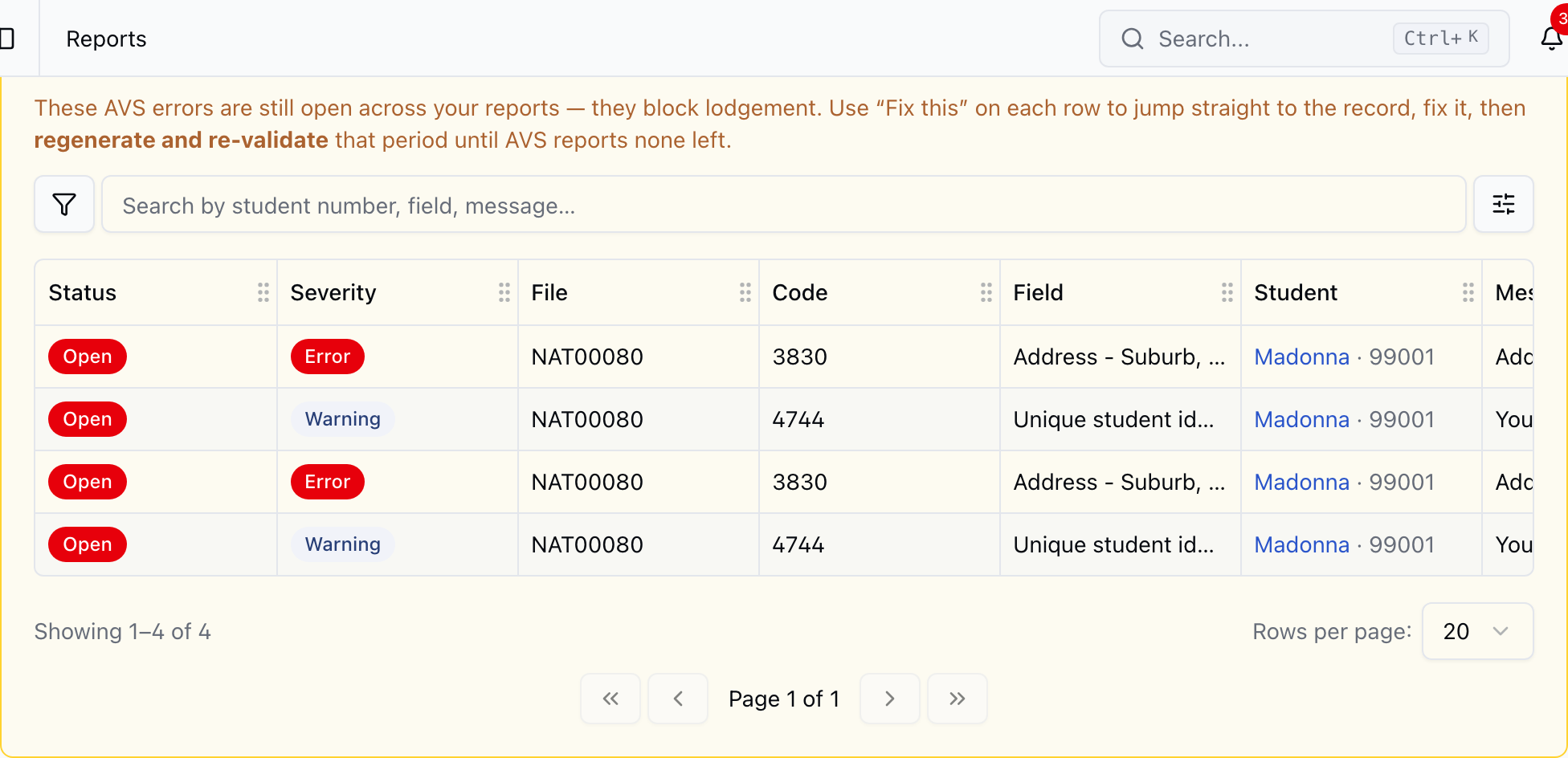
Select Fix this to open the relevant edit form with the field highlighted.
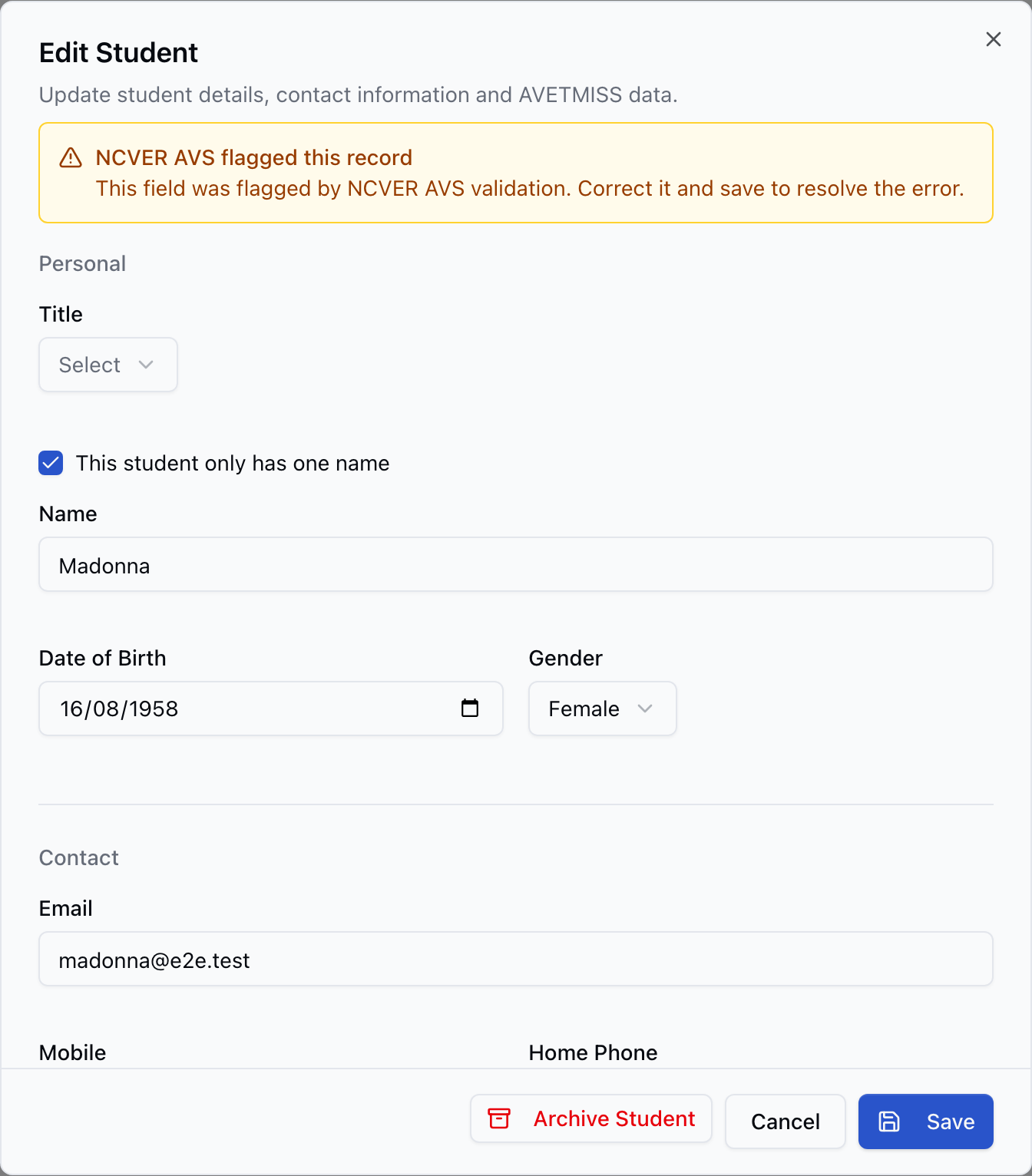
Regenerate the ZIP and revalidate it in AVS. When an error no longer appears in the uploaded result, RTObase closes it automatically. An operator can mark an item ignored while investigating, but that does not make the external validation pass.
5. Record the lodgement
After AVS validates the fee-for-service collection and the RTO completes its submission, use Lodge to record the result.
The lodgement register keeps the period, jurisdiction, client count and enrolment count as durable metadata. It does not store the NAT files or AVS reports. Keep any required submission evidence in the RTO's approved records system.
The final gate refuses a collection with known omissions or unresolved AVS errors. This prevents the register from presenting an incomplete collection as cleanly lodged.
Adapt the process to your RTO
Run readiness early enough for source-data corrections to reach the people who own them. A small provider may review the whole period at once. A larger RTO can run the same checks during the quarter, then perform the final period review before export.
Separate fee-for-service and funded reporting decisions. State and territory authorities can require fields, timing and file handling beyond the national NCVER-direct process.
Common mistakes
- Waiting until the lodgement deadline to run readiness.
- Editing generated NAT text instead of the source record.
- Treating successful file generation as successful AVS validation.
- Submitting funded activity through the NCVER-direct path without checking the authority's rules.
- Ignoring postcode and state relationships because each value looks valid alone.
- Recording lodgement while known omissions or AVS errors remain.
- Assuming RTObase stores the generated ZIP or uploaded reports.
Final check
Before recording the lodgement, confirm that:
- The period and jurisdiction are correct.
- Readiness has been rerun after every source-data correction.
- The latest ZIP was validated through AVS.
- The latest AVS result has no unresolved errors.
- Fee-for-service and funded activity follow the correct reporting paths.
- The final client and enrolment counts are understood.
- Required submission evidence is retained outside the transient file workflow.
The goal is a repeatable trail from live records to readiness, generated files, AVS validation and the lodgement register. Each correction stays in the operational source so the next collection starts cleaner.
More from the blog
18 June 2026 · Compliance
Validate AVETMISS continuously, not in the last 48 hours
Most AVETMISS pain is concentrated in the 48 hours before the deadline, and it's almost always the same five validation bounces. The fix isn't more diligence in December, it's validating continuously, at every record update, so the file you submit was already valid in March.
Read →
25 June 2026 · Compliance
Not every course lodges with NCVER: that's where findings hide
A High Risk Work Licence assessment lodges with a WHS regulator. RSA and RCG lodge with Liquor & Gaming NSW. A Food Safety Supervisor certificate lodges with the NSW Food Authority. Most student management software was built for the NCVER path and treats everything else as an exception you handle by hand, which is exactly where audit findings hide.
Read →
28 Sept 2026 · Compliance
First education agent commission return closes 30 October
The first mandatory PRISMS return covers January to June 2026. Every CRICOS provider must respond, including with a nil return.
Read →